To sell digital products on Telegram, you send the file to the buyer in your own chat with a price in Telegram Stars, and the buyer pays before they can open it. With Tiny Shops you do that from the Telegram app on your phone: attach the PDF, ebook, preset pack, photo or video, write /sell 500 Name as the caption, and send it. The store bot locks it behind a 500-Star payment, delivers it once paid, records the sale and tells you who bought what. This guide covers what you can sell, how the payment works for photos versus files, the one-time setup, and what to do when something goes wrong.
Selling a catalog of products in a storefront is a different job: see Telegram pay per view vs a Mini App shop.
What you can sell, and how the buyer pays#
Telegram treats photos and videos differently from files, so the buyer sees one of two things.
| You send | The buyer sees | After paying |
|---|---|---|
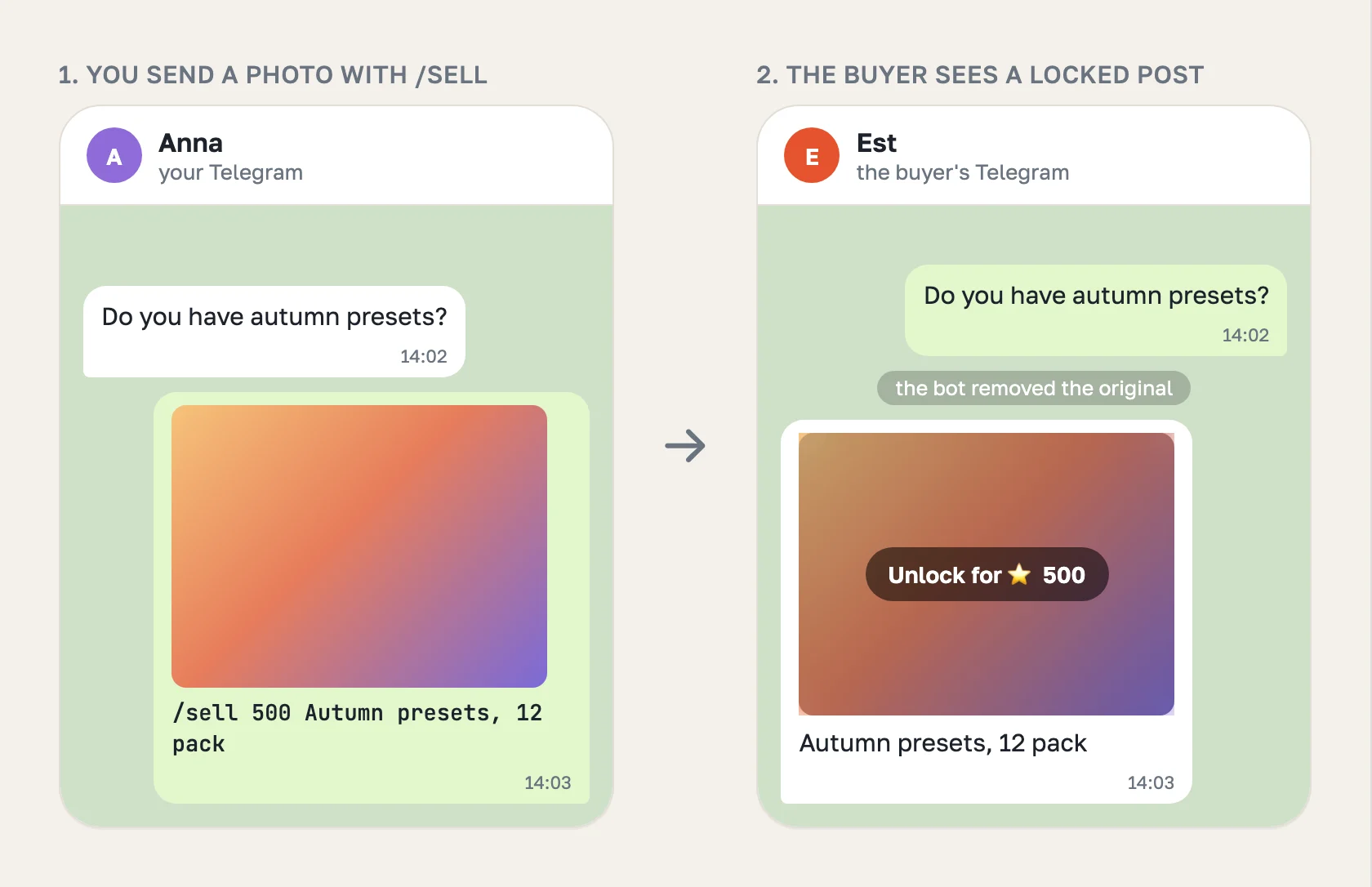
| A photo or a video | The photo, blurred, with a button to unlock it for 500 ⭐ | It unlocks in place |
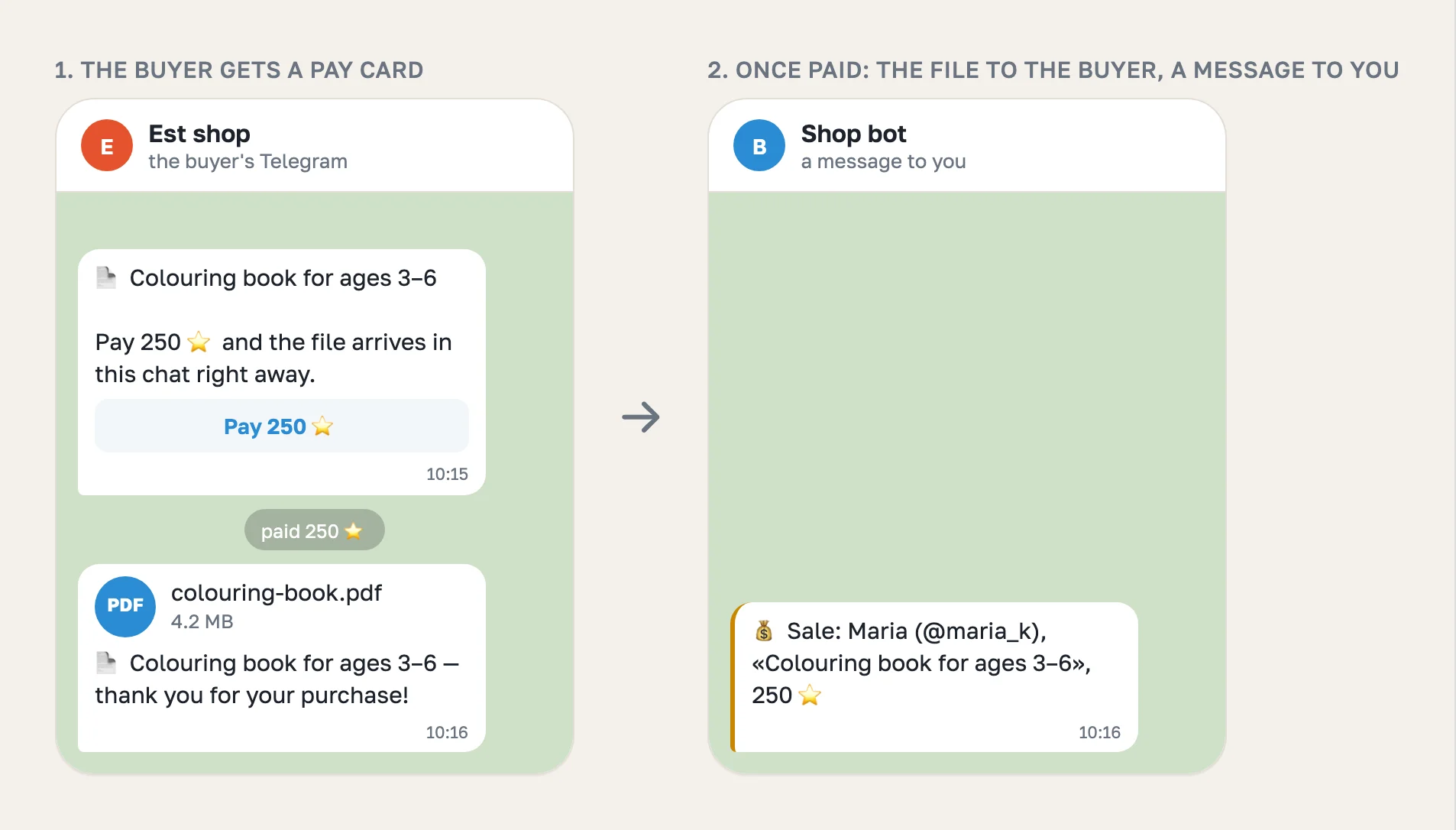
| A file: PDF, ebook (EPUB), ZIP, preset pack, template | A card with the name and a Pay 500 ⭐ button | The bot sends the file into the same chat |
Photos and videos go out as Telegram paid media. Telegram has no paid document, so a file sells through a Stars invoice instead: the buyer pays in Telegram's own payment sheet, and the file arrives a second later. In both cases the price is a whole number of Stars from 1 to 25,000, and the buyer pays inside Telegram, with no card form and no link out.
Good fits: ebooks and guides, colouring pages and printables, Lightroom presets, templates, sheet music, study notes, and custom photos or videos made for one buyer.
Before the first sale: a one-time setup#
- A Tiny Shops shop on the chat format. In sign-up, under Where will you sell?, choose In a Telegram chat.
- A bot. Choose Create it for me, or I already have one and paste the token from @BotFather.
- The bot added to your Telegram account under Settings → Telegram Business → Chatbots. Turn on every switch under Manage Messages, including the one that lets the bot delete messages. Telegram Premium is not needed. The full walkthrough is in Telegram for business.
The delete permission matters. Your message reaches the buyer before the bot can act on it, so the bot removes your original and leaves only the locked copy. Without that permission the bot refuses to sell, because your file would stay in the chat for free, and it tells you where to switch it on.
How to sell a file from your phone#
- Open the chat with the buyer in Telegram.
- Attach the file, photo or video, as you normally would.
- In the caption, write
/sell, the price in Stars, and a name:/sell 250 Colouring book for ages 3–6. - Send it.
The bot replaces your message with the locked version in the same second. The buyer pays, gets the file, and you receive a message such as 💰 Sale: Maria (@maria_k), «Colouring book for ages 3–6», 250 ⭐. The sale also appears on the Sales page in your dashboard.
The caption after the price is what the buyer sees, so write it for them: what the file is, how many pages or presets, and who it is for. Leave it out and the file name is used.
How to sell a file from the dashboard#
The same sale works from the inbox in your Tiny Shops dashboard, which is handy when the file lives on your computer:
- Open the conversation in Messages.
- Attach the file. A price field appears next to it, because a chat shop never sends a file for free.
- Enter the price in Stars and press Send for 250.
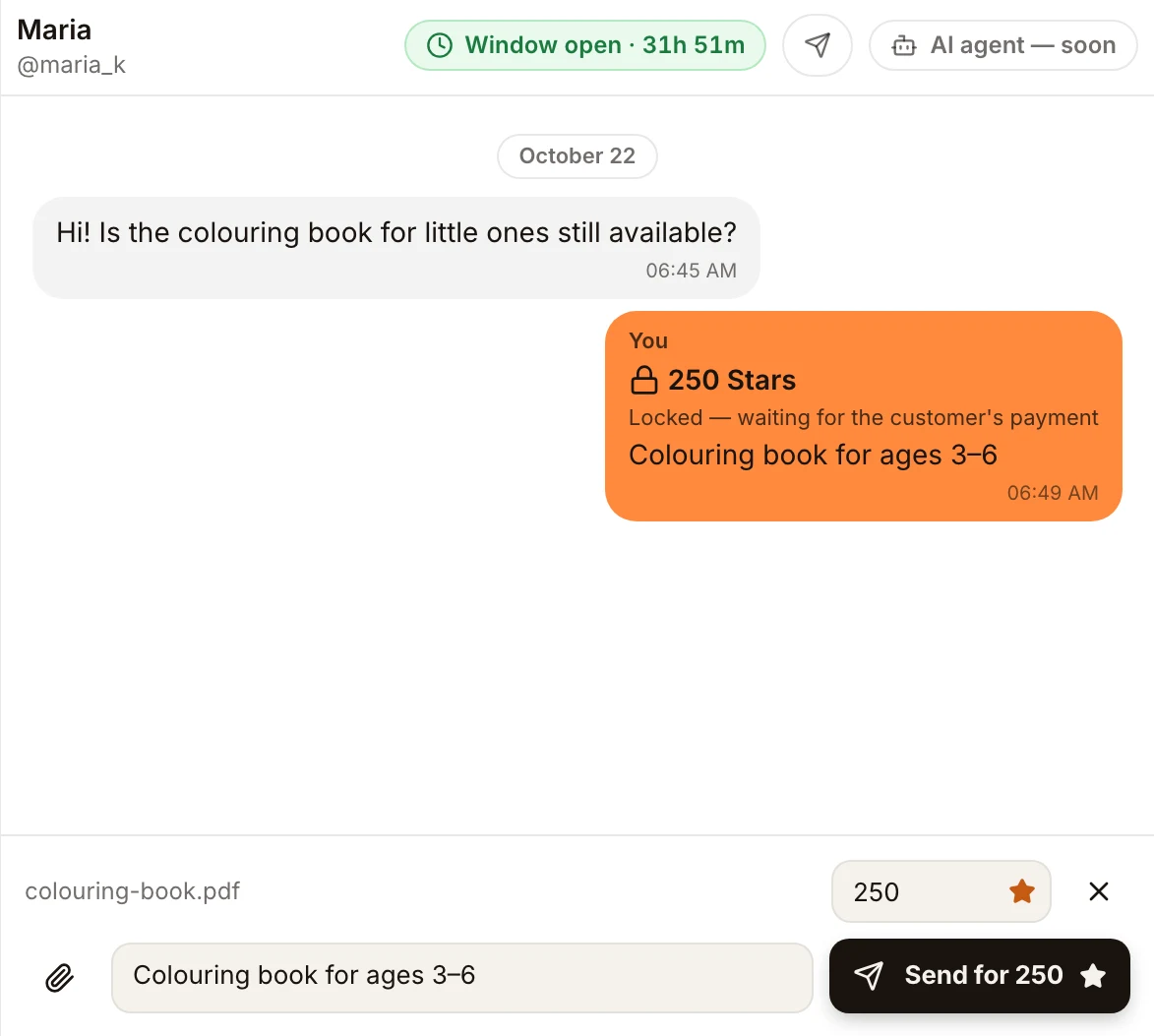
The buyer gets the same pay card. If you work with an AI assistant or a script, the same action is available through the Tiny Shops MCP server and API (reply_to_customer with one document and priceStars).
When something does not go to plan#
| What happened | What the bot does | What you get |
|---|---|---|
| The price is not a number, or is outside 1–25,000 | Leaves your message as it is | An example of the right caption |
You typed /sell 500 without attaching a file | Nothing | A reminder that /sell goes in a file's caption |
| The bot is not allowed to delete messages | Sells nothing, so the file does not stay free | Where to switch the permission on |
| You attached an album | Leaves it as it is | A note to send the items one by one |
| The buyer paid but the file could not be delivered | Records the sale | A message asking you to send the file yourself |
| The buyer paid twice, or paid for an offer you deleted | Refunds the Stars automatically | Nothing to do |
One more limit to know: only the buyer you sent the offer to can pay for it. If they forward the card, Telegram refuses the payment for anyone else before charging them.
Where the money goes and what it costs#
The Stars land on your store bot's balance, the same as any Telegram bot sale. Telegram can hold earned Stars for up to 21 days before you can withdraw them through Fragment. Tiny Shops does not hold your Stars.
Stars sales pay the plan's percent from the first sale: 5% on Free ($0 a month), 3% on Starter ($9.99), 1.5% on Pro ($29), 0.7% on Scale ($79). Stars are counted at Telegram's developer rate, $0.013 per Star.
Tips for selling files in chat#
- Show a preview first. Send a free photo of two sample pages, then the paid file. Buyers pay more readily for what they have seen.
- Price in round Stars. 250 ⭐ is about $3.25 at the developer rate. Check what similar products cost on Gumroad or Etsy and convert.
- Reply fast. A business bot can only reply within 24 hours of the buyer's last message, so send the offer while the conversation is warm.
- Mind the file size from the dashboard. A file attached in the dashboard can be up to 10 MB. From your phone, Telegram's own limits apply.
FAQ#
Can you sell digital products on Telegram? Yes. Photos and videos sell as Telegram paid media, and files such as PDFs and ZIPs sell through a Stars invoice, after which the bot delivers the file.
How do I sell a PDF on Telegram?
Attach the PDF in the buyer's chat with the caption /sell 250 Name. The buyer gets a Pay 250 ⭐ card, and the bot sends the PDF after payment.
Can I sell an ebook on Telegram? Yes, as a PDF or EPUB file, the same way as any other file.
Do buyers need a card or a crypto wallet? No. They pay with Telegram Stars, which they can buy inside Telegram.
Do I need a Telegram channel or a website? No. You sell in the private chats you already have with your customers.
What stops the buyer from getting the file for free? The bot deletes your original as soon as it sees it and refuses to sell when it is not allowed to. A buyer may still see the file in a notification for the second before it is deleted, so for very valuable files, send a preview first and the file only once they ask to buy.
Start selling your files in Telegram chats at tiny-shops.com →
