A win-back campaign is a message, or a short series of them, sent to customers who used to buy from you and stopped, or who showed interest and went quiet. The goal is one more order and, ideally, the habit back. This guide covers who counts as a lapsed customer, how to plan a win-back campaign step by step, message examples, and how to win back customers in a Telegram shop with Tiny Shops: a one-off reminder to lapsed buyers and automations that follow up on favorites.
Win-back, abandoned cart or re-engagement#
| Campaign | Who it's for | When |
|---|---|---|
| Abandoned cart | Left the cart or checkout unpaid | Within a day |
| Win-back | Bought before, then stopped; or saved a product and never came back | Weeks or months later |
| Re-engagement | Stopped reading your messages | Whenever opens drop |
Abandoned carts have their own guide: abandoned cart recovery for Telegram shops. This one is about the people who already bought, or came close, and drifted off.
Who counts as a lapsed customer#
There's no universal cut-off. Look at how often your buyers normally reorder and call someone lapsed once they've gone well past it. A coffee shop's buyer who orders every two weeks is lapsed after a month or so; a furniture buyer may not be lapsed after a year. Too long ago is a problem too: someone who last ordered three years ago is close to a new customer.
How to run a win-back campaign#
- Define lapsed for your shop. Pick a window from your own reorder cycle, for example last order 30 to 180 days ago.
- Start with your best customers. Sort by how much they spent or how many orders they placed. Someone with five orders behind them is far more likely to come back than a one-time buyer.
- Pick the incentive. A plain "we miss you" with something new to see, or a personal discount. Keep the discount small and with a deadline.
- Write one short message. Their name, one reason to come back, one button.
- Send it where they'll see it. For a Telegram shop, that's a private message from your shop bot.
- Keep a control group. Leave a small share of lapsed customers out. Some of them come back on their own, and without a control you'd credit the campaign for them.
- Follow up once, then stop. No answer after a second message means "not now". More messages get your bot blocked.
Win-back message examples#
Short, personal, one reason. Replace the bits in braces.
“, we haven't seen you in a while! Here's % off with code , good for h.
“, the new roast you liked last time is back. Want us to set one aside?
“Hey 👋 the you saved just went on sale: % off with code . It's yours for the next h if you still want it.
Skip the guilt ("Did we do something wrong?") and the paragraph. A phone screen shows two or three lines before the button.
Why win-backs work well in Telegram#
Win-back emails fight spam filters and full inboxes. In Telegram, your shop bot already has a chat with every buyer who started it, and the message lands in the chat list. That cuts both ways: a buyer who feels spammed blocks the bot, and you can't message them again. Telegram doesn't let a bot write to someone who never started it (Telegram), so a blocked bot is a lost channel. Personal, rare and useful is the only way to send win-backs there.
How to win back customers in Tiny Shops#
Win-backs are on Starter, Pro and Scale. On Free you can see who you could bring back, with an upgrade link where the send button would be. Messages go out from your connected shop bot.
Win back lapsed buyers#
- Open the dashboard home and find Bring them back, under Store pulse.
- Open the Haven't been back tab. It lists buyers whose last order was 30 to 180 days ago, biggest spenders first, with how much they spent and how many orders they placed.
- Press Remind on a row, or Remind all.
- Pick What to offer. Just a reminder sends no discount; A discount creates a personal one-time code for each buyer, valid for 48 hours.
- Edit the Message. The default is a "we miss you" note in your store's language.
{{first_name}},{{product}},{{discount}},{{code}}and{{expiry}}are filled in for each buyer. - Check What the shopper sees and press Send.
Follow up on favorites automatically#
The Win-backs page in the sidebar runs automations. Each one watches for a behaviour, waits, then sends a private discount.
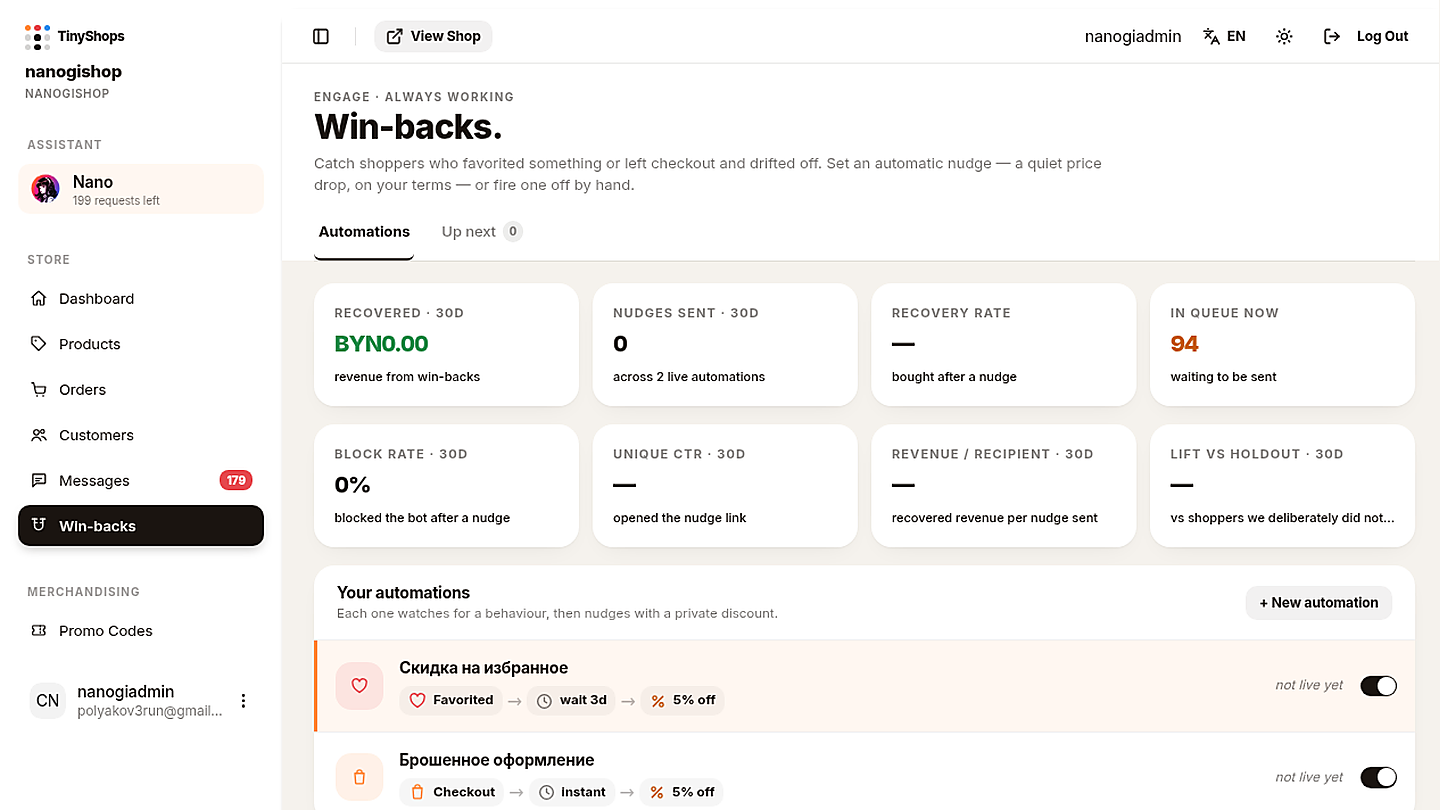
The first time you open it, Tiny Shops adds two paused automations in your store's language:
| Automation | When | Wait | Offer | Code lasts |
|---|---|---|---|---|
| Favorite price drop | Favorited an item | 3 days | 15% off | 24 h |
| Checkout left behind | Left checkout unfinished | 1 day | 10% off | 48 h |
Nothing sends until you switch one On and save. To set up the favorites one:
- Open Win-backs in the sidebar. You land on Automations.
- Click Favorite price drop in Your automations, or press New automation to start from scratch.
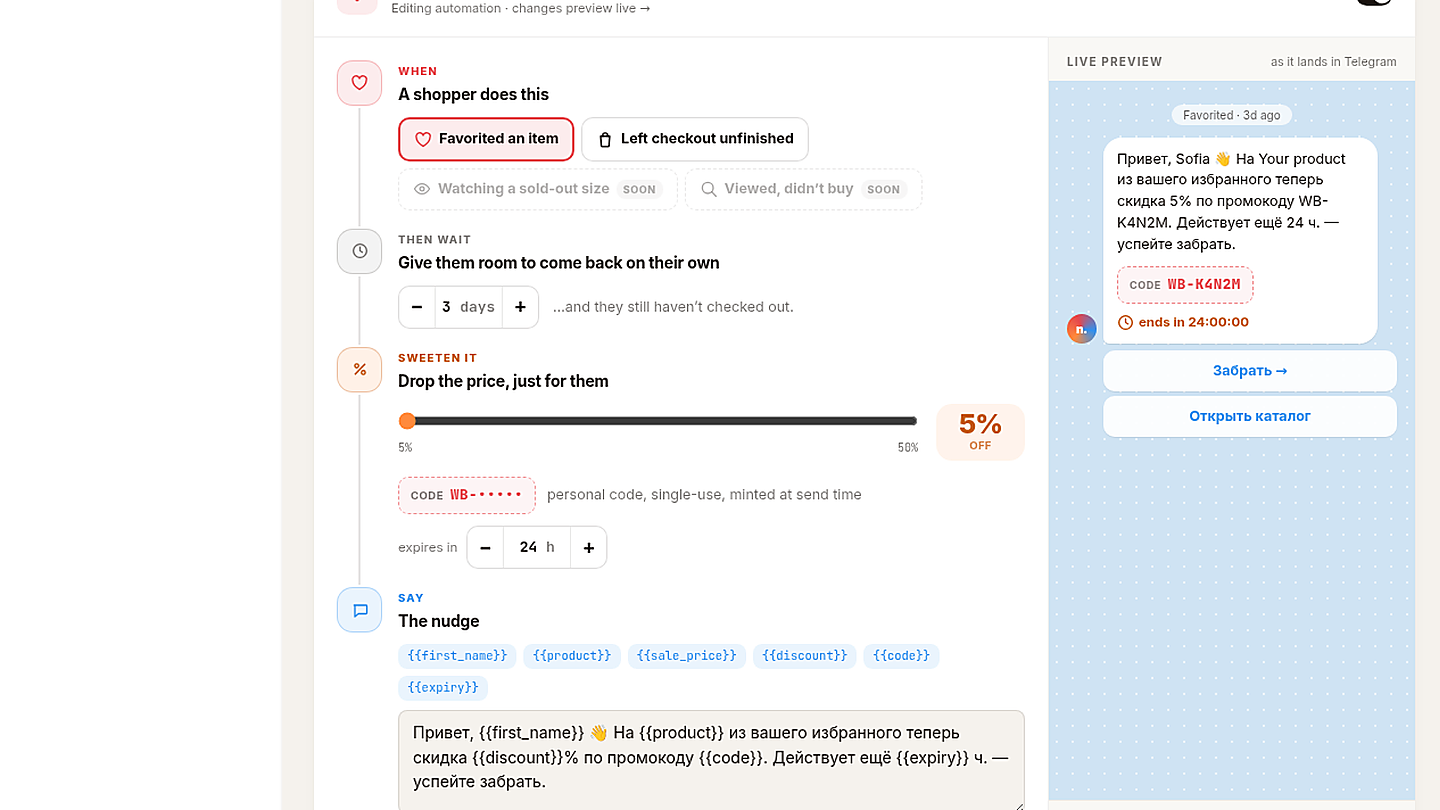
- When. Pick Favorited an item. (Left checkout unfinished is the abandoned-checkout follow-up. Watching a sold-out size and Viewed, didn't buy are marked Soon.)
- Then wait. Set the days, 0 to 30. At 0 it sends as soon as they qualify; otherwise it waits "…and they still haven't checked out". If they buy during the wait, nothing is sent.
- Sweeten it. Set the discount, 5% to 50%, and how many hours the code lasts. The code is personal, single-use and minted at send time.
- Say. Write the message.
{{sale_price}}adds the discounted price. - Buttons. Up to two: Opens the product goes straight to the item in the Mini App, Opens the shop goes to the storefront.
- Check the Live preview, then press Send a test to myself. The test goes to your notification chat, which you connect in Telegram bot settings.
- Switch it On and press Save automation. Paused automations and unsaved drafts don't send.
Send, snooze or skip by hand#
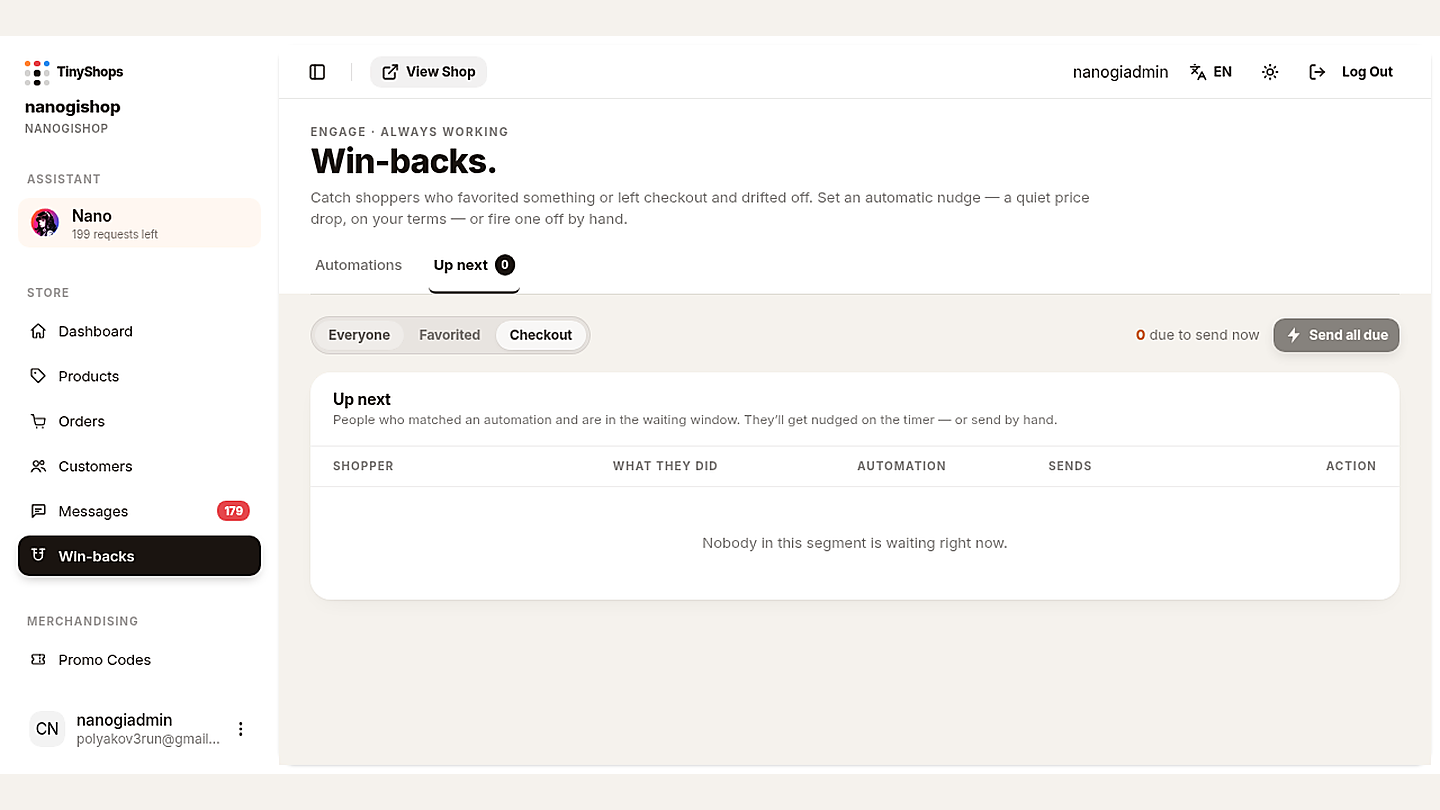
The Up next tab lists the people waiting in an automation's window. The tab badge counts those due to send now, not everyone waiting. Filter by Everyone, Favorited or Checkout, then per row choose Send now, Snooze a day or Skip. Send all due sends everyone whose timer is up.
Guardrails Tiny Shops applies for you#
- One nudge per shopper every 14 days, across all automations.
- Not right after a broadcast. A win-back waits 72 hours after any marketing message the shopper got from your bot.
- Only recent signals. Automations look back 30 days, so switching one on doesn't message people who favorited something months ago.
- A daily cap on win-back messages per store, and an automatic stop if too many shoppers block the bot in one day.
- No nudge after a purchase. If the shopper ordered after the trigger, the nudge is cancelled.
- A holdout group. 10% of shoppers who qualify are deliberately not nudged, so the page can show what the campaign really added.
What to measure#
The cards on Win-backs look back 30 days:
- Recovered — revenue from win-backs.
- Recovery rate — the share who bought after a nudge, with how many ordered again within 90 days.
- Block rate — the share who blocked the bot after a nudge. If it climbs, the message or the timing is too pushy.
- Unique CTR — the share who opened the nudge link.
- Revenue / recipient — recovered revenue per nudge sent. If it's thinner than the discount you give, wait longer or offer less.
- Lift vs holdout — recovered sales against the shoppers who weren't nudged.
From an agent#
Win-backs are on the merchant MCP server and over HTTP: list_winbacks, create_winback and update_winback manage automations; list_winback_queue, send_winback_nudge_now, snooze_winback_nudge and skip_winback_nudge work the queue; list_winback_audiences and send_winback_reminder handle the one-off reminder from the dashboard home. Nano, the dashboard assistant, uses the same tools.
FAQ#
What is a win-back campaign? Messages to customers who stopped buying or went quiet after showing interest, meant to bring them back for another order.
When should you send a win-back message? Once a customer has gone well past your usual reorder time. For many small shops that's a month or two after the last order.
What should a win-back offer be? Something they can't get by waiting: a personal, short-lived code, or news about a product they bought before. A big public discount teaches everyone to wait.
How do I win back customers without spamming them? Send one message, maybe one follow-up, and stop. Tiny Shops skips anyone messaged in the last 14 days and anyone who blocked the bot.
Can I pause an automation without deleting it? Yes. Switch it to Paused and press Save automation. Delete automation removes it for good.
Bring your quiet customers back: open your store at tiny-shops.com →
What shipped first: the Win-backs launch note.
