Abandoned cart recovery means getting back the shoppers who picked a product, got to the cart or the payment screen, and left without paying. You find out who they are, fix what stopped them, and send a short reminder at the right moment, sometimes with a small personal discount. This guide covers why carts get abandoned, how to write and time a recovery message, and how to recover abandoned carts in a Telegram shop with Tiny Shops, by hand or automatically.
Abandoned cart vs abandoned checkout#
| Abandoned cart | Abandoned checkout | |
|---|---|---|
| Where they stopped | Added items, never started paying | Started paying, never finished |
| How warm | Interested | Ready to buy |
| What usually helps | A reminder of the product | Fixing the payment problem, a reminder, sometimes a discount |
Both count as cart abandonment. Abandoned checkouts are the warmest list you'll ever have: the shopper already chose the product and the price.
Why shoppers abandon carts#
Baymard Institute puts the average documented cart abandonment rate at 70.22%, across 50 studies (Baymard). Among the checkout reasons US shoppers give, extra costs (shipping, taxes, fees) come first, followed by slow delivery, not trusting the site with card details, having to create an account, and a long or complicated checkout. Many others were just browsing.
That gives you two jobs: remove the reasons you control, then remind the people who were simply interrupted.
How to reduce cart abandonment#
- Show the full price early. Delivery cost and fees on the product page or in the cart, not as a surprise on the last step.
- Don't force an account. In a Telegram Mini App the shopper is already signed in with Telegram, so this one is solved for you.
- Offer payment methods your buyers use. Cards, wallets, Telegram Stars or cash on delivery: Telegram payment methods for your shop.
- Keep checkout short. Ask only for what you need to deliver the order.
- Say when it arrives. A delivery estimate answers the "too slow?" doubt before it costs you the order.
How to write an abandoned cart message#
- Send the first one within a day. The shopper still remembers the product. Waiting a week means starting from zero.
- Name the product. "Your linen shirt is still waiting" beats "You left something behind".
- One button back to the product, not to the home page.
- Discount only if you need to. Start with a plain reminder. If you add a discount, make the code personal and short-lived, so it doesn't turn into a public sale.
- Send one, maybe two. Then stop. Each extra message is a reason to block the shop.
Why Telegram is good at cart recovery#
On a website you can only recover a cart if you collected the shopper's email or phone and their permission to write. In a Telegram shop the bot already has a chat with the shopper. Telegram's rule is simple: "Bots can't start conversations with users. A user must either add them to a group or send them a message first" (Telegram). Anyone who opened your shop through the bot has started it, so the reminder arrives as a private message in the chat list, next to their friends.
How to recover abandoned carts in Tiny Shops#
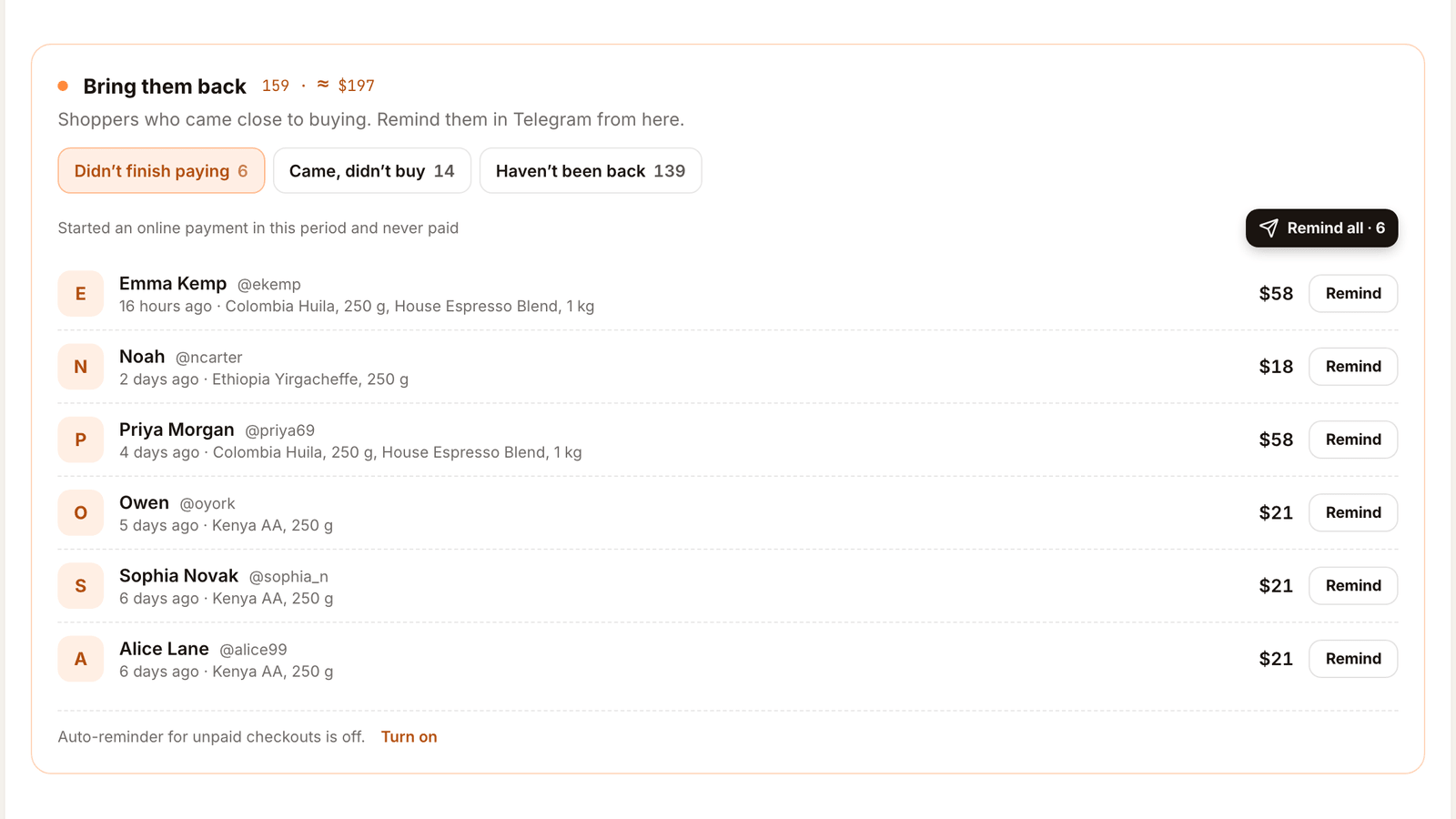
The dashboard home has a block called Bring them back, right under Store pulse. Its heading shows how many people you could bring back and roughly how much their unpaid carts hold. It follows the period picked in Store pulse: Today, 7 days or 30 days.
Mellow Coffee Roasters in the screenshots is a sample store. The shoppers, products and amounts are made up.
The three lists#
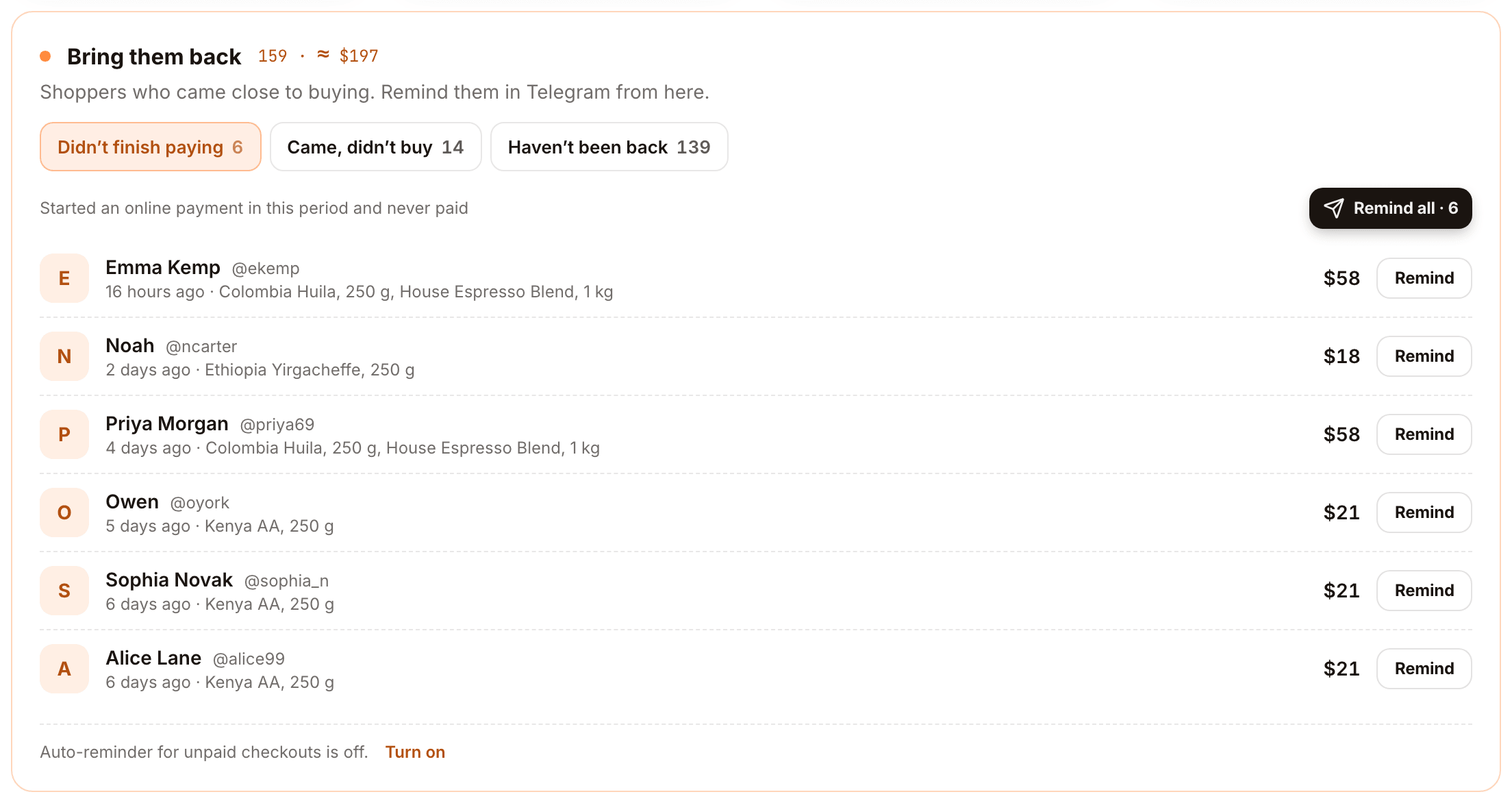
Didn't finish paying — shoppers who started an online payment in the period, didn't pay within an hour, and haven't ordered since. Each row shows when they stopped, what was in the cart and the amount. This is your abandoned checkout list.
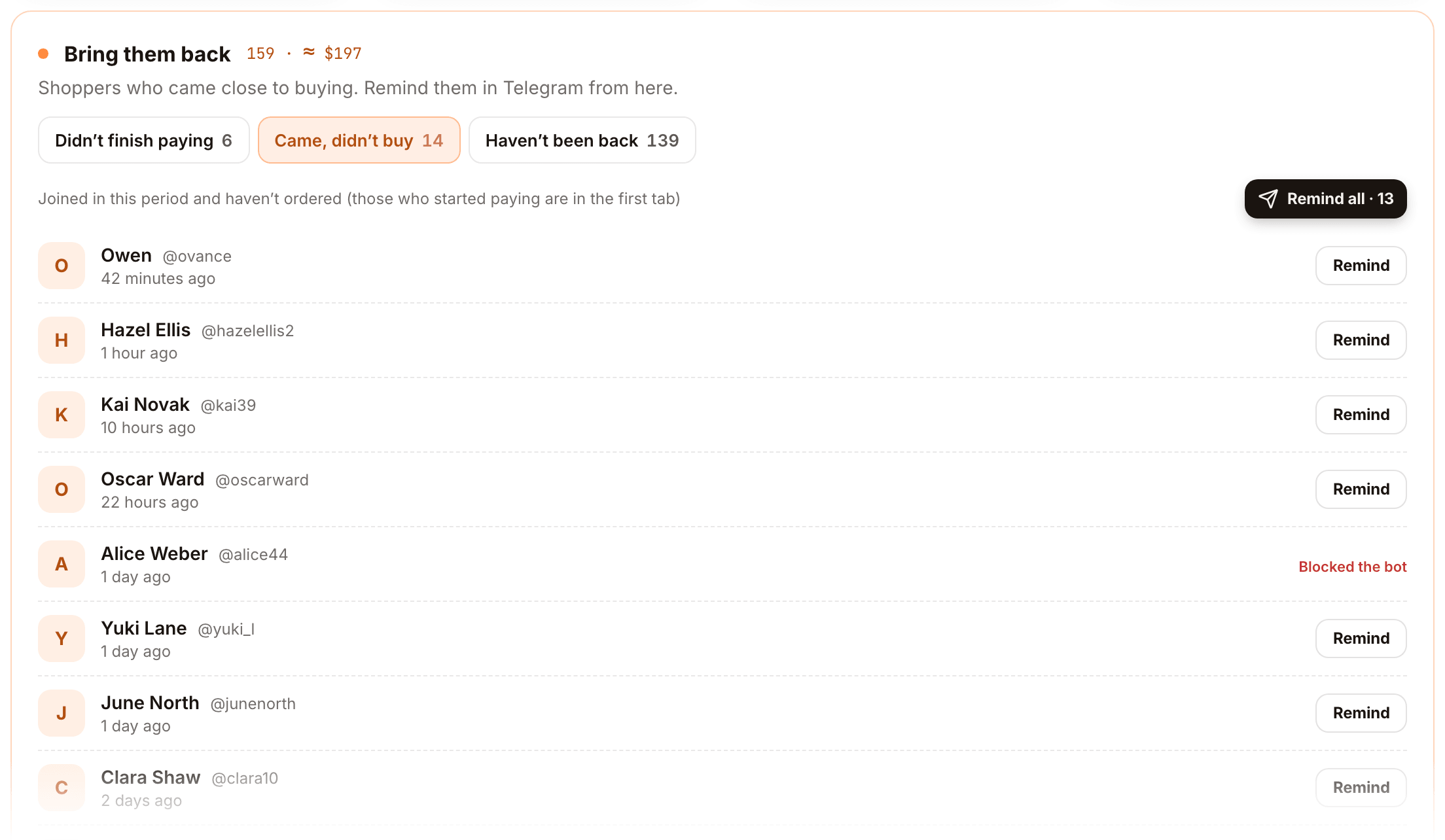
Came, didn't buy — new customers who joined in the period and haven't ordered. Those who started paying are in the first tab, so nobody appears twice.
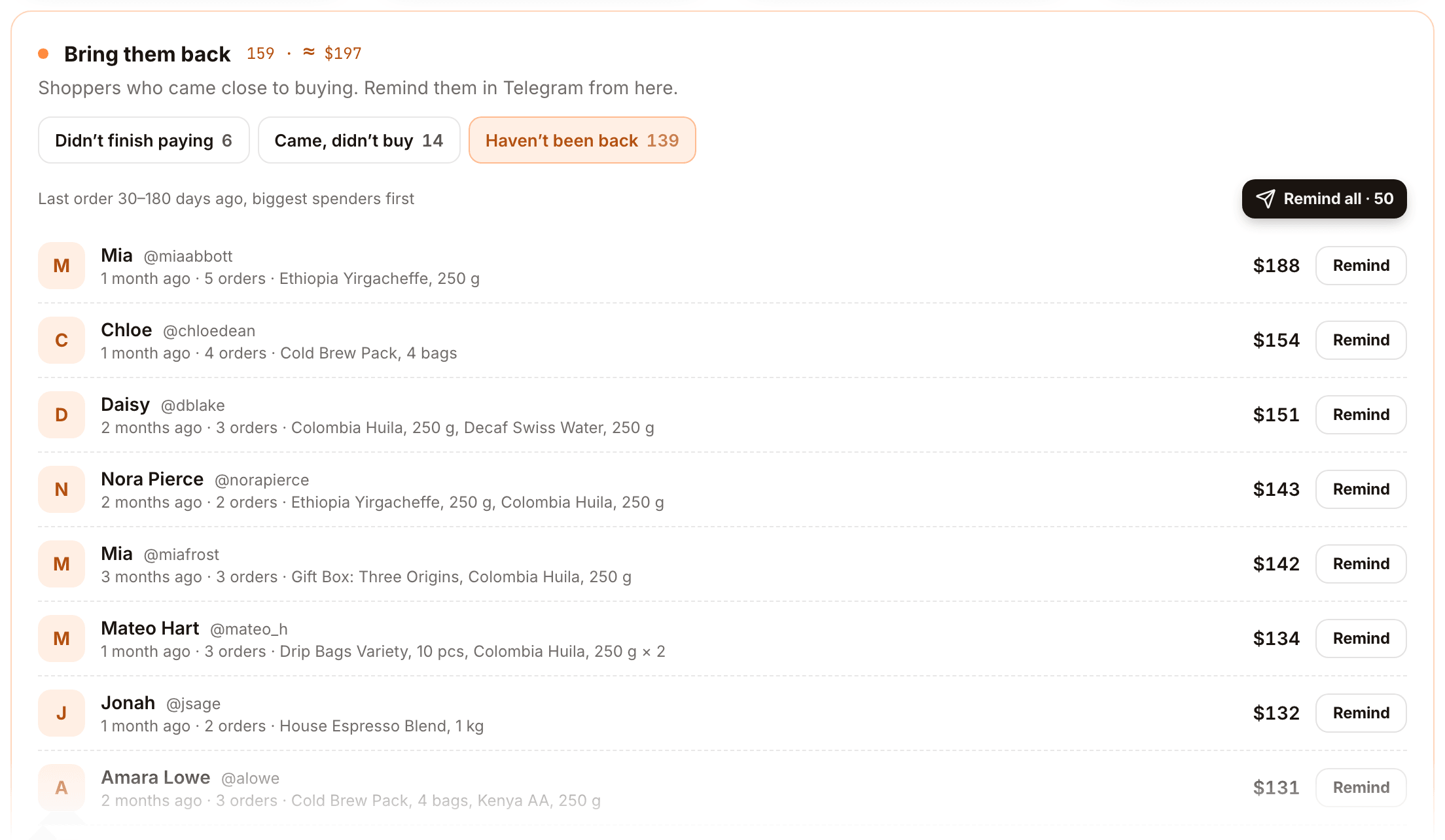
Haven't been back — past buyers whose last order was 30 to 180 days ago, biggest spenders first. That's a win-back list rather than a cart one; see how to run a win-back campaign.
Send a reminder#
- Open the Didn't finish paying tab.
- Press Remind on one row, or Remind all for the whole tab.
- Check To. Remove anyone you don't want to message.
- Pick What to offer. Just a reminder sends no discount. A discount creates a personal one-time code for each shopper, valid for 48 hours; set the percent under Discount, %.
- Edit the Message. The text is ready.
{{first_name}},{{product}},{{discount}},{{code}}and{{expiry}}are filled in for each shopper. - Set the Button label. The button opens your shop.
- Check What the shopper sees. The live preview fills in a real name, product and code.
- Send. The shop bot delivers the messages.
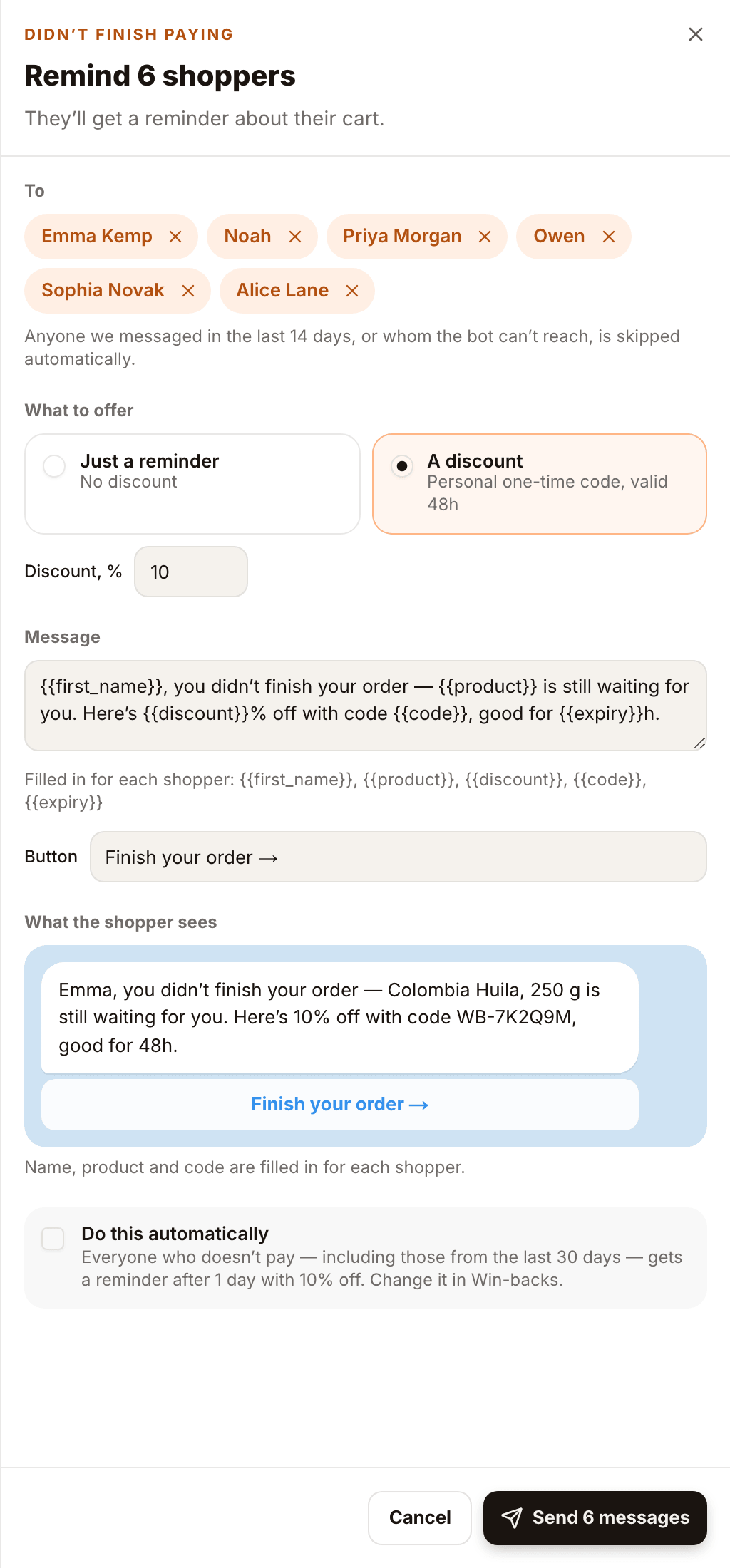
The default text depends on the list and is written in your store's language, not your dashboard's.
Make it automatic#
On the Didn't finish paying tab the sheet has one more checkbox: Do this automatically. With it on, everyone who starts paying and doesn't finish gets the same reminder on a timer, including people from the last 30 days, so you don't have to come back to the list.
Under the list you can see whether the auto-reminder for unpaid checkouts is on, and turn it on in one click. To change the delay, the discount or the text, open Win-backs in the sidebar and edit the Left checkout unfinished automation.
Built-in limits#
- No double messages. Anyone you messaged in the last 14 days is skipped.
- Nobody who can't be reached. If a shopper blocked the bot, the row says Blocked the bot instead of offering Remind, and they're left out of Remind all.
- The code is personal. It works once, for that shopper only. Forwarded to a channel, it won't become a sale for everyone.
- A daily limit caps how many win-back messages a store sends per day.
What Tiny Shops can and can't see#
- Tracked: online payments that started and didn't finish, new customers with no order, and lapsed buyers.
- Not tracked as abandoned: a cart the shopper filled but never took to payment. Those shoppers still show up under Came, didn't buy if they're new.
- Cash on delivery and manual payment create an order straight away, so there's no unpaid checkout to recover; follow up on the order instead.
What you need#
- A connected shop bot. It sends the messages.
- Starter, Pro or Scale. On Free you still see the lists, with an upgrade link where the send button would be.
What to measure#
- The Bring them back heading. If the unpaid amount keeps growing, look at checkout before writing more reminders.
- Recovery rate and Block rate on the Win-backs page for the automatic reminder. A rising block rate means the message is too pushy or too frequent.
- Orders from the period in Store pulse, before and after you turn reminders on.
From an agent#
The same lists and the same send are tools on the merchant MCP server and over HTTP: list_winback_audiences returns the three lists (unpaid, no_order, lapsed), and send_winback_reminder sends a reminder. Without confirm: true it only returns who would get it and a sample text. Nano, the dashboard assistant, uses the same tools: "remind everyone who didn't finish paying this week, 10% off" works in chat, and Nano shows you the list before sending.
FAQ#
What is a good abandoned cart recovery rate? There's no one number: it depends on your price, your audience and how warm the list is. Track your own recovery rate and block rate and change one thing at a time.
When should I send an abandoned cart message? Within the first day, while the shopper still remembers the product. One reminder, maybe one more; then stop.
Should an abandoned cart message include a discount? Not always. Try a plain reminder first. If you add one, keep it small, personal and short-lived.
What's the difference between cart abandonment and checkout abandonment? Cart abandonment covers anyone who added items and left. Checkout abandonment is narrower: the shopper started paying and stopped.
Recover your abandoned carts in Telegram: open your store at tiny-shops.com →
