Ecommerce analytics is collecting and reading the numbers your online store produces — visits, orders, revenue, products, returning customers — so you can decide what to stock, what to promote and who to bring back. A small shop doesn't need a data team for this. It needs about eight numbers, a fixed period to compare against, and fifteen minutes a week. This guide covers which ecommerce metrics to track and how to calculate them, which tools collect them, and how to read them in a Telegram store on Tiny Shops.
The ecommerce metrics a small shop should track#
| Metric | How to calculate it | What it tells you |
|---|---|---|
| Visitors | People who opened the store in the period | Whether your traffic (posts, ads, broadcasts) works |
| New customers | People who signed in or left contact details for the first time | Whether visitors trust the store enough to engage |
| Orders | Orders placed in the period | Demand, before money |
| Revenue | Sum of order totals, cancelled orders excluded | The number that pays the bills |
| Average order value (AOV) | Revenue ÷ orders | Whether bundles, upsells and free-delivery thresholds work |
| Conversion rate | Buyers ÷ visitors (or new customers who ordered ÷ new customers) | How well the store turns interest into orders |
| Top products by revenue | Revenue per product, ranked | What to keep in stock and put on the first screen |
| Repeat customer rate | Buyers who had bought before ÷ all buyers in the period | Whether people come back without paid traffic |
Two rules make these numbers useful:
- Always compare with the previous period. "130 orders" says nothing. "130 orders, 11% more than the 30 days before" says the shop is growing.
- Compare with yourself, not with benchmarks. Published conversion-rate averages mix big brands, different traffic sources and different ways of counting. Your own last month is the benchmark that holds.
Three kinds of ecommerce analytics tools#
| Tool | What it measures | Good for |
|---|---|---|
| Your store's built-in dashboard | Orders, revenue, customers, products — straight from the order database | Daily and weekly decisions; the numbers are exact |
| Web analytics (Google Analytics 4, Yandex Metrika) | Page views, product views, carts, checkouts, traffic sources | Seeing where shoppers come from and where they drop off |
| Ad pixels (Meta Pixel) | Which ad clicks led to a purchase | Optimizing paid ads |
Start with the built-in dashboard. Add web analytics and a pixel when you start paying for traffic and need to know which source brings buyers.
How to set up ecommerce analytics for a small shop#
- Write down the question. "Is the shop growing?", "Which product should I reorder?", "Do people come back?" Each question maps to one or two metrics from the table.
- Pick a fixed period. Weekly for decisions, monthly to see the trend without the noise of single days.
- Track the funnel, not only totals. Visitors → new customers → orders. The step with the biggest drop is the one to fix.
- Check the same numbers on the same day. A short weekly routine beats a long dashboard nobody opens.
- Turn every number into one action. Low traffic → a post or a broadcast. Customers who didn't order → a reminder. Low repeat rate → cashback or a win-back.
How to track ecommerce analytics in Tiny Shops#
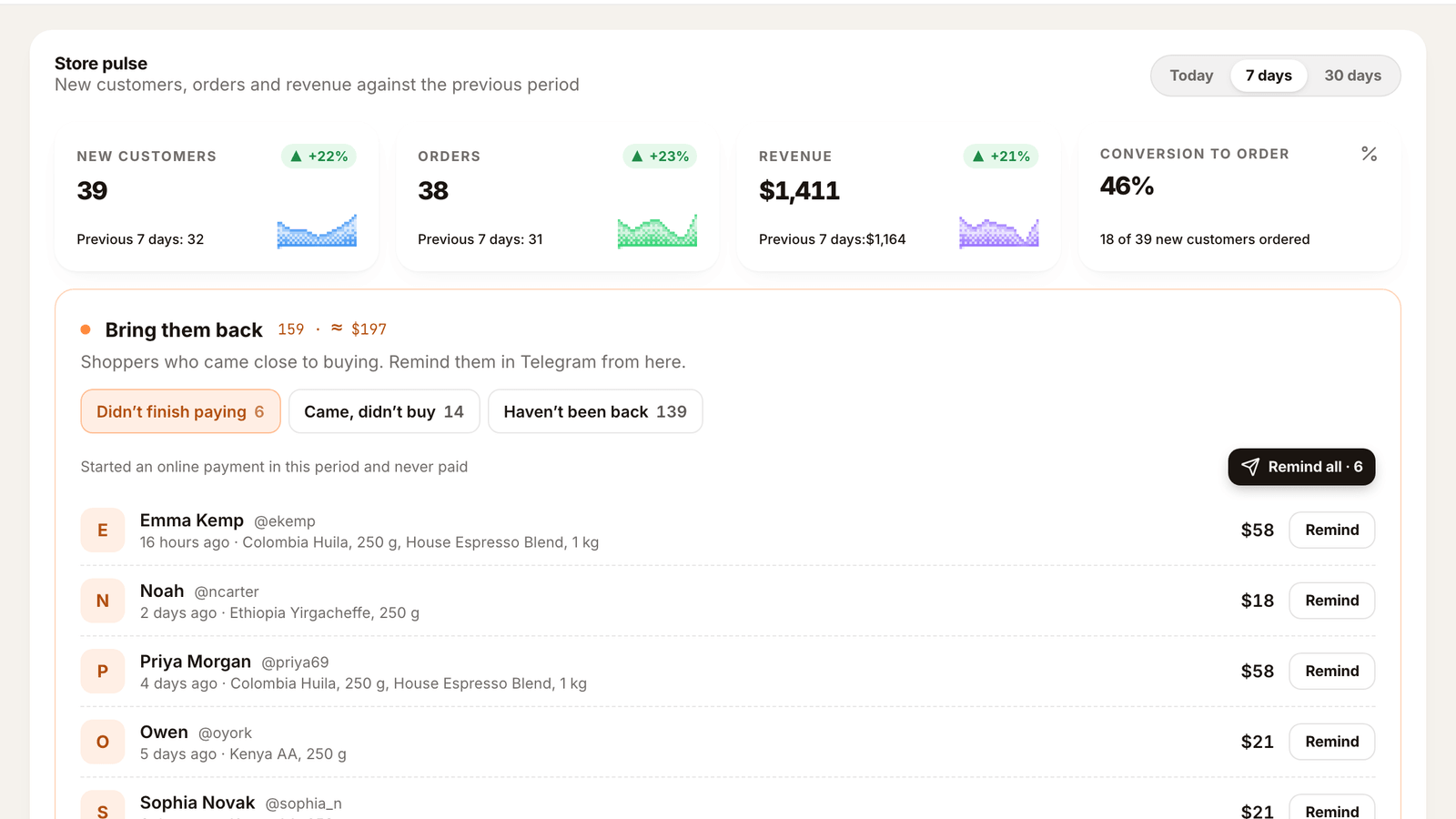
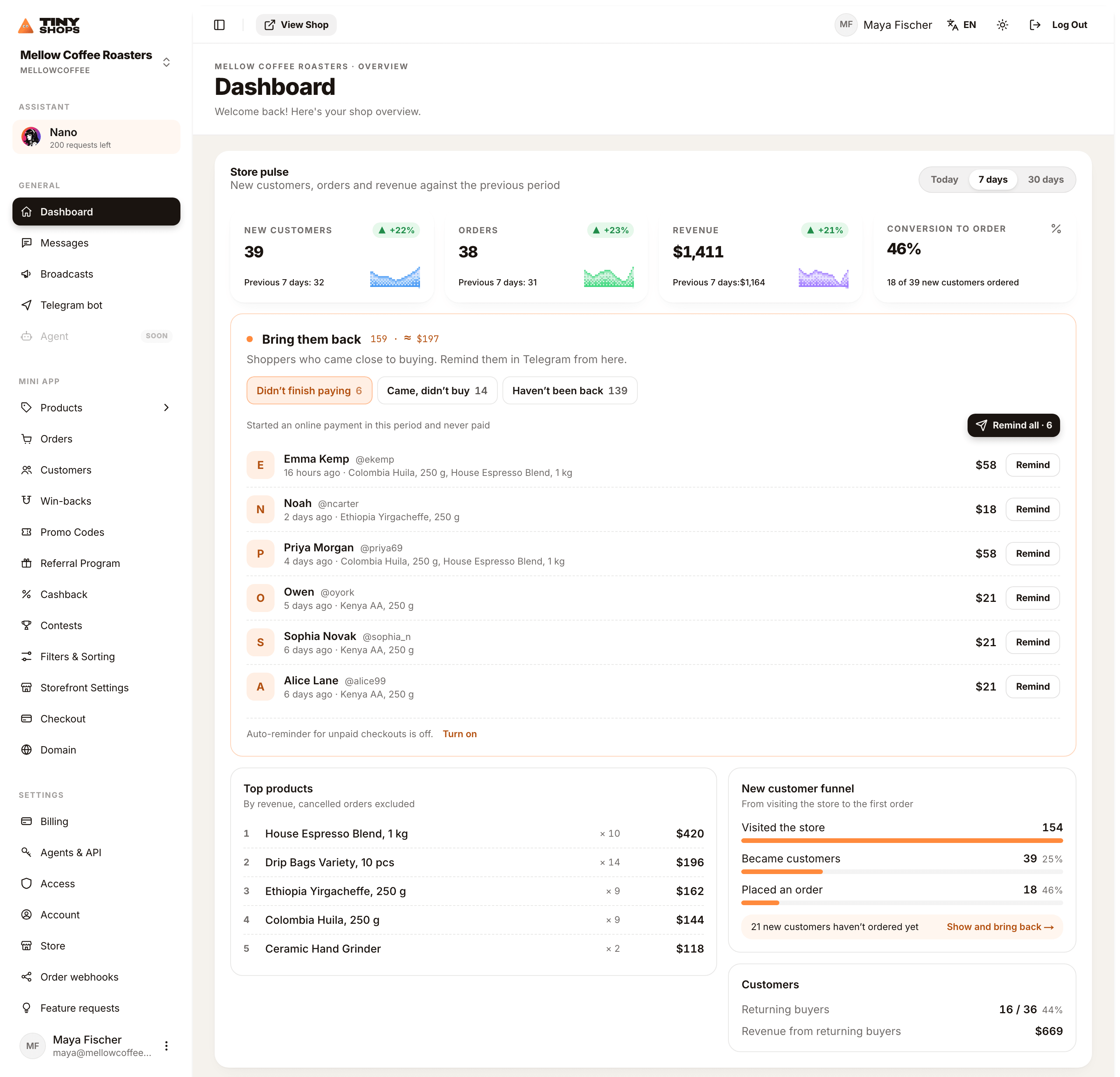
- Open the dashboard home. Go to dashboard.tiny-shops.com; the Dashboard row in the sidebar is the home page. The first block is Store pulse: New customers, orders and revenue against the previous period.
- Pick the period. Switch between Today, 7 days and 30 days.
- Read the four cards. New customers, Orders, Revenue and Conversion to order, each against the previous period.
- Check Top products. Ranked by revenue, cancelled orders excluded.
- Find the leak in the New customer funnel. Visited the store → Became customers → Placed an order.
- Bring back the people who didn't order. Press Show and bring back → under the funnel.
- Check Returning buyers. The share of buyers who had bought before, and Revenue from returning buyers.
- Optional, on Pro and Scale: connect Google Analytics 4, Yandex Metrika or Meta Pixel in Pixels & analytics to see traffic sources and ad results.
Mellow Coffee Roasters in the screenshots below is a sample store. The customers, products and numbers are made up so the cards are easy to read.
Periods: what each one compares#
| Period | What it compares |
|---|---|
| Today | Today since local midnight against Yesterday by now — yesterday up to the same hour. At 2 pm you compare with yesterday at 2 pm, not with a full day. |
| 7 days | The last 7 days against the Previous 7 days. |
| 30 days | The last 30 days against the Previous 30 days. |
The 7- and 30-day windows roll with the clock. "Today" uses your browser's time zone, so midnight is your midnight.
The four cards: orders, revenue, customers, conversion#

- New customers — people who opened your shop for the first time in the period.
- Orders — orders placed in the period.
- Revenue — money from those orders, in your store currency.
- Conversion to order — the share of new customers who already ordered. The caption spells it out: "68 of 142 new customers ordered".
The first three cards show the number, the previous period under it, and a green or red badge with the change in percent. In the sample store over 30 days that is 142 new customers (+19%), 130 orders (+11%) and $4,956 in revenue (+13%). When the previous period was zero there is nothing to compare with, so the badge is hidden instead of showing a meaningless +∞.
Average order value isn't a separate card, but it's one division away: $4,956 ÷ 130 orders ≈ $38. Note it once a month; if it falls, try a bundle or a free-delivery threshold.
The small chart on each card is a sparkline: one bar per day for 7 and 30 days, one per hour for Today. A total can look fine while the line shows every sale came in on Monday — the sparkline is where you see that.
Top products by revenue#
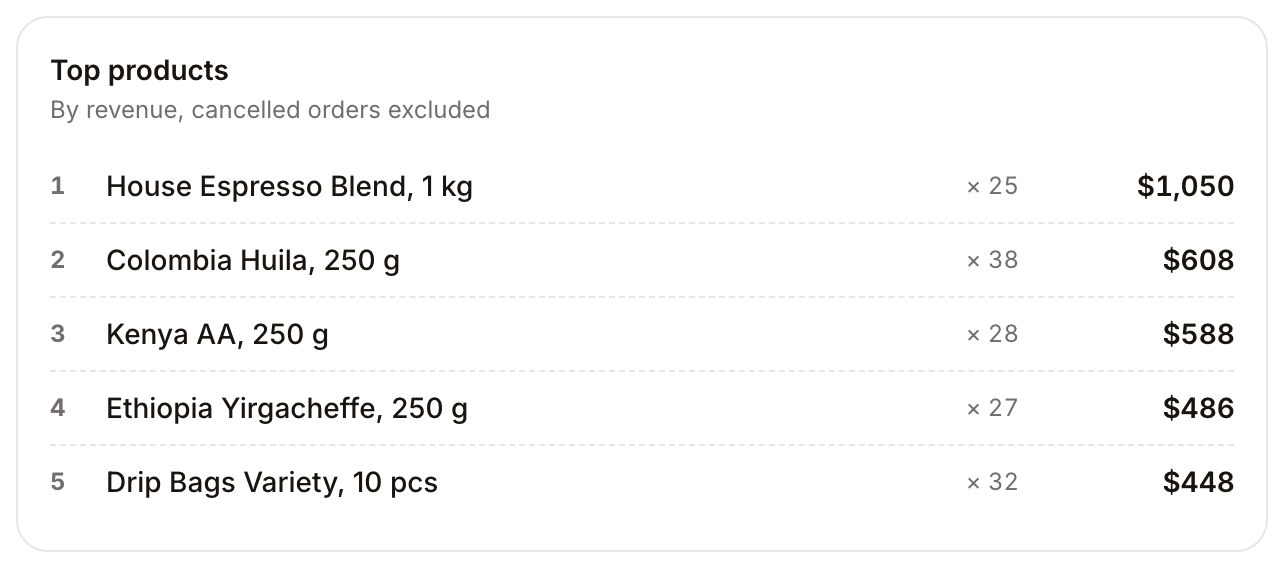
The five products that earned the most in the period, with how many were sold. Cancelled orders are left out.
The list is ranked by revenue, not by units. In the sample store, Colombia Huila sold 38 bags and House Espresso Blend only 25, but the espresso is the 1 kg pack, so it earns $1,050 against $608 and sits on top. Ranking by revenue tells you what actually pays the bills: which product to keep in stock, which one to put on the first screen of your storefront, which one to mention in your next broadcast.
The funnel: where conversion leaks#
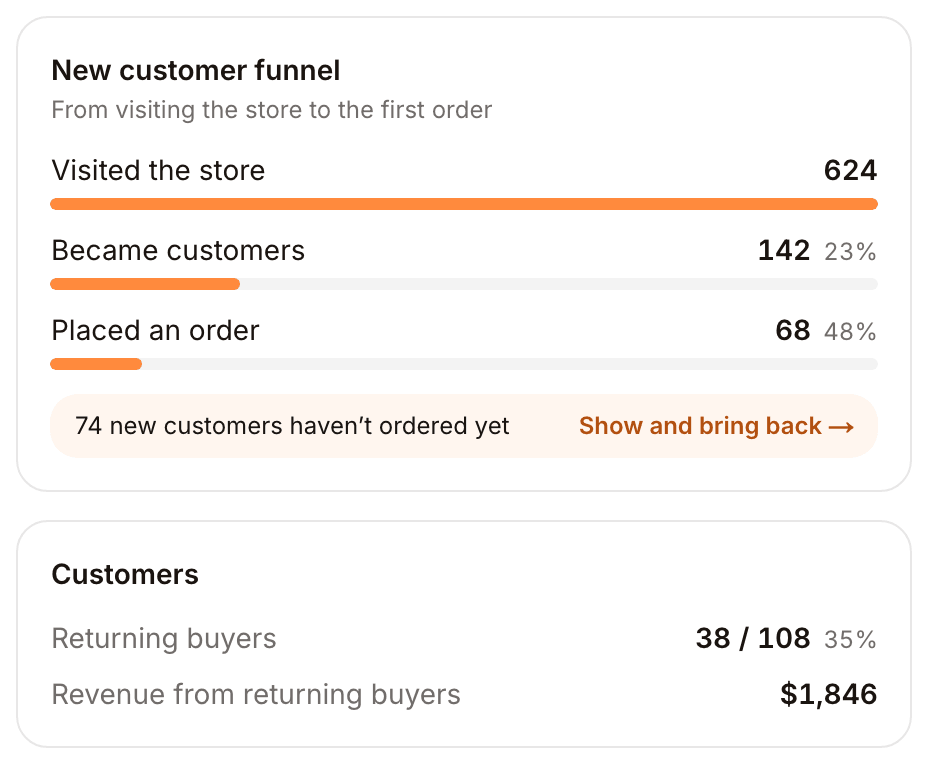
The New customer funnel follows new people from the first visit to the first order:
- Visited the store — opened your Mini App.
- Became customers — signed in, so you have their Telegram.
- Placed an order — ordered at least once.
Each step shows the share of the step before. In the sample store, 624 people visited, 142 became customers (23%) and 68 of them ordered (48%).
The step that drops the most is the one to work on. Few visitors means your traffic is the problem — post in your channel, run a broadcast, share the store link. Visitors who don't become customers usually mean the first screen doesn't hook them. Customers who don't order are the cheapest to fix: they already know the shop and you can message them.
That is what the line under the funnel is for: "74 new customers haven't ordered yet → Show and bring back". The link opens their list right on the home page, and you can remind them in Telegram from there. How that works is in Abandoned cart recovery for Telegram shops.
"Visited the store" comes from storefront analytics. If analytics is off for your store, the funnel starts at "Became customers".
Repeat customer rate#
Next to the funnel, Customers shows:
- Returning buyers — how many of the period's buyers had bought from you before, and their share. In the sample, 38 of 108 (35%). That share is your repeat customer rate.
- Revenue from returning buyers — what they spent in the period.
New customers cost you traffic. Returning buyers cost almost nothing. If the share is low, give people a reason to come back: cashback on the next order, a win-back with a personal discount, or a broadcast when new stock lands.
Traffic sources and ads: Pixels & analytics#
Store pulse counts what happened in your store. To see where visitors came from and which ads paid off, open Pixels & analytics and connect Google Analytics 4 (Measurement ID), Yandex Metrika (counter number) or Meta Pixel (Pixel ID). Tiny Shops adds their official tags to your storefront, and the storefront reports:
- Page views
- Product views
- Add to cart
- Checkout started
- Purchases with order total
Pixels are available on Pro and Scale. Nothing is sent from the previews in the dashboard or while you view a closed store. Where the law requires it (for example, in the EU), you are responsible for telling shoppers about tracking and getting their consent.
On your phone#
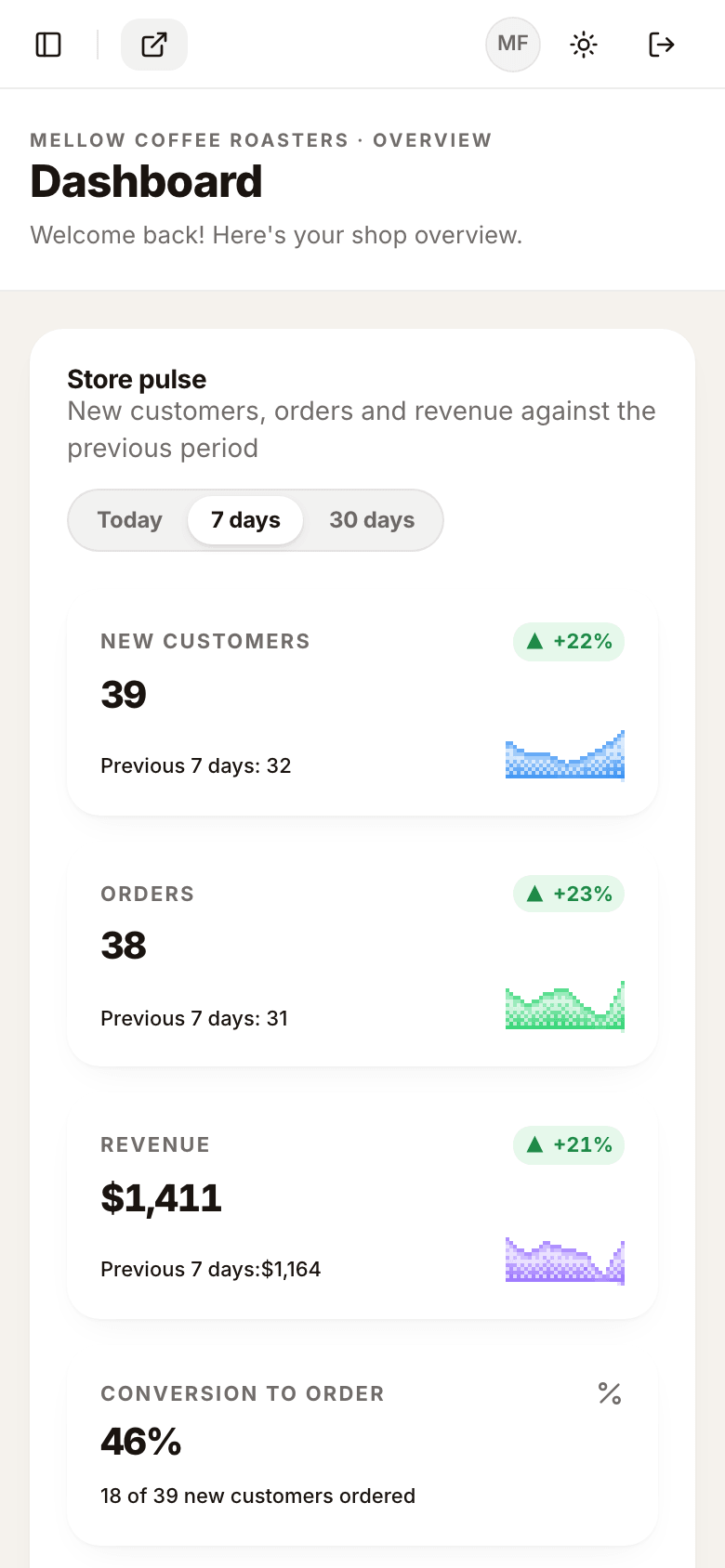
On a phone the cards stack in one column, with the period pills on top. It is the same page, so a quick check from the Telegram link to your dashboard works.
A fifteen-minute weekly routine#
- Switch to 7 days. Are orders and revenue up or down? Look at the sparkline to see which days carried the week.
- Check Top products. Is the bestseller in stock? Is it the first thing people see in the storefront?
- Look at Conversion to order. If it dropped, open Show and bring back and remind the people who didn't order.
- Look at Returning buyers. If the share is falling, plan a broadcast or turn on cashback.
- Once a month, do the same on 30 days and note your average order value — the weekly noise evens out there.
Limits#
- Store pulse shows the store you have open; it doesn't add up several stores on one account.
- Periods are fixed at Today, 7 days and 30 days. There is no custom date range on this block.
- Average order value and a cost per customer aren't calculated for you. Divide revenue by orders for AOV; ad cost per buyer lives in your ad account once the pixel is connected.
From an agent#
The same numbers are available to AI agents and scripts through the merchant MCP server and over HTTP. get_analytics takes period: 'today' | '7d' | '30d' and returns new customers, orders and revenue with the previous period, the daily or hourly series behind the sparklines, top products, the funnel and returning buyers. Nano, the assistant in the dashboard, uses the same tool, so you can ask it "how did this week compare with last week?" in chat.
FAQ#
What is ecommerce analytics? Collecting and reading the data an online store produces — traffic, orders, revenue, products and customers — to make decisions: what to stock, what to promote, which customers to bring back.
What are the most important ecommerce metrics? For a small shop: visitors, conversion rate, orders, revenue, average order value, top products by revenue and repeat customer rate. Each one should be compared with the previous period.
What is a good ecommerce conversion rate? There is no single number: it depends on the product, the price and where traffic comes from, and every tool counts it a little differently. Track your own rate against last week and last month, and work on the funnel step that drops the most.
Is Google Analytics enough for an online store? It shows traffic and behavior well, but order and revenue numbers are exact only in the store's own dashboard. Use both: the store dashboard for sales, GA4 for traffic sources.
How do I see analytics for a Telegram shop? Telegram's built-in statistics cover channels and groups, not store sales. A store on Tiny Shops shows orders, revenue, the funnel and returning buyers in Store pulse on the dashboard home.
Open your store and see your first numbers at tiny-shops.com →
- 🇷🇺 Tiny Shops RU
- 🇬🇧 Tiny Shops EN
