A Telegram bot broadcast used to end at "delivered." You knew the message left. You did not know who tapped the button, who bought, or what the send was worth. Telegram broadcast analytics in Tiny Shops is that missing half: delivery, unique clicks, purchases, and order value for the shop you are in.
Coatroom in the screenshots is a sample shop. The figures are there so the labels are easy to read. They are not a benchmark, and they are not your numbers.
This is private messages from your shop bot to people who have opened the store. Telegram's own channel statistics count views, shares, and reactions on a channel post. A bot DM has no view counter and no open rate. The metrics below start at delivery and continue through the order.
The funnel on one send#
Open Messages → Broadcasts, then click the text of a sent broadcast. The page is titled Broadcast statistics.
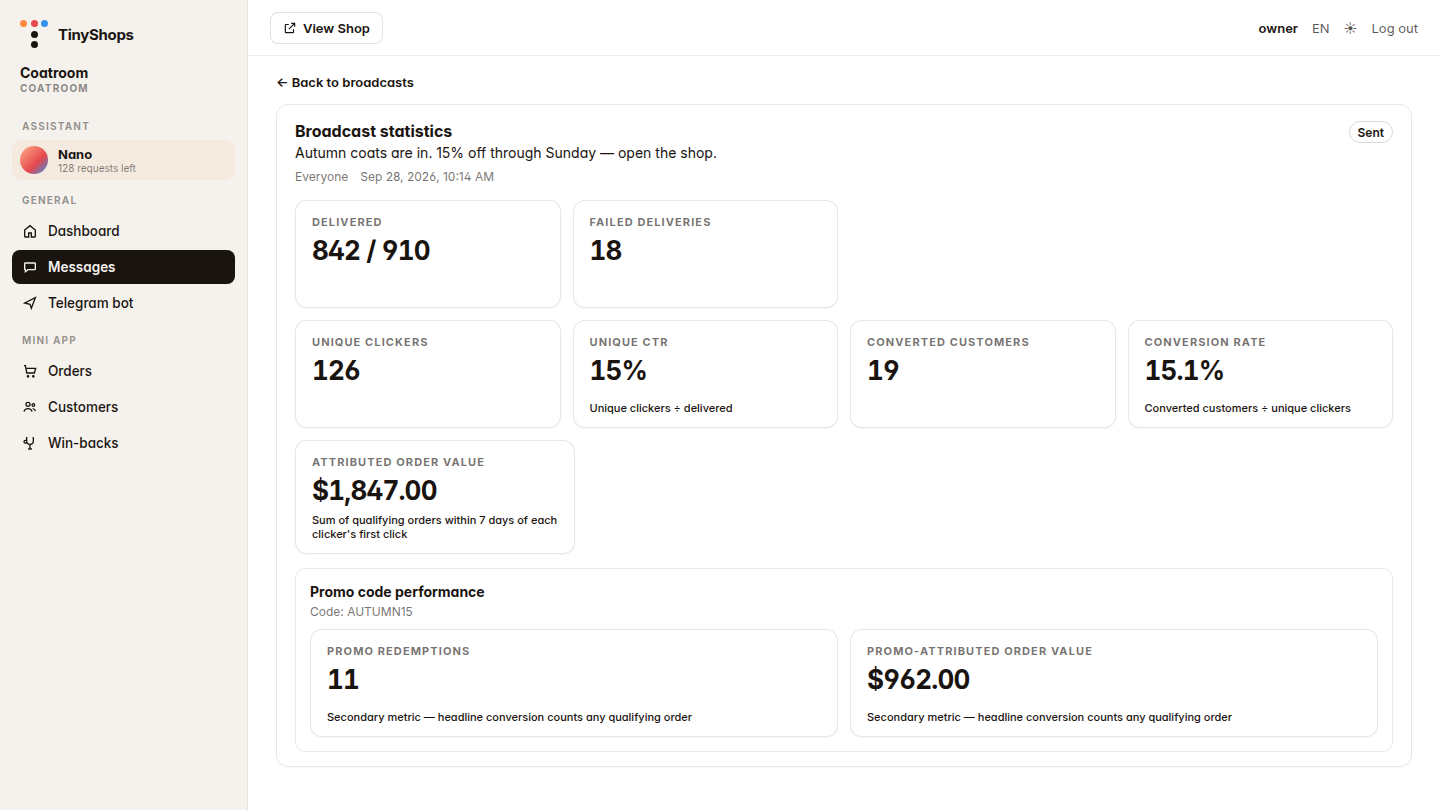
Four steps, in order:
| Step | What Tiny Shops counts |
|---|---|
| Delivered | Messages that arrived, out of everyone you intended to reach |
| Unique clickers | People who tapped the link button. A second tap by the same person does not add another click. |
| Converted customers | People who placed a qualifying order within 7 days of their first click |
| Attributed order value | The sum of those qualifying orders |
A promo code, if you attached one, sits underneath as a second pair of numbers. It does not replace the sale count.
On the sample send, "Autumn coats are in":
- 842 / 910 delivered, and 18 failed deliveries
- 126 unique clickers, so unique CTR is 15% (126 ÷ 842)
- 19 converted customers, so the conversion rate is 15.1% (19 ÷ 126)
- $1,847.00 in attributed order value
- Promo AUTUMN15: 11 redemptions and $962.00, which is the slice of that $1,847 that actually used the code
The other 8 buyers checked out without the code. They still count in converted customers and in the $1,847. The promo block is labeled as a secondary metric for that reason.
Where the 30-day numbers live#
The same Broadcasts tab opens with four cards: Last 30 days (this store).
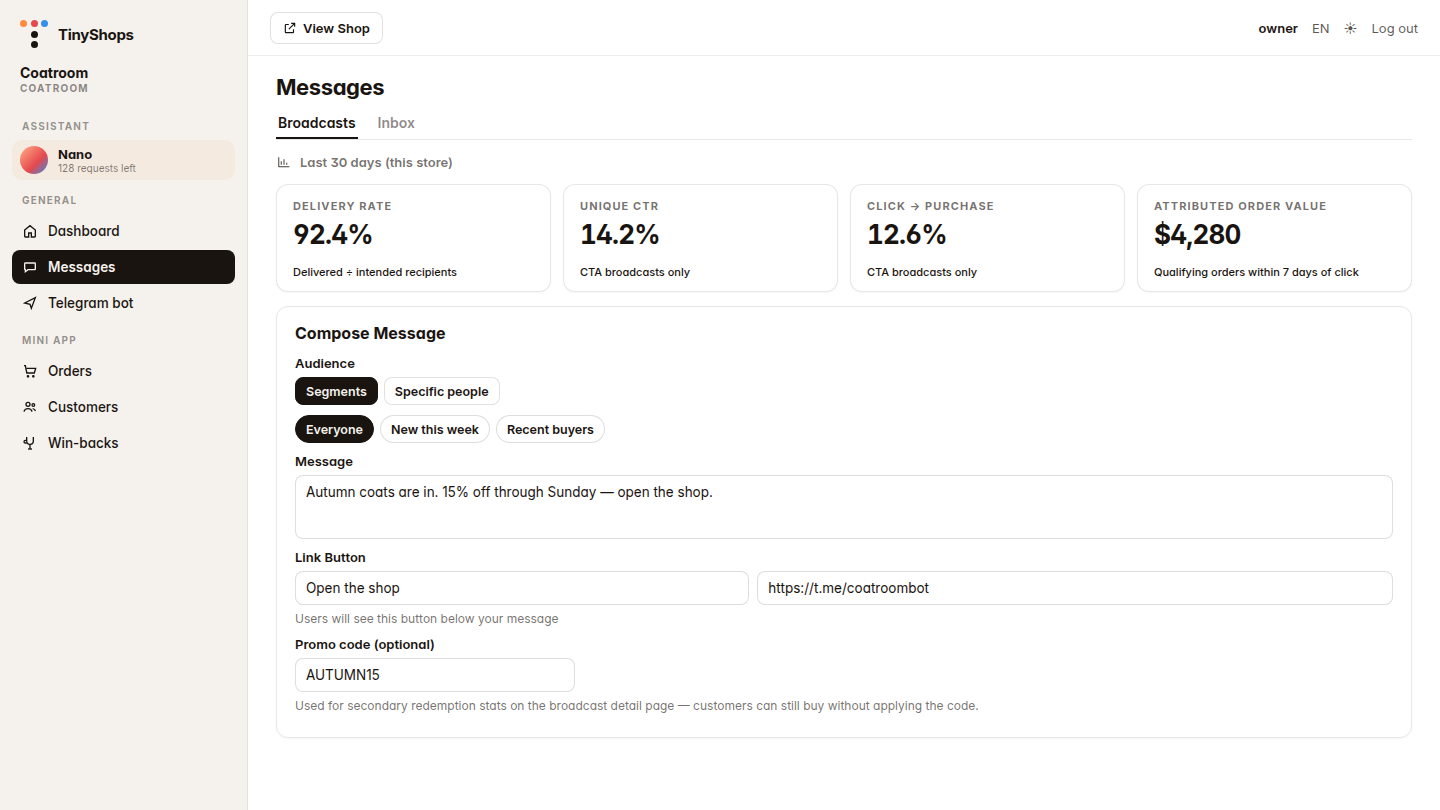
| Card | Caption in the product | What it means |
|---|---|---|
| Delivery rate | Delivered ÷ intended recipients | Of everyone the sends tried to reach, the share that arrived |
| Unique CTR | CTA broadcasts only | Unique people who tapped, divided by messages delivered, only on sends that had a link button |
| Click → purchase | CTA broadcasts only | People who bought, divided by unique clickers, on those same sends |
| Attributed order value | Qualifying orders within 7 days of click | Order totals credited to those sends |
"CTA" here means the broadcast had a link button. A text-only send is in the delivery rate. It is left out of unique CTR and click → purchase, because there was nothing to tap.
A person who taps two different broadcasts in the month counts once in that 30-day unique CTR. On a single broadcast's page, they count for that send.
History is under the composer. Each sent row shows delivered out of intended. A row with a button also shows CTR.
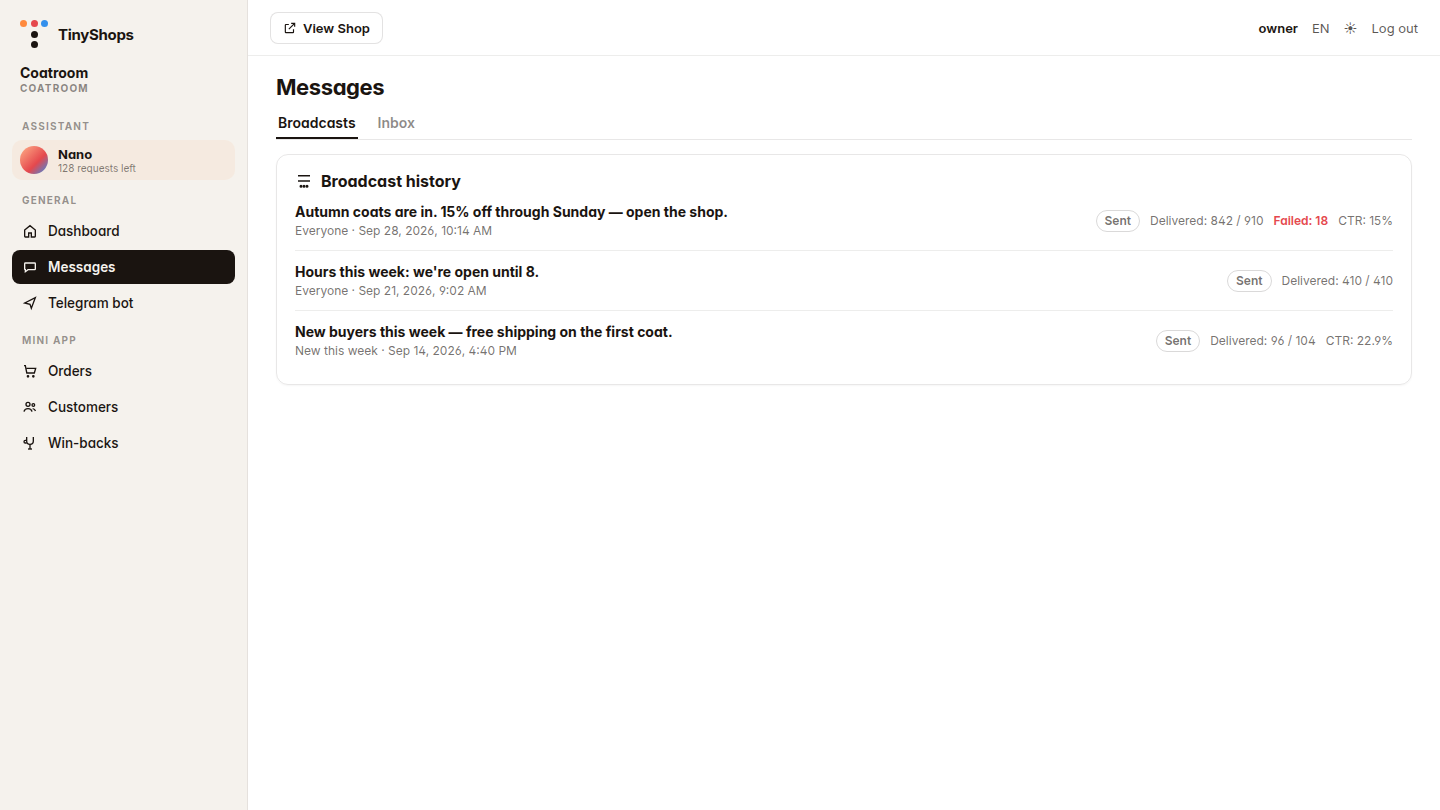
The hours message in that list was delivered 410 / 410 and has no CTR. It had no button, so clicks were never measured. The coats send shows CTR: 15%. Click the text to open the full statistics.
Direct URL: dashboard.tiny-shops.com/messages. In the left nav it is Messages, under General.
How the click-through rate is calculated#
Unique CTR on one broadcast is unique clickers divided by messages delivered.
There is no open rate to put underneath it. Telegram does not tell a bot which private chats were read. A "good click through rate" quoted for email is usually clicks divided by opens, or clicks divided by impressions. Those denominators do not exist on a shop-bot broadcast. Comparing your 15% unique CTR with an email benchmark mixes two different fractions.
The comparison that holds is your own previous send to a similar audience: same kind of offer, same button, same segment. If delivery stays high and unique CTR falls, the text or the button is the thing that changed. If unique CTR holds and click → purchase falls, the offer reached people and checkout did not finish the job.
History prints the same ratio, rounded to one decimal, as CTR: 15%.
Conversion tracking: seven days, one customer#
A purchase is credited when all of this is true:
- The person tapped that broadcast's button.
- The order was created after that tap, and within 7 days of their first tap. Later taps do not move the clock.
- The order status is Processing, Shipped, or Delivered. Pending and Cancelled do not count.
Converted customers is people, not orders. One person who places two qualifying orders is one converted customer. Both order totals still add into attributed order value.
If the same person taps two broadcasts and then orders, the later tap inside the window gets the order. The earlier broadcast does not also count that sale.
The store's currency is the currency on the cards. Coatroom is in dollars because that sample store is.
A link button is what makes clicks visible#
Clicks are counted only when the message has a link button: button text plus an http or https URL. Add it in the composer with Add link button. The field label is Link Button.
Two kinds of URL:
- Your shop's own
t.melink (the bot that runs the Mini App). Tiny Shops rewrites it into a Mini App open. The click is recorded when the Mini App actually opens, then the buyer is in the shop. That is the path you want for a Telegram Mini App store: the button is the door back into the catalog. - Any other
httpslink. The tap is recorded, then the person is sent on to the URL you entered.
A broadcast with no button still shows delivery. The statistics page says so in one line: add a link button on the next send to measure clicks and conversion. The hours message in the history screenshot is that case.
The button is one button, under the message. It is the tracked keyboard on a telegram bot broadcast message, not a row of unlabeled links inside the text.
The promo code is a second number#
Promo code (optional) on the composer attaches a code you already have. Customers can still buy without applying it. The hint under the field says the code is for the secondary stats on the detail page.
Promo redemptions counts qualifying orders that used that code. Promo-attributed order value is their total. Headline conversion keeps counting every qualifying order, with or without the code. If 19 people bought and 11 used AUTUMN15, both figures are true.
The note Telegram still sends you#
After the send, Tiny Shops can DM you a delivery report in the shop's notification chat. That note is the operational split the dashboard cards compress:
- Delivered
- Blocked by the user
- Chat not found
- Skipped, because they had already blocked the bot
- Other errors
- Total reach, and total recipients
On the coats send, delivered is 842 of 910 and failed deliveries are 18. The rest of the gap is in that Telegram note (blocked, missing chat, already skipped). The dashboard row does not pretend those are all "failed."
How this fits selling on Telegram#
How to sell on Telegram is the shop: a Mini App, a catalog, checkout inside the chat. A telegram bot store already has the audience in Messages, split into Everyone, New this week, Recent buyers, or specific people.
A broadcast is how you talk to that list. Telegram broadcast analytics is how you tell a drop apart from a quiet one: who was delivered, who opened the Mini App or the link, who became a converted customer, and the order value in the next 7 days.
This is shop-campaign measurement. It is not a general chatbot analytics product: there is no topic clustering of support chats here, and no open rate. The inbox next to Broadcasts is for replies. The cards on this page are for the send.
If checkout itself is where people stall, fix payment before you tune the button. The payments guide covers Stars, Stripe, and crypto. For people who already bought, cashback is the next order. For people who favorited or left checkout, win-backs is a private nudge, not a blast.
What to change on the next send#
- Delivery rate fell. Read the Telegram report. A rise in "blocked the bot" is a different problem from "other errors."
- Unique CTR fell, delivery did not. Rewrite the text or the button. The hours message cannot teach you this, because it has no button.
- Clicks held, click → purchase fell. The button worked. The offer or checkout did not. Look at the product the button opens, and at payment.
- Promo redemptions are a small slice of converted customers. People are buying without the code. That can be fine. It means the headline order value is the number to manage, and the code is a bonus rather than the whole campaign.
Who can send#
Broadcasts live in Messages, which is part of a paid plan. The free-until-100-contacts start does not include them.
- Starter: up to 5 broadcasts a month
- Pro: up to 10 broadcasts a month
- Scale: unlimited broadcasts
The 30-day cards are for the store you have open. They do not mix in another shop on the same account.
FAQ#
How do I calculate the CTR of a Telegram broadcast?#
Divide unique people who tapped the button by messages delivered. In the sample, 126 ÷ 842 = 15%. Do not divide by the intended audience (910), and do not divide by opens. There is no open count. History shows this as CTR.
How many days does conversion tracking cover?#
Seven days from that person's first click on the broadcast. An order on day eight is not credited. The order also has to reach Processing, Shipped, or Delivered.
Does one customer count twice?#
As a converted customer, no. One person is one converted customer on that broadcast, even with two orders. Both qualifying orders still add into attributed order value. Across two broadcasts, the later click inside the window gets the sale.
Why is there no open rate?#
Telegram does not report reads for a bot's private messages. Delivery is the first number you can trust. Clicks start only when there is a link button.
What if the broadcast has no button?#
You get delivery, including the Telegram report of blocks and errors. Unique CTR, conversion, and order value stay empty. The statistics page tells you to add a link button on the next send.
Try it on the next drop#
Open Messages, put a link button on the send (your t.me shop link if the goal is the Mini App), and read the broadcast after people have had time to buy. Seven days is the window the order value uses.
Create your free store at tiny-shops.com →
Tiny Shops is a no-code Telegram shop builder. The broadcast statistics above are on the Messages page for shops that can send. New here? Start with how to set up a Telegram store.
