Tiny Shops is a no-code Telegram Mini App shop builder that takes payment inside the chat: Telegram Stars, Stripe (Apple Pay and Google Pay), TON, and regional providers, with no Tiny Shops commission on the charge.
Every second a customer spends figuring out how to pay you is a second they consider not buying. Telegram solved this: payments happen inside the chat, in one tap, with no redirects or account creation. Stores using in-chat checkout see 2–3× higher conversion than those linking out to external payment pages.
This guide covers every payment method available for Telegram stores in 2026 — Telegram Stars, Stripe, TON crypto, Google Pay, Apple Pay, and regional providers — with real fee data, a comparison table, and a 5-minute setup walkthrough using Tiny Shops.
Why In-Chat Payments Convert Better#
Traditional e-commerce checkout loses 60–80% of shoppers (Baymard Institute, 2025). The top reasons: forced account creation, too many form fields, and redirects to unfamiliar payment pages.
Telegram eliminates all three:
- Pre-authenticated users — no signup, no email verification
- One-tap wallets — Google Pay and Apple Pay complete in under 3 seconds
- Zero context switch — the payment sheet is native to the app the customer is already in
Shops on Tiny Shops report an average checkout completion rate of 78% for in-chat payments vs. 34% for external checkout links. The difference compounds: a store doing 50 orders/day at $25 AOV gains roughly $16,500/month by closing that gap.
If you haven't set up your store yet, start with our Telegram store setup guide, then come back here to configure payments.
Payment Methods Compared#
| Method | Fees | Coverage | Setup Time | Best For |
|---|---|---|---|---|
| Telegram Stars | 0% (Telegram takes ~15% on Star purchases) | Global, all platforms | 2 min | Digital goods, subscriptions, tips |
| Stripe (Google Pay / Apple Pay / cards) | 2.9% + $0.30 | 46 countries, 135+ currencies | 10 min | International physical & digital goods |
| TON / Crypto (via Crypto Bot or Wallet) | 0.5–1% network fee | Global, no KYC for small amounts | 15 min | Crypto-native audiences, cross-border |
| ЮKassa (YooMoney) | 3.5% | Russia, CIS | 10 min | Russian-market merchants |
| Sberbank | 2.6–3.5% | Russia | 10 min | Russian merchants needing SBP payouts |
| Tranzzo | 2.7% + ₴5 | Ukraine | 10 min | Ukrainian merchants |
“Stripe and ЮKassa both surface Google Pay and Apple Pay automatically — the customer sees whichever wallet matches their device. You don't configure wallets separately.
Telegram Stars: The Zero-Setup Option#
Stars (ticker: XTR) are Telegram's native virtual currency. They're the fastest path to accepting payment because no provider token is required.
How it works for you:
- Customer pays with their Stars balance (purchased via Apple/Google in-app)
- You receive Stars instantly in your bot balance
- Withdraw to TON (Toncoin) after a 21-day hold, or use Stars for Telegram Ads
Constraints:
- Whole units only (no decimals)
- Tips are not supported for XTR checkout
- Best for digital goods, subscriptions, and micro-transactions under $50
If your catalog is digital-only, Stars alone may be enough. For physical products, pair Stars with a card processor.
Stripe & Card Payments#
Stripe#
The default choice for international sellers. One provider token unlocks Visa, Mastercard, Google Pay, and Apple Pay in a single integration. For the click-by-click paste into Tiny Shops, follow how to connect Stripe to your Telegram shop.
- Payouts: 2–7 business days (rolling basis)
- Chargebacks handled through Stripe Dashboard
- Supports 135+ currencies; settlement in your home currency
What about PayPal?#
PayPal is not on Telegram's list of supported payment providers, so it can't be plugged into in-chat checkout. If some of your buyers only pay via PayPal, the workaround is an external payment link — with the conversion drop that comes with leaving the chat. For card and wallet payments inside Telegram, Stripe covers the same US/EU audience natively.
Freedom Pay (Central Asia)#
Selling physical goods in Kyrgyzstan, Kazakhstan, or Uzbekistan? Freedom Pay (ex-PayBox) is the regional BotFather provider — same paste-a-token flow as Stripe. Walkthrough: how to connect Freedom Pay.
TON / Crypto#
Telegram's native blockchain. Customers pay from their TON Wallet or Crypto Bot balance.
- Near-zero fees (~0.05 TON per transaction)
- No chargebacks — final settlement
- Convert to fiat via P2P or centralized exchanges
- Ideal for cross-border sales where card processing is unavailable
Step-by-Step: Set Up Payments in Tiny Shops#
Total time: ~5 minutes. You need a Telegram bot (create one via @BotFather — see our bot creation guide).
Step 1 — Get a Provider Token#
- Open Telegram → message @BotFather
- Send
/mybots→ select your store bot → tap Payments - Choose a provider (Stripe, ЮKassa, Sberbank, Tranzzo, etc.)
- Complete the provider's merchant onboarding
- Copy the provider token (format:
123456789:TEST:AbCdEf...)
You'll receive a test token and a live token. Use the test token first.
For Telegram Stars, skip this step entirely — no token needed.
Step 2 — Connect the Token in Tiny Shops#
- Log in to your Tiny Shops dashboard
- Go to Storefront Settings → Checkout Mode
- Select Native Payments
- Click Add Payment Provider:
- Name: e.g. "Stripe" (internal label)
- Token: paste the token from BotFather
- Test mode: ON for now
- Active: ON
- Save
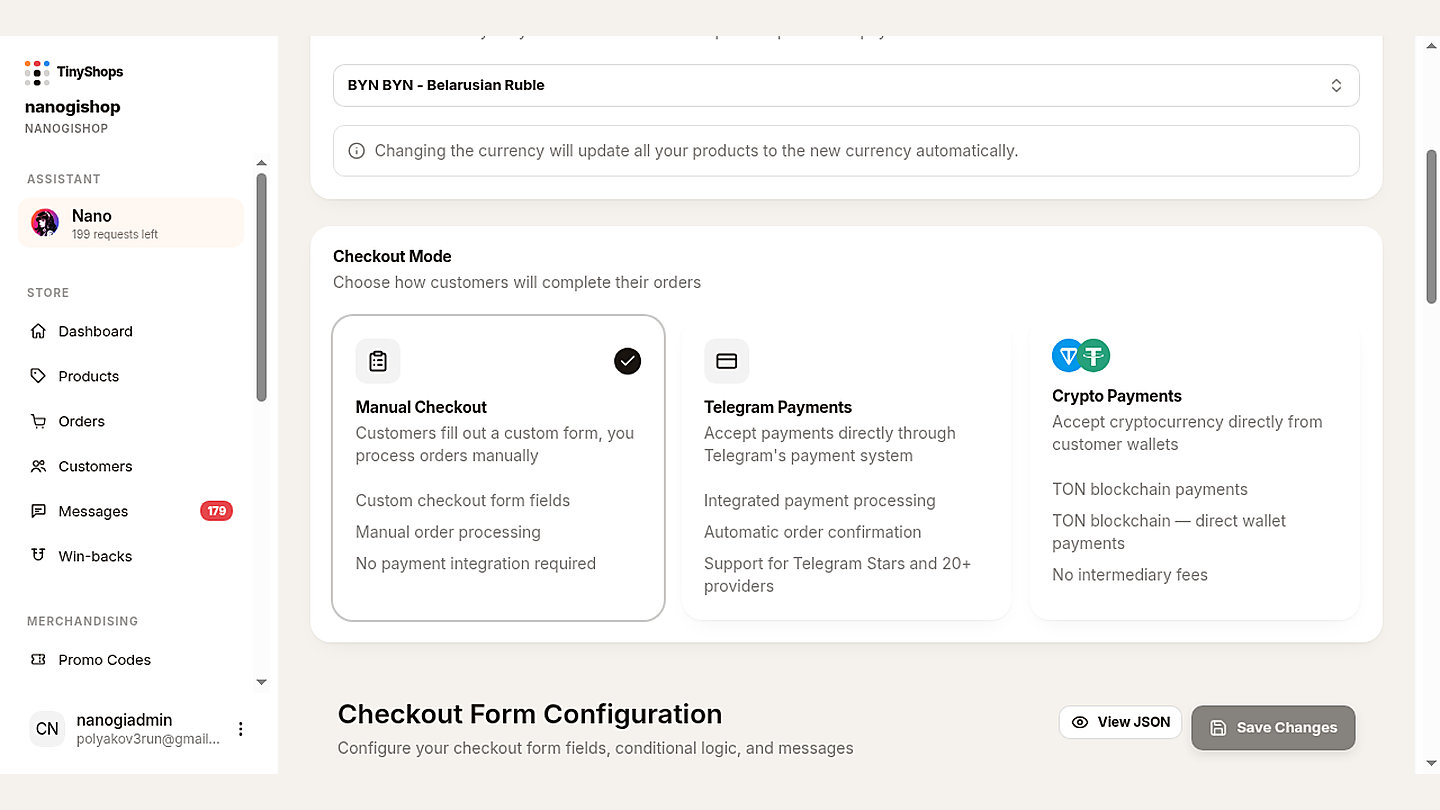
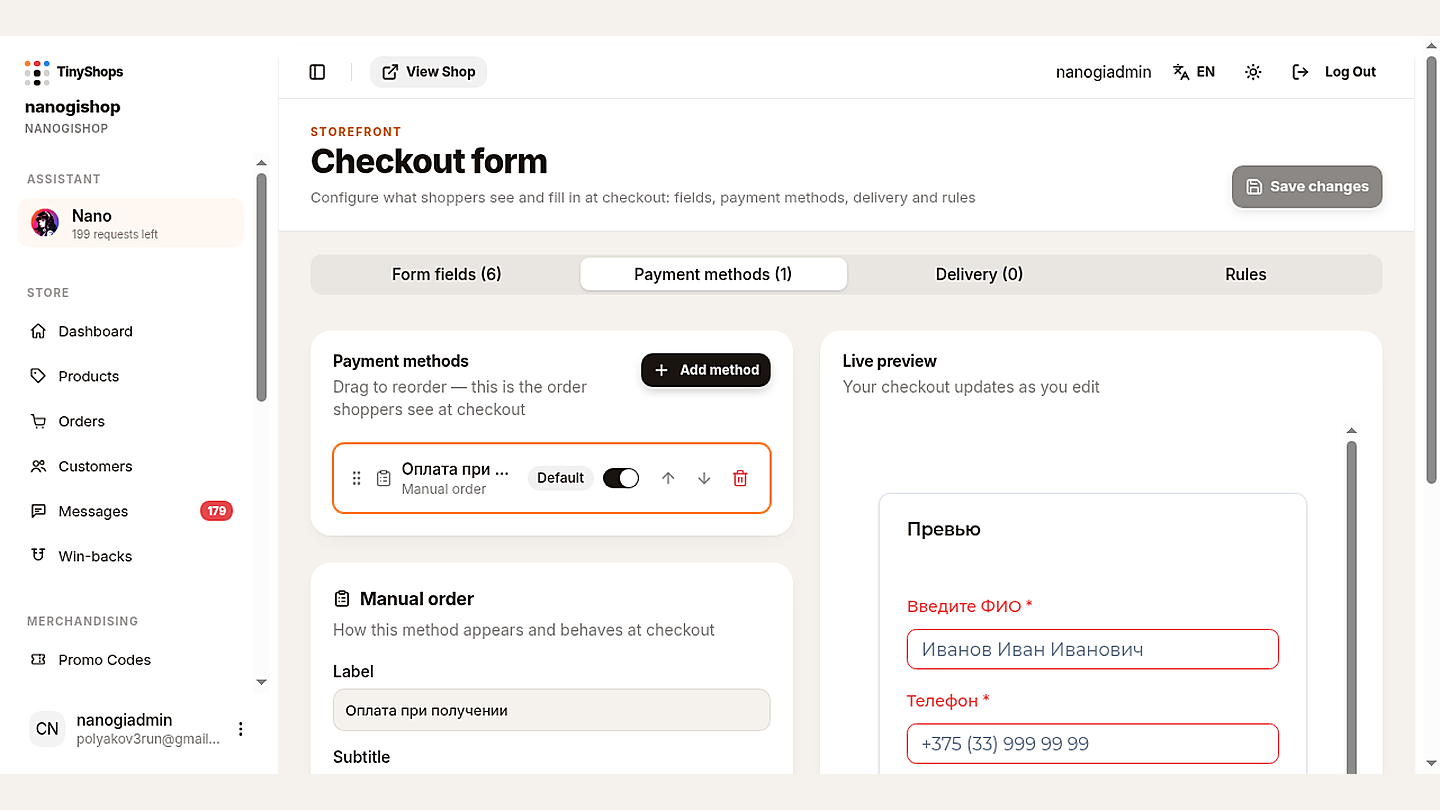
Checkout Mode now lives under Storefront Settings → Orders & Payments: Manual, Telegram Payments (Stars and card providers), or Crypto Payments (TON). Payment methods are configured on the dedicated Checkout form.
For Stars: set your store currency to XTR in Storefront Settings. No provider entry needed.
Step 3 — Configure Checkout Fields#
Under Storefront Settings → Invoice Configuration, toggle fields:
| Field | Digital goods | Physical (local) | Physical (intl) |
|---|---|---|---|
| Name | ○ | ✓ | ✓ |
| Phone | ○ | ✓ | ✓ |
| ✓ | ✓ | ✓ | |
| Shipping address | ○ | ○ | ✓ |
Enable Flexible Shipping if delivery cost depends on the customer's address — Telegram will send a shipping query before finalizing payment.
Step 4 — Enable Tips (optional)#
Under Invoice Configuration → Tips:
- Set up to 4 suggested amounts (e.g. $1, $2, $3, $5)
- Set a max tip (e.g. $10)
- Amounts are in smallest currency units (cents for USD, kopecks for RUB)
Tips are unavailable for XTR (Stars) checkout.
Step 5 — Test Before Going Live#
- Keep Test mode ON and use the test token
- Open your bot in Telegram, add a product, proceed to checkout
- Use your provider's test card:
- Stripe:
4242 4242 4242 4242, any future expiry, any CVC - ЮKassa:
5555 5555 5555 5559
- Stripe:
- Verify:
- Payment sheet shows your store name and correct amount
- Required checkout fields appear
- Order appears in your dashboard with status "Pending"
- Customer receives a confirmation message
- Notification group gets an alert
Step 6 — Go Live#
- Replace the test token with your live token
- Toggle Test mode OFF
- Save — you're now accepting real money
Troubleshooting#
| Symptom | Cause | Fix |
|---|---|---|
| "Payment provider not found" | Token typo or wrong bot | Re-copy token from BotFather; confirm it belongs to this bot |
| Payment sheet shows $0.00 | Price stored in wrong unit | Ensure prices are in smallest units (×100 for USD/EUR/RUB) |
| Stars option missing | Store currency ≠ XTR | Set store currency to XTR in Storefront Settings |
| Google Pay / Apple Pay not shown | Provider doesn't support wallets in your region | Switch to Stripe or confirm provider wallet support |
| Test payment succeeds but live fails | Still using test token in live mode | Swap to the live token and disable test mode |
| Order created but no notification | Notification group not linked | Link a Telegram group in Storefront Settings → Notifications |
FAQ#
What commission does Tiny Shops take? Zero. You pay only your payment provider's standard fee (typically 2.6–3.5%).
Can I run Stars and card payments simultaneously? Yes. Set your primary currency for card payments and enable a second storefront (or product category) priced in XTR.
How fast do I get paid? Stripe: 2–7 days. ЮKassa/Sberbank: 1–3 days. Stars: withdrawable to TON after 21 days. TON/crypto: instant settlement.
Are refunds possible?
Card refunds go through your provider's dashboard. Stars refunds use Telegram's refundStarPayment API. TON transactions are irreversible — handle disputes manually.
Is customer card data safe? Yes. Card data flows directly between Telegram and the PCI DSS-certified provider. It never touches Tiny Shops servers.
Do I need a developer? No. The entire setup is done through BotFather + the Tiny Shops dashboard. No code required. For advanced customization, see our Telegram Mini Apps guide.
Start Accepting Payments Today#
The math is simple: in-chat checkout converts 2–3× better than external links, and Tiny Shops charges 0% platform commission. You keep every cent minus your provider's fee.
- Create your free Tiny Shops store
- Paste your provider token (or enable Stars)
- Test one transaction
- Go live — your first sale can happen in the next 10 minutes
Need a specific rail next? Connect Stripe or Freedom Pay, or skim the Stripe vs Stars rulebook before you mix catalog types. Plans and limits are on pricing.
Already selling? Read how to boost repeat purchases with cashback or choose the best Telegram store builder for your needs.
Rich receipts and /balance: Bot API 10.3 update.
