Tiny Shops is a no-code Telegram Mini App shop builder for brands that ship real parcels. For physical goods, checkout is a card rail inside Telegram (Stripe, Apple Pay, Google Pay, or another provider). Telegram Stars are for digital goods only. Mix those two rails on the same Mini App and Telegram may stop showing you to mobile users.
This is the 2026 rulebook, not another full payments setup. For the click-by-click provider walkthrough see how to accept payments in Telegram. Ready to paste a Stripe token? Use how to connect Stripe to your Telegram shop.
The rule in one sentence#
Parcels and offline services: card provider. Digital goods sold inside Telegram: Stars (currency XTR). Do not sell digital items on Stripe inside the Mini App.
Telegram's own payments docs say it cannot display your bot or Mini App to mobile users if you try to sell digital goods and services through other currencies or third-party providers. That is an App Store / Play Store compliance rule, not a Tiny Shops opinion. Physical goods and offline services are the exception: you may use Stripe and the rest of Telegram's supported providers.
Telegram has 1 billion+ monthly users (Durov, March 2025) and 500 million Mini App users as of Telegram's 30 June 2024 blog. Those people still pay with Apple Pay and Google Pay when you ship a box. They do not need Stars for a hoodie.
What you pay (and what you don't)#
Tiny Shops takes 0% on the charge. The money lands in your Stripe (or other provider). You still pay that provider's fee. We do not mark it up.
That is the honest version of "free checkout." There is no Tiny Shops cut hiding in the total. Stripe's fee is Stripe's fee, and it varies by country. Check your Stripe dashboard, not a blog post, for the number that applies to you.
Stars look "zero setup" because there is no provider token. They are the wrong rail for a parcel. Shoppers buy Stars through Apple or Google in-app purchase. That is a digital-goods path, not a shipping path.
Pick one rail for what you actually sell#
| You sell | Rail | Where the money goes | Mini App on iPhone |
|---|---|---|---|
| Physical goods, food, offline services | Telegram Payments + Stripe (or another card provider) | Your Stripe account | Fine, this is the supported physical path |
| Digital goods or services inside Telegram | Stars only (XTR, empty provider token) | Stars, then your Stars payout | Fine, this is the required digital path |
| Both in one Mini App, digital charged on cards | Mixed | A mess | Telegram may hide the Mini App from mobile users |
If your catalog is sneakers, candles, or anything with a courier, stay on Telegram Payments and a card provider. Leave Stars off. If you later add a digital add-on (a course, a file, a membership), that add-on needs Stars, and it is safer as a separate flow than as a second button on the same physical checkout.
What "mixing rails" actually breaks#
The scare is real and specific. From Telegram's digital-goods payments FAQ:
“Telegram cannot display your bot or mini-app to mobile users if you attempt to sell digital goods and services via other currencies or through third-party payment providers.
It does not say a Stripe shop for parcels will vanish from iOS. It says: if this Mini App sells digital goods, those digital goods must be Stars. Put a "Pro plan" or an e-book on the same cart as a T-shirt and charge both through Stripe, and you have given Telegram a reason to hide the Mini App from iPhone and Android shoppers.
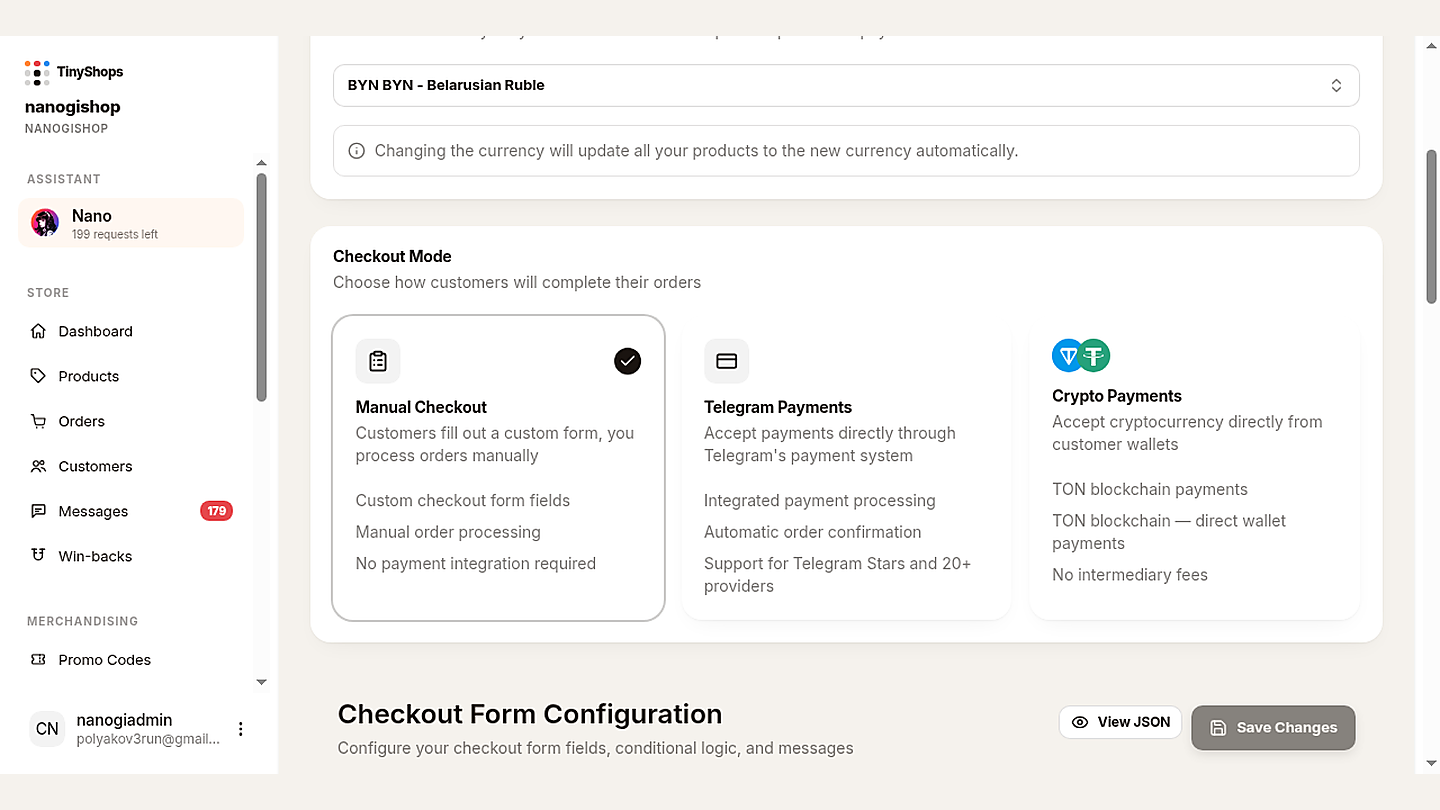
Practical test: open Storefront Settings → Orders & Payments. Checkout Mode is one choice, not a buffet.
- Manual Checkout — form only, you collect payment yourself. Fine for COD. Not a card rail.
- Telegram Payments — Stars or 20+ providers with automatic confirmation. For parcels, this is Stripe / Apple Pay / Google Pay. Do not also set store currency to
XTRunless you are selling digital. - Crypto Payments — TON. Not the lead path for a Stripe shop.
Set it in Tiny Shops (physical shop)#
You need a store and a Stripe account (or another provider Telegram lists in BotFather → Payments). Then:
- Dashboard → Storefront Settings → Orders & Payments.
- Store currency: your real selling currency (USD, EUR, GBP), not
XTR. - Checkout Mode: Telegram Payments.
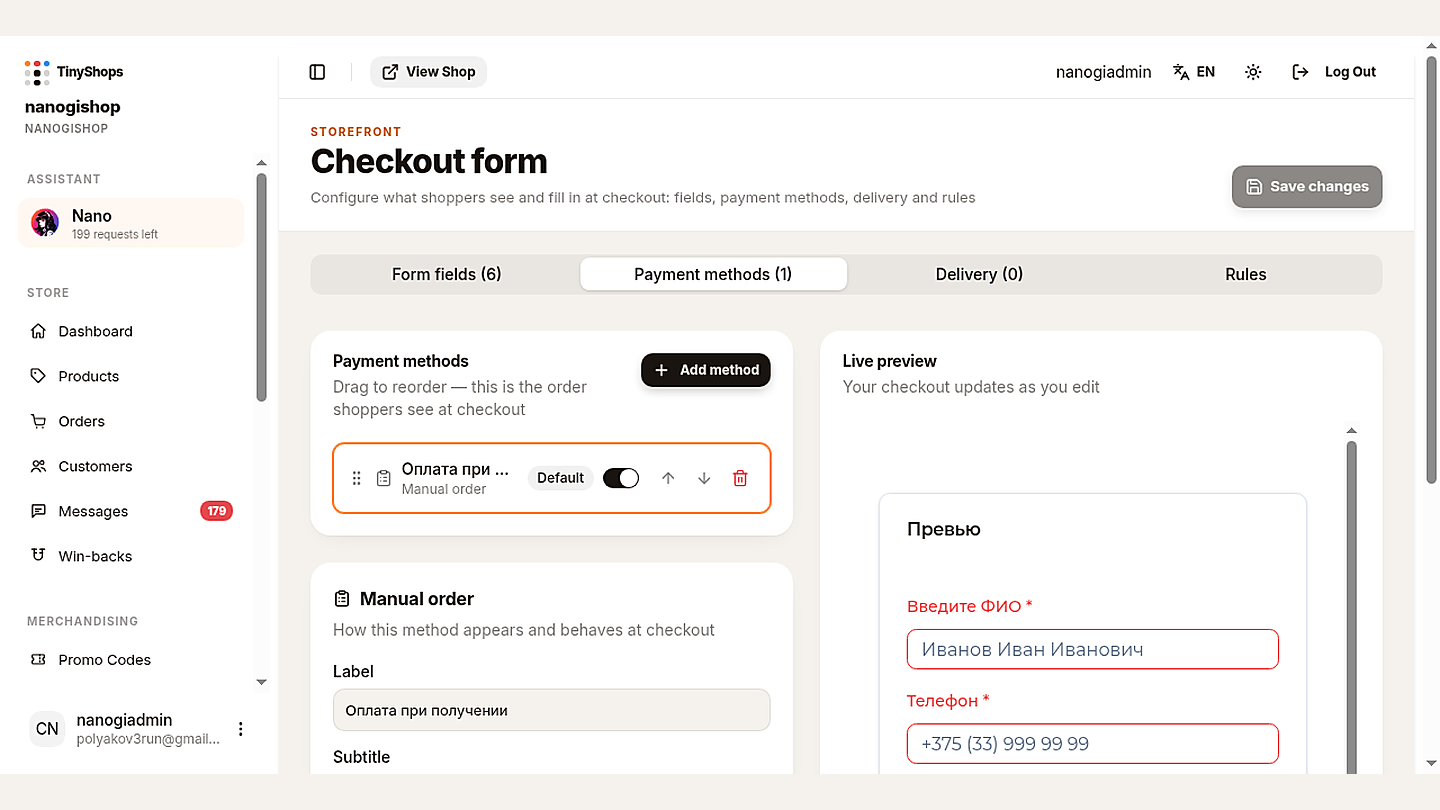
- Open the Checkout form (the banner "New checkout configurator" on that page).
- Payment methods tab → + Add method → your Stripe (or card) method. Make it Default. Leave Stars off this shop.
- Save. Send a test if your provider offers one. Confirm the charge in Stripe, not only in the dashboard.
Shoppers pay inside Telegram. Apple Pay and Google Pay show up when Stripe and the device support them. There is no redirect to a random website.
Need BotFather provider tokens, invoice fields, or Stars for a digital shop? That is the full payments setup guide. For Stripe alone, the spoke is connect Stripe; for Central Asia, Freedom Pay.
What the shopper sees#
They open your Mini App from the bot, add a parcel to the cart, tap pay. Telegram's payment sheet opens on top of the chat. They confirm with Apple Pay, Google Pay, or a saved card. You get an order in Orders. The payout is your Stripe dashboard, not a Tiny Shops wallet.
If you left Manual Checkout on, they submit a form and you chase payment yourself. That is COD, not the 2026 card path.
If you left Crypto on as the mode, they see TON. Do not lead a Stripe audience there.
FAQ#
Can I take Stripe in a Telegram shop in 2026? Yes, for physical goods and offline services. In Tiny Shops: Checkout Mode Telegram Payments, store currency not XTR, Stripe (or another card provider) on the Checkout form.
Why not Stars for hoodies? Stars are Telegram's in-app currency for digital goods and services. Physical purchases stay on third-party providers. Telegram's Stars announcement says physical products keep using those providers.
Will Stripe hide my Mini App on iOS? Not for parcels on a card provider. Telegram hides a bot or Mini App from mobile users when you sell digital goods via other currencies or third-party providers. Keep digital off this cart, or sell it as Stars in a separate flow.
Does Tiny Shops take a cut? No. 0% on the charge. You pay Stripe (or your provider). Money lands in your Stripe.
Do I need Apple Pay separately? No. With Stripe on Telegram Payments, Apple Pay and Google Pay appear when the shopper's device and your Stripe country support them.
What about TON or USDT? Tiny Shops can take TON in Crypto Payments mode. For a Stripe parcel shop, do not make that the default.
Where do refunds and receipts live? Card refunds go through Stripe. Orders stay in the Tiny Shops Orders list. For digital Stars sales, Telegram also requires a /paysupport path. A parcel shop's support still needs a real reply path (Messages, or a support bot command you actually watch).
I already have the long payments article. Use that for tokens, invoice fields, and Stars. Use this page to choose the rail so the Mini App stays visible and the money lands in Stripe.
Turn it on today#
- Storefront Settings → Orders & Payments
- Currency = your parcel currency, not
XTR - Checkout Mode = Telegram Payments
- Checkout form → Payment methods → Stripe (Default) → Save
- Place a test order from your own phone, including an iPhone if you have one
If the test charge shows in Stripe and the Mini App still opens on iOS, you are on the 2026 physical path.
Compare plans on pricing, then create or open your store at tiny-shops.com →
- 🇬🇧 Tiny Shops EN
- 🇷🇺 Tiny Shops RU
