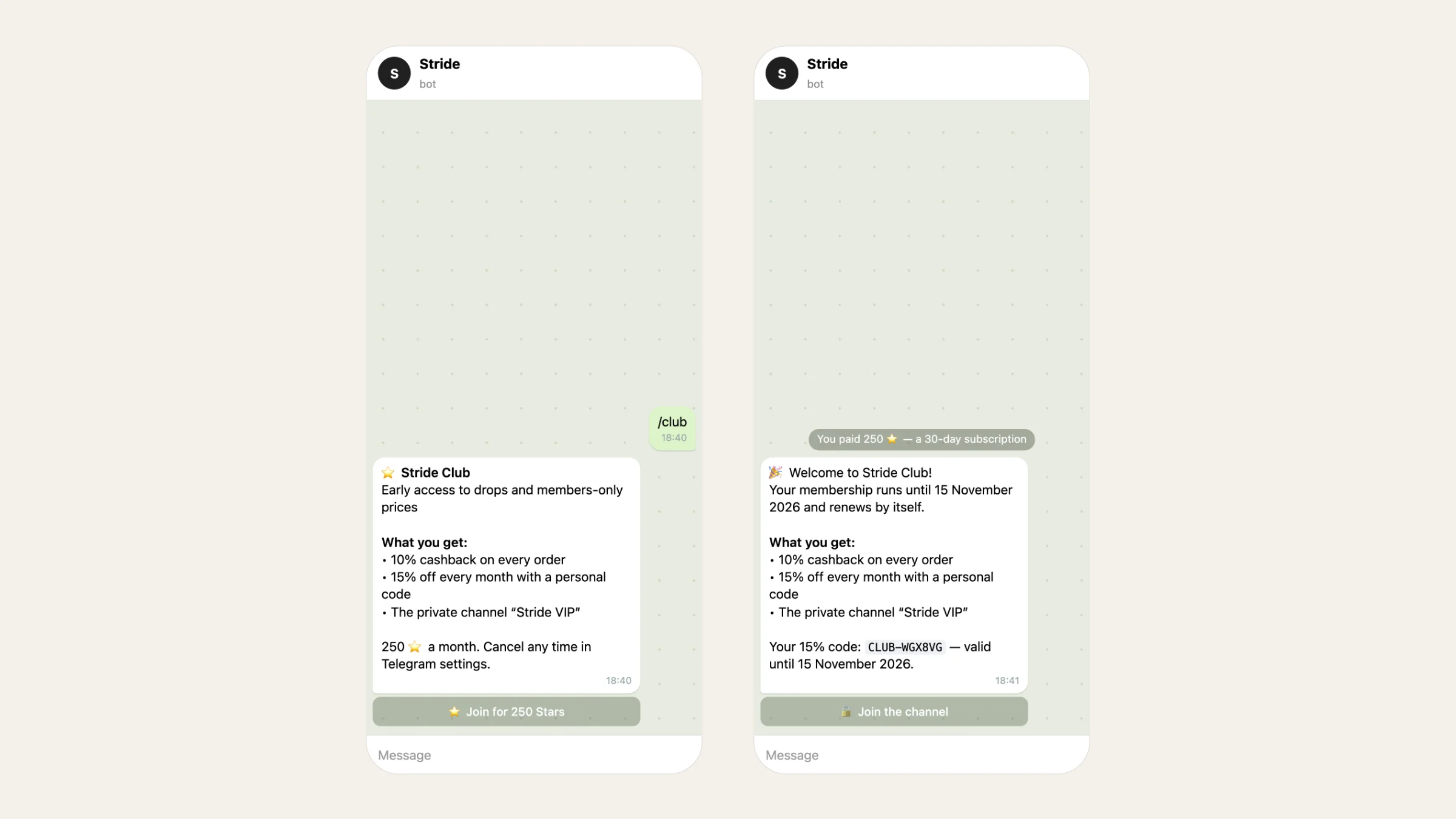
Every store has people who buy again and again, and every channel has readers who'd pay to be closer. A paid subscription is how you turn both into recurring income on Telegram. This guide compares the ways to monetize a Telegram channel and walks through setting up a paid club: a Telegram Stars subscription run by your store bot, with perks members actually feel.
Four ways to monetize a Telegram channel#
| Way | How you earn | What you need | Best for |
|---|---|---|---|
| Telegram Ads revenue share | Telegram shows ads in the channel and shares the revenue | An eligible public channel with a large audience | Big content channels |
| Paid posts | Each photo or video unlocks for Stars | Content people pay for once | Creators selling single pieces |
| A paid invite link | A monthly Stars fee to stay in the channel | A channel worth paying for | Access-only communities |
| A membership bot | A monthly Stars subscription with perks: cashback, codes, channel access | A bot that manages members | Stores and communities with regulars |
Ads need audience size you may not have yet. Paid posts earn once per piece. Subscriptions pay every month, which is why they are the most predictable of the four. For paid posts, see how Telegram paid media works.
Paid invite link or a membership bot#
Telegram has a built-in option: in the channel settings, go to Channel type → Manage invite links → Create a new link and turn on Require monthly fee. Whoever joins through that link pays Stars every month.
That's enough when access is the whole offer. A membership bot adds what a link can't:
| Paid invite link | Membership bot (Tiny Shops club) | |
|---|---|---|
| Monthly payment in Stars | Yes | Yes, renewed by Telegram every 30 days |
| Access to a private channel | Yes | Yes: a one-person link, removed when membership ends |
| Higher cashback on orders | No | Yes |
| A personal discount code every month | No | Yes |
| A member list with statuses | No | Yes: renewing, renewal off, payment failed, ended, refunded |
| Stop a renewal or refund a member | No | Yes, from the dashboard |
| Joining | Through the link | /club in the bot, or a club link anywhere |
How to set up a paid Stars club in Tiny Shops#
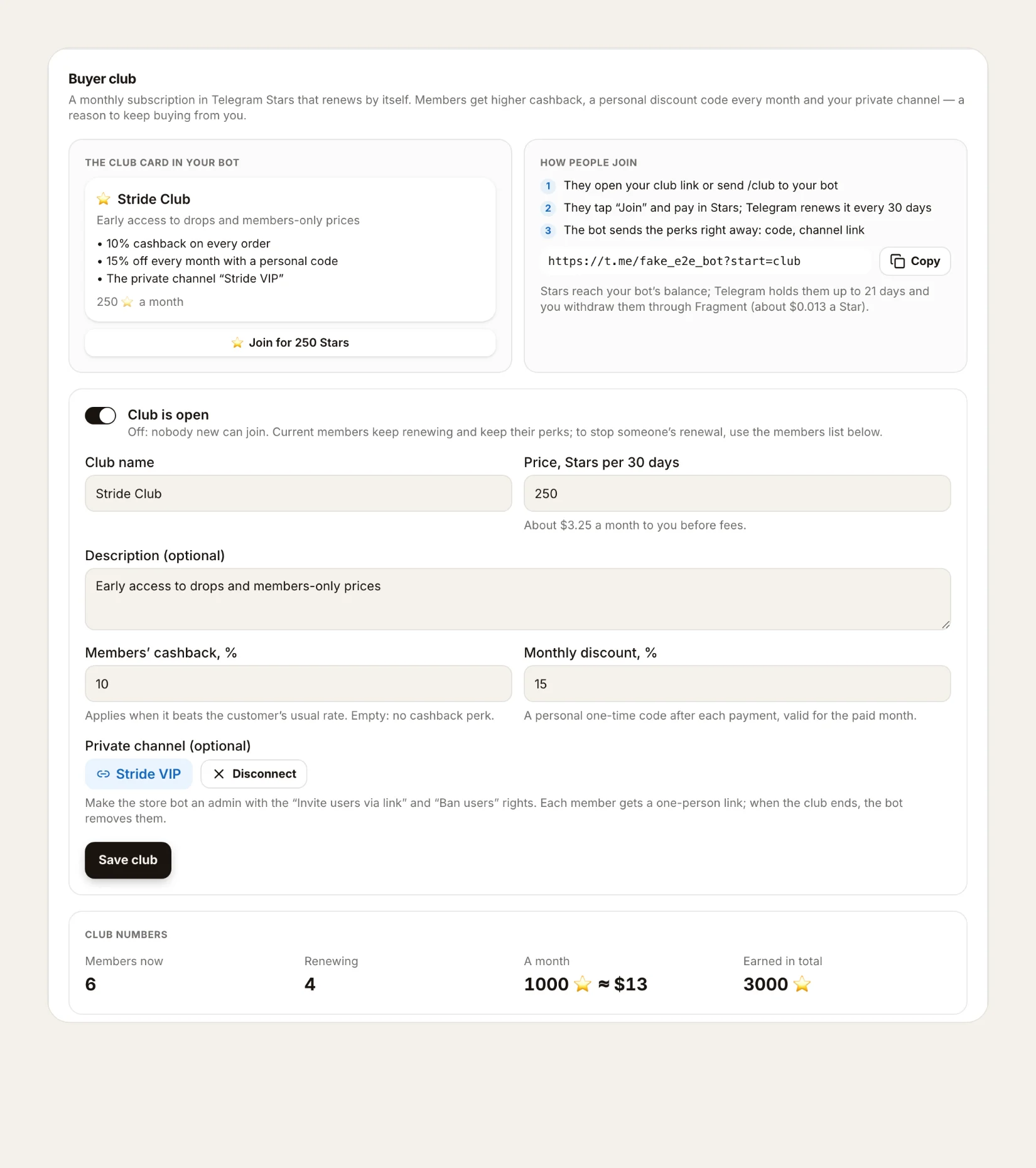
- Open Telegram bot → Club in the dashboard.
- Name it and set the price. Fill in Club name and Price, Stars per 30 days (1 to 10,000 Stars). A new price applies only to new members.
- Add a description (optional): one line on why to join.
- Choose the perks. Members' cashback, % (1–50) applies when it beats the buyer's usual rate, even if your store's own cashback is off. Monthly discount, % (1–90) sends a personal one-time code after each payment.
- Connect a private channel (optional). Make your store bot an admin of the channel with the Invite users via link and Ban users rights, so it can hand out links and remove members whose club has ended.
- Turn on Club is open and press Save club.
- Share the club link in your channel, the bot's welcome and broadcasts. Buyers can also send /club to your bot.
How people join#
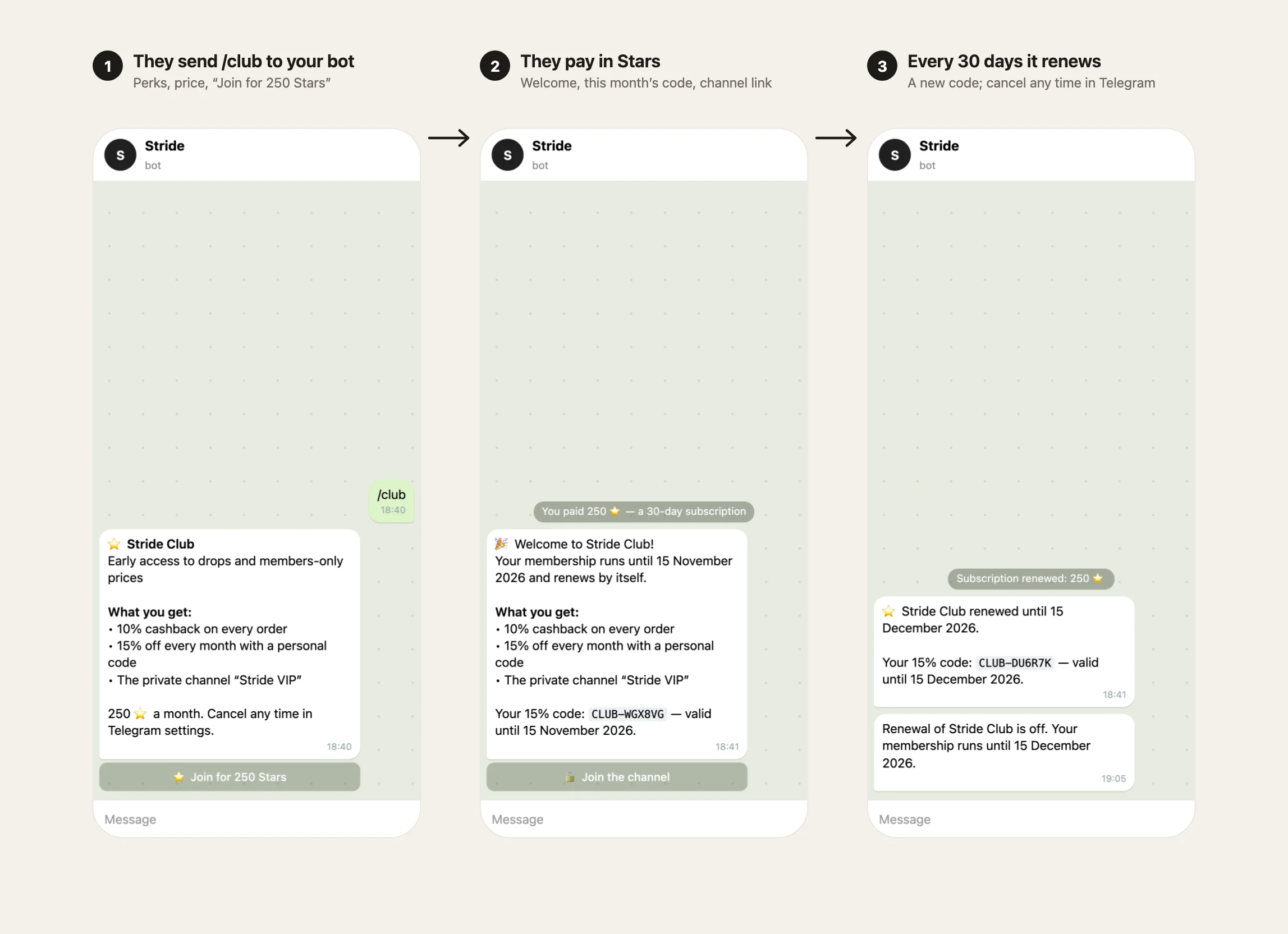
- A buyer sends /club to your bot, or opens the club link. The bot shows the perks, the price and a Join button.
- They pay in Stars. The bot immediately sends a welcome, a personal code for this month and a one-person link to your private channel.
- Every 30 days Telegram renews the subscription, and the bot sends a new code. Members can cancel the renewal any time in Telegram settings: the club stays active until the paid month ends.
How to price your club#
Members pay in Stars, and you withdraw Stars through Fragment at about $0.013 a Star. So 250 Stars a month comes to roughly $3.25 per member before any withdrawal fees. Three ways to land on a price:
- From the perks. If a member who orders twice a month saves $5 with cashback and the monthly code, a price below that is an easy yes.
- From what regulars spend. A club works best for people who already buy every month. Price it as a small share of a typical month's spend.
- Start lower. You can raise the price later. Existing members keep theirs, and new members pay the new one.
Getting paid#
Stars go to your store bot's balance. Telegram holds them for up to 21 days, and you withdraw them through Fragment. Buyers ask payment questions with /paysupport: the bot answers them and sends you a notification.
Managing members#
The same tab shows Club numbers: Members now, Renewing, Stars A month and Earned in total. Below is the member list with each member's status. You can Stop renewal for anyone, or Refund Stars for their last payment: the club then ends at once and the bot removes them from the channel. Refunds come out of your bot's Stars balance.
If you sell in chat#
If you sell paid files for Stars in chat, you have no orders, so cashback and codes don't apply. In that case the club is paid, recurring access to your private channel, run by the bot.
Through agents#
Your agents and Nano can work with the club too: get_club shows the settings and numbers, update_club changes the settings, list_club_members lists the members, and cancel_club_renewal and refund_club_membership stop a renewal and refund a payment. The last two need owner rights and a confirmation.
FAQ#
Can a Telegram bot charge a monthly subscription? Yes. Telegram supports Stars subscriptions in bots: the buyer pays once, and Telegram renews the charge every 30 days until they cancel.
What happens when a member cancels? The club stays active until the end of the paid month. Then the membership ends and the bot removes them from the private channel.
Can members pay by card? The club takes Telegram Stars. Buyers can top up Stars inside Telegram with a card or through the app store.
Do I need a store to run a club? A storefront unlocks cashback and the monthly code. Without one, the club still sells paid access to your private channel.
Open your store and start a paid Telegram Stars club at tiny-shops.com →
