Tiny Shops is a no-code Telegram Mini App shop builder. Freedom Pay (formerly PayBox) is a Central Asian payment company — you connect it as a Telegram Payments provider by taking a provider token from @BotFather and pasting it into Tiny Shops. There is no Freedom Pay–specific button in the dashboard; any BotFather token works the same way. You type Freedom Pay yourself as the Provider Name.
This how-to is for merchants in Kyrgyzstan (KG), Kazakhstan (KZ), and Uzbekistan (UZ) who sell physical goods or services. For the full comparison of Stars, Stripe, crypto, and other providers, see how to accept payments in Telegram. Selling into Stripe countries instead? Use the sibling walkthrough how to connect Stripe, or the Stripe vs Stars rulebook if you are choosing rails.
What you need#
- A Telegram bot linked to your Tiny Shops store
- A Freedom Pay merchant account for your country entity (KG anketa, or the KZ / UZ site if that is your legal entity)
- Ability to complete KYC / company docs and, for live charges, a signed connection agreement with Freedom Pay
Step 1 — Freedom Pay account and store ID#
- Submit the merchant request on Freedom Pay (KG: freedompay.kg/en/anketa).
- Complete the application (company docs as requested). New merchants usually start in test mode; Freedom Pay enables production after testing and a signed connection act.
- In the personal account, note your store / account ID (sometimes shown as merchant or shop ID). Illustrative example of the ID style:
545158— use the ID from your cabinet, not this number.
Confirm with your Freedom Pay manager: Telegram Bot Payments availability, supported invoice currencies (often KGS for KG merchants — confirm), and fees in your agreement.
Step 2 — Provider token in BotFather#
- Open @BotFather →
/mybots→ your Tiny Shops bot. - Bot Settings → Payments.
- Choose FreedomPay KG (for Kyrgyzstan). Depending on your account and region, you may also see FreedomPay KZ, FreedomPay UZ, or legacy PayBox.money — confirm the exact label in the BotFather UI; do not invent a name that is not listed.
- Complete the redirected Freedom Pay bot flow (typically enter your store/account ID and whatever fields they ask for).
- Copy the TEST provider token first. After live enablement, BotFather will show a LIVE token (often containing
:LIVE:— confirm in the UI).
Telegram does not process cards and takes no commission on third-party provider payments; Freedom Pay does the acquiring.
Step 3 — Paste the token in Tiny Shops#
- Open the dashboard → Storefront Settings → Orders & Payments.
- Select Telegram Payments.
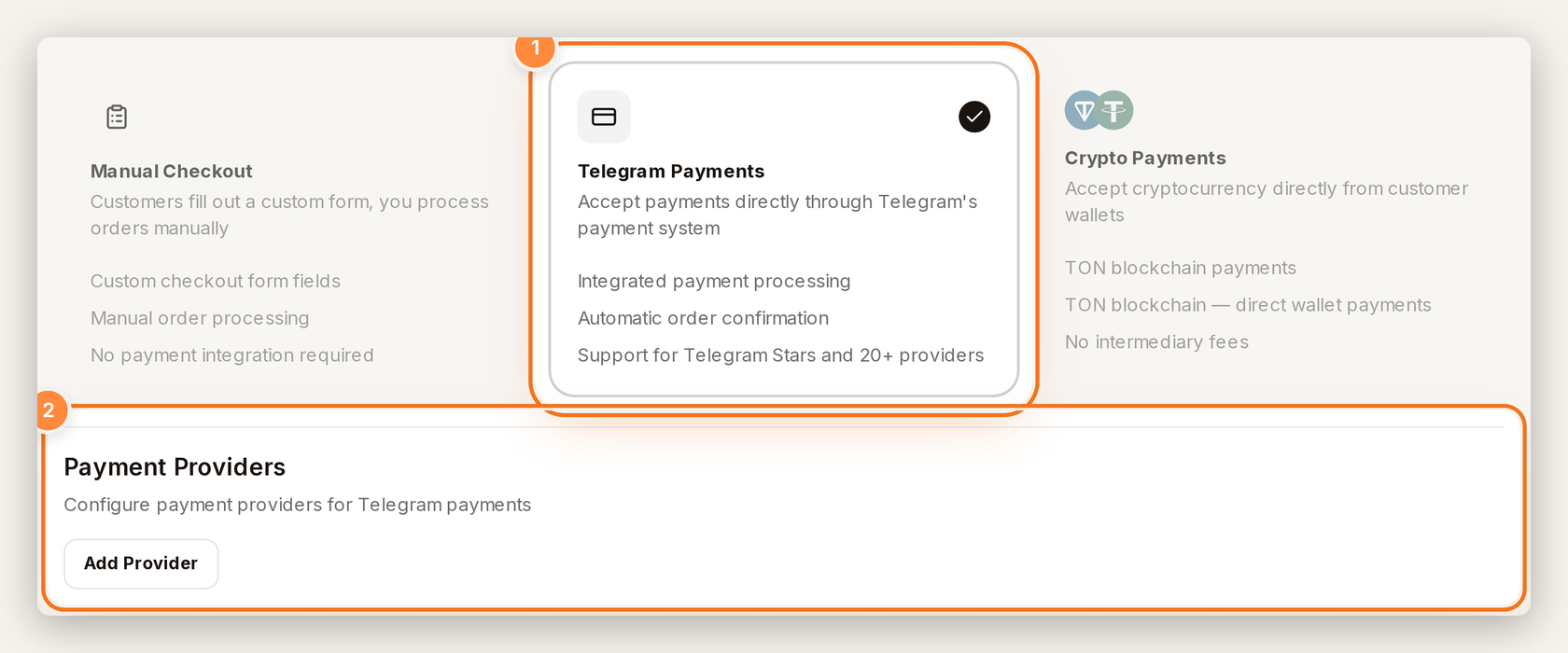
Telegram Payments mode — Add Provider is on this screen.
- Click Add Provider and fill in:
- Provider Name — type your own label, e.g.
Freedom Pay(Tiny Shops does not pre-fill a Freedom Pay option) - Provider Token — paste from BotFather
- Test Mode — on while testing
- Provider Name — type your own label, e.g.
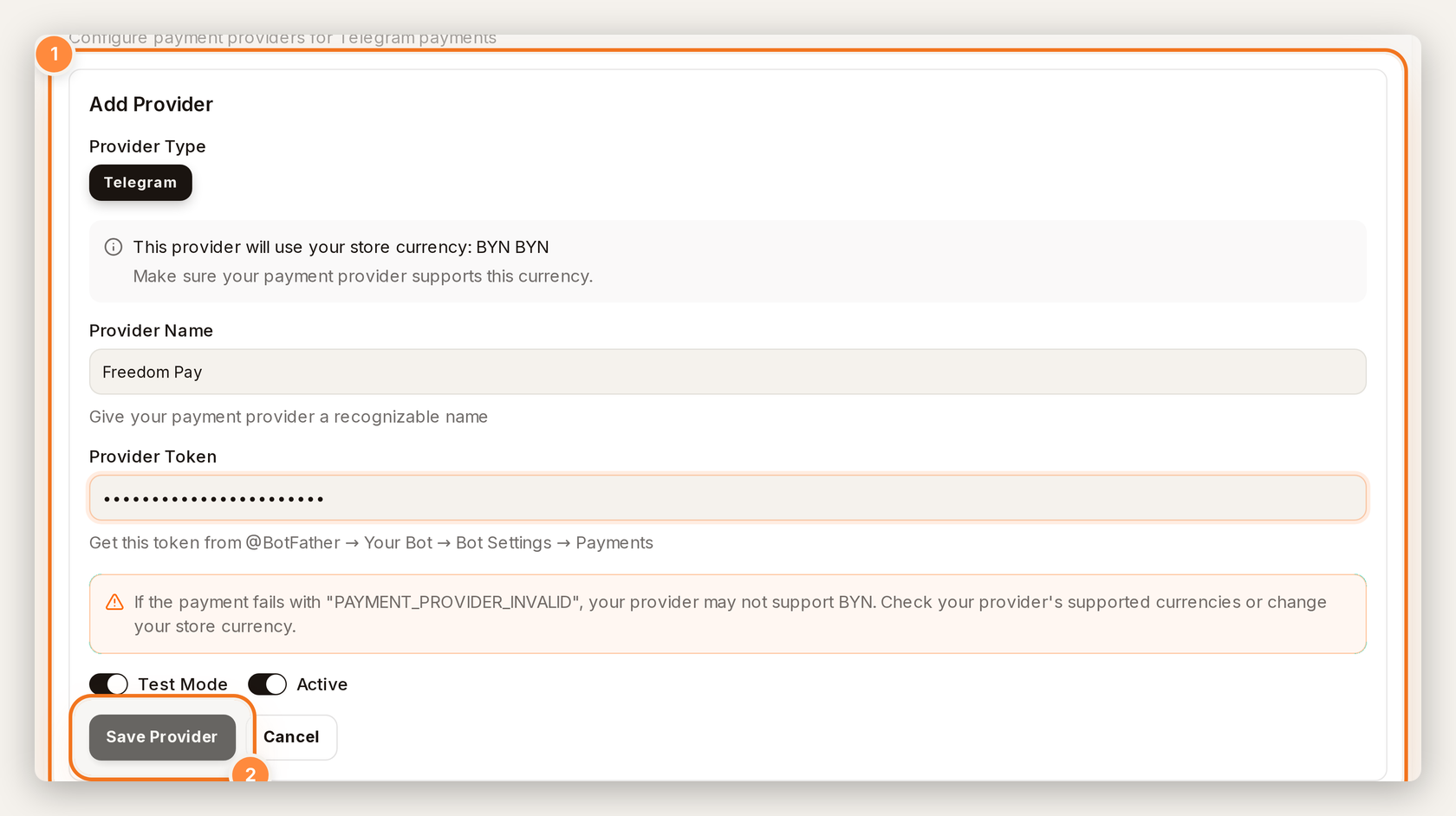
Add Provider — name, BotFather token, and Test Mode.
- Click Save Provider.
- Confirm the saved row shows Active (and Test Mode while testing). The provider row has Edit / Delete — there is no Make default on the Telegram Payments provider list. If your shop also uses Checkout Form payment methods, Default lives on that rail instead.
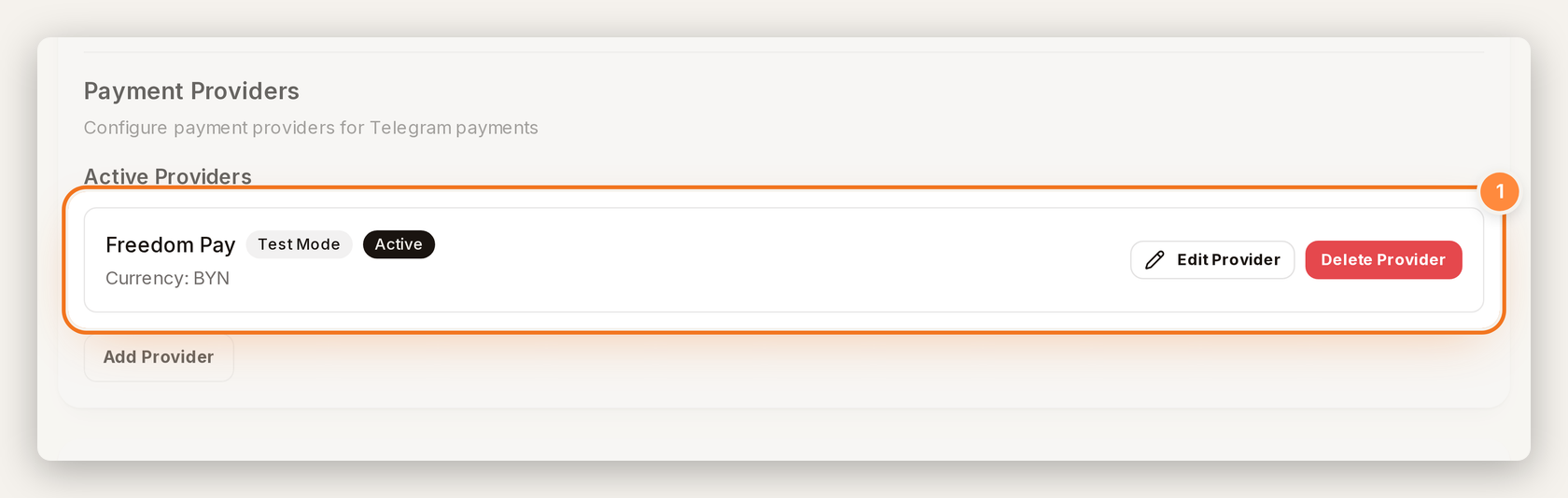
After save — Freedom Pay row with Test Mode and Active; Edit / Delete on the row.
- Set store currency to one Freedom Pay confirms for your account.
Official path and fields: Telegram Payments docs.
Step 4 — Place a test order#
In the Mini App, check out with Freedom Pay’s published test card (from their Merchant API docs):
| Field | Test value |
|---|---|
| Card | 4111 1111 1111 1111 |
| Expiry | 12/24 (2024/12 in Freedom Pay’s docs) |
| CVV | 123 |
| Cardholder | at least two English words (e.g. Test User) |
| 3‑DS (if asked) | 12345678 |
If checkout rejects the expiry as past, re-check the current test-card list — Freedom Pay still publishes 2024/12 there; ask their support if a newer test expiry is required.
If the test list on Freedom Pay’s site has been updated, prefer their current docs over this table.
Step 5 — Go live#
- Finish Freedom Pay’s agreement / connection act so the merchant account is in production.
- Get the LIVE token from BotFather → Payments.
- In Tiny Shops, replace the token (edit the provider you saved), turn Test Mode off, click Save Provider.
- Confirm the row still shows Active (without Test Mode). That is enough for Telegram Payments — you do not need a Make default control on this provider row.
- Place a small real order to confirm settlement with Freedom Pay.
Physical goods vs digital (Stars)#
| Catalog | Payment path |
|---|---|
| Physical goods & services | Freedom Pay (or another) BotFather provider token |
| Digital goods/services inside Telegram apps on mobile | Telegram Stars (XTR) — empty provider token; see Stars payments |
Apple/Google rules mean mobile users must not be offered third-party card checkout for digital goods inside Telegram. If your catalog mixes both, use Stars for digital SKUs and Freedom Pay for physical.
Fees and currency#
- Telegram takes no commission on third-party provider payments.
- Tiny Shops does not take a platform cut on the charge.
- Freedom Pay commission is set individually in your agreement (percent, fixed, or combined). Do not assume a public % — ask your manager or read the contract.
- Confirm supported invoice currencies with Freedom Pay. KG onboarding guidance often expects prices in KGS; Telegram’s currency table also lists KZT and UZS, but provider support is separate.
FAQ#
Is Freedom Pay the same as PayBox?
Freedom Pay rebranded from PayBox.money. In BotFather you may still see a legacy PayBox.money entry alongside FreedomPay KG / KZ / UZ — pick the label that matches your country entity.
Do I need Freedom Pay’s Merchant API (init_payment, signatures)?
No for Tiny Shops Telegram Payments. You only need the BotFather provider token. The gateway API is a separate integration path.
Why PAYMENT_PROVIDER_INVALID?
Often a currency mismatch. Align store currency with what Freedom Pay supports for your Telegram connection.
Can I use Freedom Pay for digital downloads on mobile?
Use Stars (XTR) for digital goods on mobile. Freedom Pay’s provider token is for the physical/services rail.
Where do buyers pay?
Inside Telegram’s native payment sheet after checkout in your Mini App — same UX as other BotFather providers.
Does Tiny Shops show “Freedom Pay” as a built-in provider?
No. You add a generic provider and type Freedom Pay (or any label) in Provider Name.
Sources / further reading#
- Telegram Bot Payments (physical goods)
- Telegram Stars / digital goods
- Freedom Pay KG — Telegram service · RU
- Freedom Pay KG — merchant anketa
- Freedom Pay Merchant API intro (test cards)
- Tiny Shops — Telegram Payments
- How to accept payments in Telegram (all methods)
- How to connect Stripe to your Telegram shop
- Stripe vs Stars for Telegram checkout
- Tiny Shops pricing
Create or open your store at tiny-shops.com — or jump straight to the Telegram shop builder →
- 🇷🇺 Tiny Shops RU
- 🇬🇧 Tiny Shops EN
