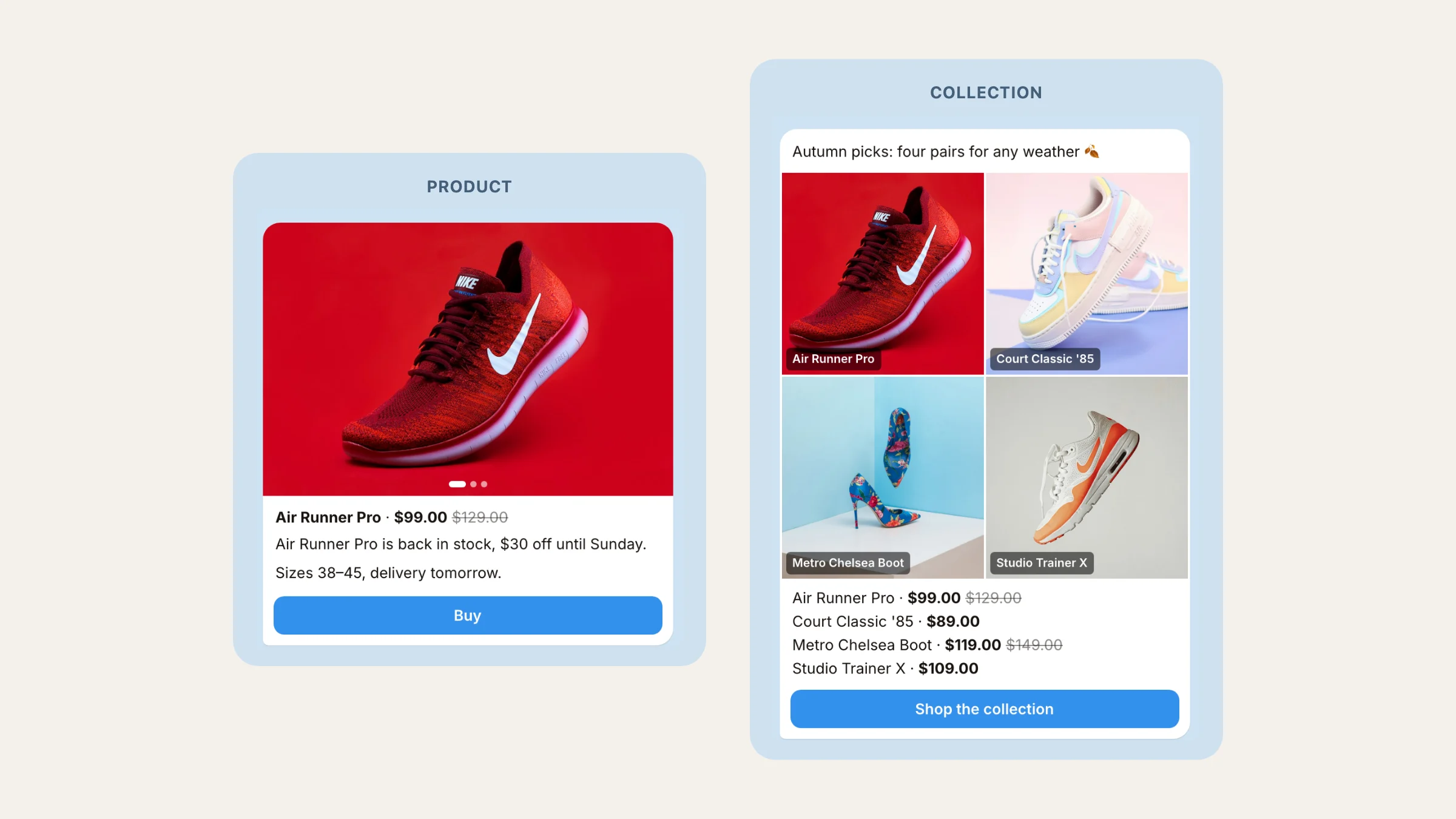
A Telegram broadcast is one message sent to many people at once. For a store it is the cheapest sales channel there is: no ad spend, and the message lands in the buyer's chat list next to their friends. This guide covers the ways to broadcast on Telegram, the limits Telegram sets, and the exact steps to send a broadcast that sells: a product card with a photo, a price and a Buy button.
Three ways to broadcast on Telegram#
Telegram has no "broadcast list" any more: channels replaced broadcast lists back in 2015. Today a broadcast goes out through one of three places.
| Way | Who gets it | How it arrives | Buttons | Per-person stats |
|---|---|---|---|---|
| Channel post | Everyone who joined the channel | In the channel feed | Yes, through a bot | No, only views |
| Group message | Group members | In the group chat | Yes, through a bot | No |
| Bot broadcast | Everyone who started your bot | A personal chat, like a DM | Yes | Yes: delivered, clicked, bought |
A channel is good for content. A bot broadcast is what sells: it arrives as a private message from your store, it can carry Buy buttons, and you can see who opened it and who placed an order.
The rules a bot broadcast follows#
- Only people who started your bot. A bot cannot write first. People who pressed Start or shopped through your bot can receive broadcasts; anyone Telegram won't let the bot reach shows up as Failed.
- About 30 messages a second. That is Telegram's limit for bulk notifications from a bot. Tiny Shops sends in batches of 50 with a short pause, so a broadcast to a few thousand people finishes in minutes.
- Blocked means gone. If someone blocked your bot, the message fails. Tiny Shops marks that person and leaves them out of every next broadcast, so your delivery rate stays honest.
- No recall. A sent message cannot be pulled back. Check the preview before you press Send.
How to send a Telegram broadcast in Tiny Shops#
- Open Broadcasts in the dashboard and start a new message.
- Pick the message type. Under Message type, choose Text, Product or Collection. Product turns one item into a card. Collection puts 2 to 6 items into one message.
- Find your products. The card takes the photo, title and price from the catalog, and a sale price shows next to the old one. Nothing to upload or retype.
- Write the text. One or two lines on why now: "Back in stock, sizes 40–43" beats a paragraph.
- Choose the audience. Under Audience, pick Everyone, New this week (joined in the last 7 days) or Recent buyers (ordered in the last 7 days). You can combine segments, or switch to Specific people and pick buyers by name.
- Add a second button and a promo code if you need them. Add link button puts your own link next to Buy. Promo code (optional) attaches a code so you can count redemptions.
- Send now or schedule. Pick Send now, or Schedule and set Send at. A scheduled broadcast picks its audience at the moment it goes out, so new buyers are included.
- Confirm. The dialog reminds you that messages cannot be recalled. Press Send broadcast.
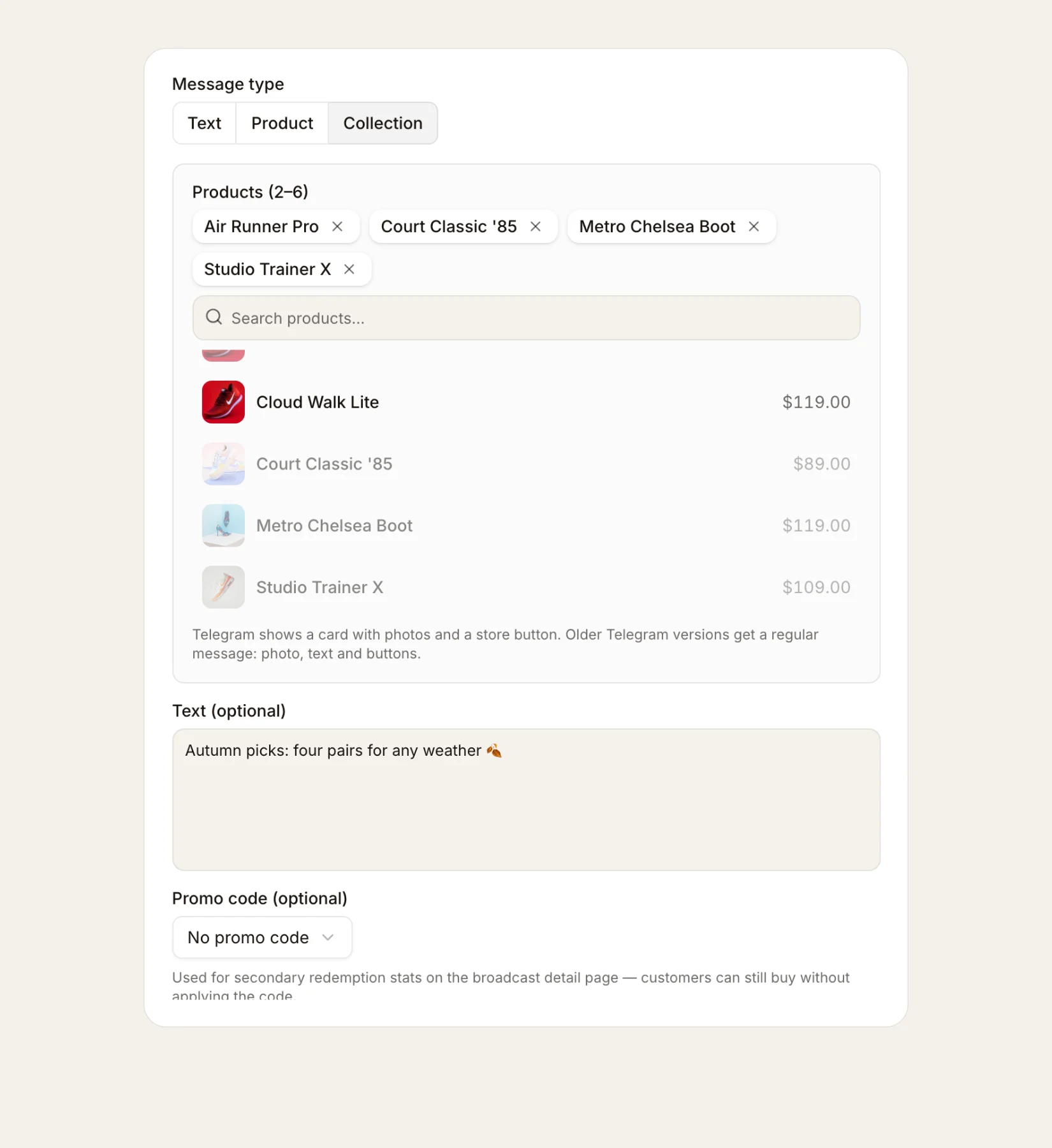
Product, Collection or Text#
- Product shows one item: its photo (several photos become a slideshow), title, price, your text and a Buy button. The button opens that exact product in your store, not the home page. Use it for a restock, a new arrival or a price drop.
- Collection shows 2 to 6 items: a captioned photo collage, a price list and a Shop the collection button that opens your store. Use it for a weekly drop or a gift guide.
- Text is for news with no product: opening hours, a delivery change, a giveaway.
The buttons are labeled in your store's language. Buyers on an older Telegram version get a regular message with the photo, text and buttons, so nothing breaks.
Cards work for stores with a storefront, whether your products live in Tiny Shops or in a Google Sheet. Stores that sell in chat keep sending text broadcasts.
What to check after sending#
Open the broadcast in the history. You will see:
- Delivered and Failed. Failed deliveries are almost always people who blocked the bot.
- Unique CTR. People who tapped a button, divided by people who got the message. Clicks are counted only when the message has a button, which Product and Collection always do.
- Converted customers and Attributed order value. Orders placed within 7 days of a person's first click.
How these numbers are counted, and how to use them for the next send, is in Telegram broadcast analytics for your shop.
How many broadcasts you can send#
| Plan | Broadcasts a month |
|---|---|
| Free | 3 |
| Starter | 10 |
| Pro | 25 |
| Scale | Unlimited |
The count is shared across all your stores. A broadcast that reached nobody gives its slot back, and cancelling a scheduled one does too.
Five habits of a broadcast that sells#
- One product, one reason. A card with one item and one line of text gets more taps than a long announcement.
- Send when your buyers read. Look at when your orders usually come in and schedule for that hour.
- Talk to recent buyers separately. "Recent buyers" already trust you; a complementary product works better for them than a discount.
- Use the code only to measure. A promo code shows how many orders came from this exact message.
- Don't send every day. Each send is a reason to mute or block the bot. Two or three good broadcasts a month beat ten average ones.
A receipt after payment#
When a buyer pays for an order online, the bot sends them a receipt in the same tidy format: the items, quantities, the total and 📦 My orders / 🏠 Return to the shop buttons. That way the buyer can always find the order and come back for the next one. The receipt reaches anyone who has started your store bot at least once.
Through agents#
Agents and Nano can send cards too: pass template — PRODUCT or COLLECTION — and productIds from list_products to send_campaign or schedule_campaign. Without confirm: true the tool returns a preview: how many people will get the message and which products it holds.
FAQ#
Does Telegram still have broadcast lists? No. Telegram replaced broadcast lists with channels. To message many people one by one today, you send a broadcast from a bot.
Can a bot message someone who never started it? No. A bot can only write to people who started it first. That's why every order and every store visit through your bot grows your broadcast audience.
How fast does a broadcast go out? Telegram lets a bot send about 30 messages a second in bulk. A broadcast to 3,000 people takes a few minutes.
Can I take a broadcast back? No. A sent message can't be recalled, so check the preview first.
Open your store and send your first Telegram broadcast with a product card at tiny-shops.com →
