An AI sales assistant for a Telegram shop reads each customer message, looks up the answer in your own store, and prepares a reply for you to send. In Tiny Shops it works inside the shop inbox: it drafts answers from your catalog, stock, delivery info and the buyer's own orders, suggests up to three products as cards, and passes the chat to you when it is not sure. You approve every message before the customer sees it. This guide covers how the agent decides what to say, what it is not allowed to do, how it sells in chat, how to sell files for Telegram Stars with it, and what it costs.
Quick answers#
- Does the agent reply to customers on its own? No. Today it works in Drafts mode: it prepares a reply, and you send, edit or delete it. There is no autopilot yet.
- Where does it get its answers? From your catalog and stock, the About page, delivery settings, the buyer's own orders and the notes you write for it. Nothing else.
- Which plans include it? Starter, Pro and Scale. It is not on Free.
- What does it cost? Drafting is part of the plan. When a buyer orders a product from the agent's card within 72 hours, those items pay the agent fee: 20% on Starter, 10% on Pro, 5% on Scale.
Why a small shop needs help in chat#
Most Telegram shops sell through conversation. A buyer opens the store, sees a shirt, and writes: "Is there one like this in beige, size M?" Whoever answers first, with the right size and price, usually gets the order. Whoever answers the next morning often does not.
The questions repeat. Size, colour, price, stock, delivery time, "where is my order". Each answer takes a minute to look up. Twenty chats a day turn into an hour of copying prices from the dashboard into Telegram.
A generic chatbot does not fix this. It answers from a script or from what a language model "knows", so it invents a size that is sold out or a delivery date you never promised. An AI sales assistant is useful only if it answers from your store and stops when it does not know.
The Telegram shop inbox: one place for every chat#
The agent lives in Messages, the shop inbox in your dashboard. Every chat with your store bot is there, and so are the chats from your personal account if you sell through Telegram Business.
Each chat in the list carries one badge, so you can see at a glance what it needs:
| Badge | What it means |
|---|---|
| Needs you | The agent handed the chat to you |
| Draft | A reply is ready for you to check |
| Window closing | Telegram's 24-hour reply window ends soon |
| Awaiting reply | The buyer wrote and nobody has answered |
| Awaiting payment | The buyer ordered from an offer and has not paid yet |
| Window closed | You can no longer reply in this chat |
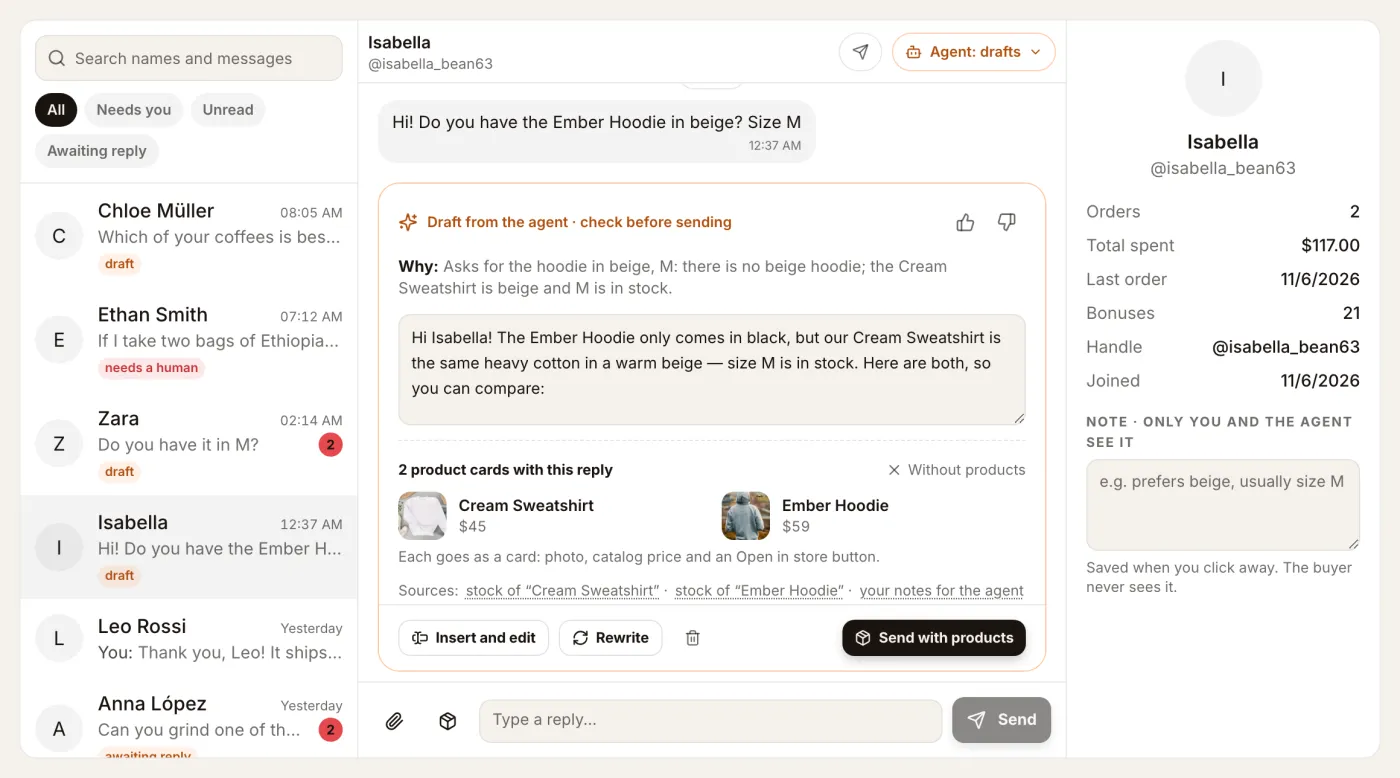
The Needs you filter is a queue: the chats the agent passed to you. Use Mark resolved when you are done. The customer panel on the right shows the buyer's orders, total spent and bonuses, plus a private note that only you and the agent see, such as "likes beige, usually size M". The agent reads that note before it drafts.
Smaller details make the inbox feel like Telegram itself. The buyer sees "typing…" while you write. Read receipts show in chat stores. You can send a product card from the composer with its photo, price and an Open in store button. On a phone the inbox has two screens, the list and the chat, with Back to the list.
How the AI drafts replies to customers in Telegram#
When a buyer writes, the agent reads the message and the chat history, then decides what kind of message it is: a question, a wish to buy, an order status request, a complaint, or small talk. Then it looks up the facts.
It uses only these sources:
- your catalog: names, prices, variants, photos;
- stock for each size and colour;
- the About page and your delivery settings;
- the buyer's own orders;
- your notes for the agent: FAQ, "right now" notes, do and don't.
The draft appears above the reply field with a short Why line and the sources it used. For the beige shirt question it might say: "Asks for beige in M. Linen Sand is the same cut, M is in stock, price from the catalog." Under it is the reply and, when it makes sense, product cards.
You then choose:
- Send as it is.
- Insert and edit to move the text into your reply field and change it.
- Rewrite with a hint: shorter, warmer, another product, or more formal.
- Delete it and answer yourself.
You can type while the agent is still drafting. The draft never overwrites your own text. If the buyer writes again after the draft was made, the draft is marked out of date, so you do not send an answer to a question that has already moved on.
Every draft has 👍 and 👎. A thumbs-down asks for a reason and, optionally, how you would have answered. The agent uses that in the next drafts.
What the agent will not do#
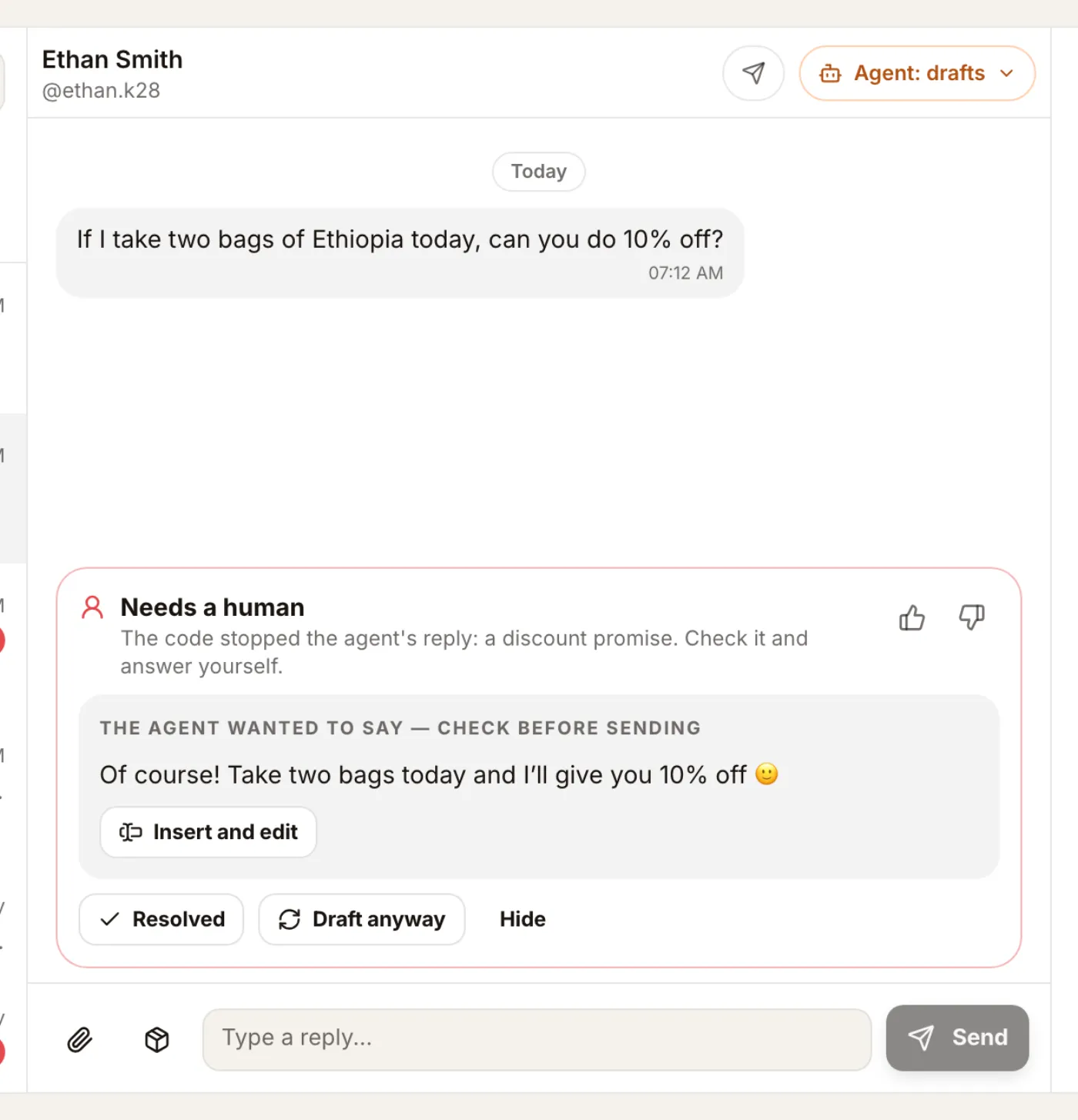
Some promises cost money or trust. The agent is not allowed to make them, and this is enforced by code, not only by instructions to the model.
The agent cannot:
- promise a discount;
- promise a refund;
- promise a delivery date;
- confirm a payment the store has not received.
If a draft contains one of these, the code stops it. The chat moves to Needs you with the reason, for example "promise of a discount", and you see what the agent wanted to say. You decide whether to send it.
The same happens when the store has no answer. A buyer writes "I want to return my order, the size is wrong". Returns are your decision, so the agent does not guess. It hands the chat to you: "The agent couldn't answer from your store data." The draft is also checked for numbers. If a price or a quantity in the reply is not in your store data, you get a warning before sending.
When the model returns something broken, the agent makes one repair attempt with the reason, instead of failing silently or sending nonsense.
You can also take a chat out of the agent's hands. Take the chat means you answer, and the agent steps back in that chat. Hand back to the agent returns it. Each chat can have its own mode: off, drafts, or, later, replies as the store.
Set up the agent in ten minutes#
Open Agent → Settings in the dashboard.
- Pick a mode. Choose Drafts. Off keeps it silent. Auto is marked "soon" and cannot be switched on yet.
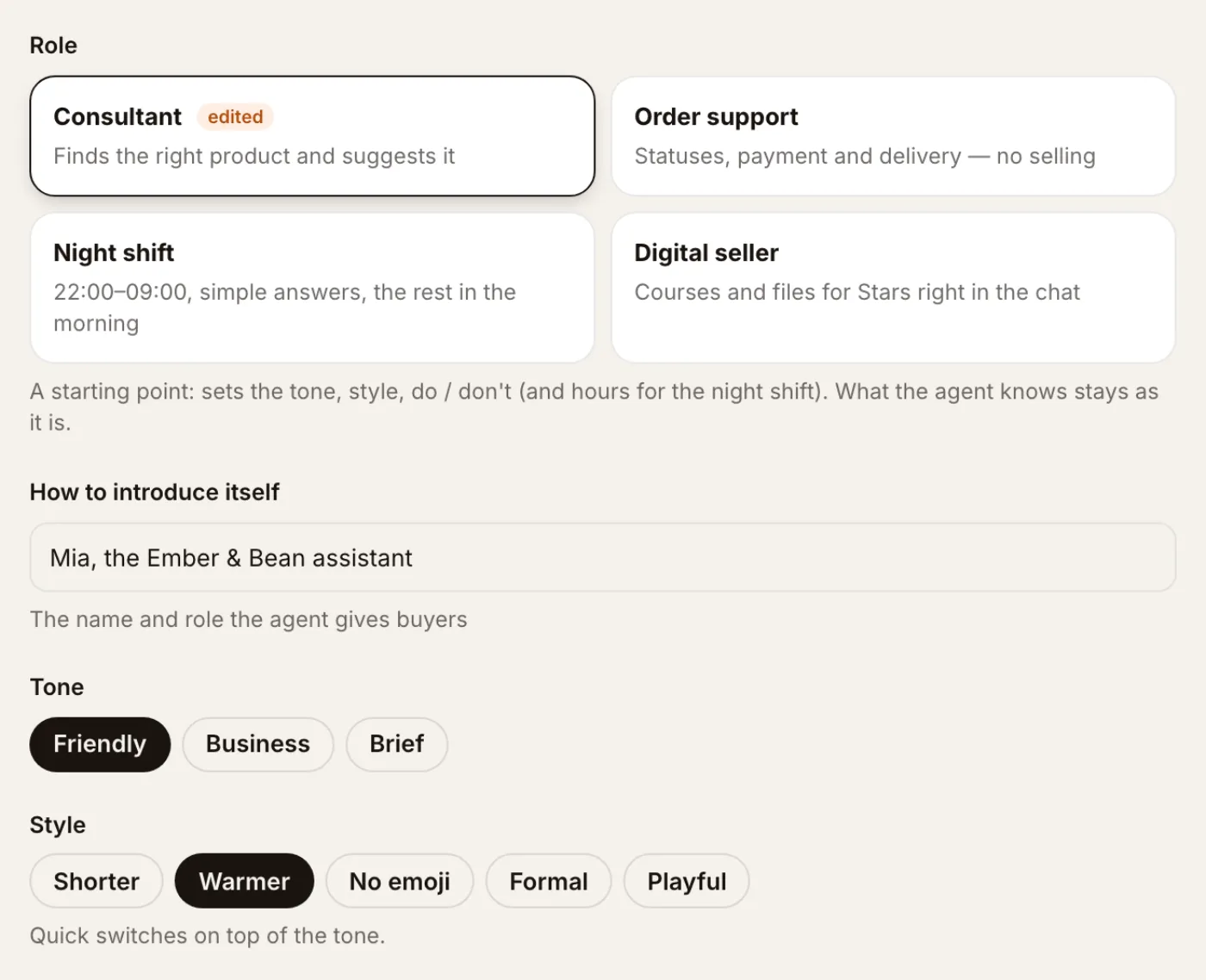
- Pick a role. It is a starting point for tone, style and the do and don't lists:
- Consultant picks a product and offers it.
- Order support answers about status, payment and delivery, and does not sell.
- Night shift works 22:00–09:00, answers simple questions and leaves the rest for the morning.
- Digital seller sells courses and files for Stars in the chat.
- Name it. "Lena from Harlow Clay" or just the shop's name. This is how the agent introduces itself.
- Choose the tone and style. Friendly, businesslike or brief, plus chips such as shorter, warmer, no emoji, formal.
- Tell it what to know. Where you ship from, how long dispatch takes, the exchange policy.
- Add FAQ pairs. What buyers ask and how you answer. The agent quotes these answers and cites them as the source.
- Add "right now" notes. "Closed on Sunday", "New linen arrives on the 15th". A note with a date stops on its own after that day.
- Write do and don't. "Call the buyer by name. Offer a replacement when a size is out." "Don't argue about returns."
- Add handoff words. If a message contains one of them, such as "refund" or "complaint", the chat goes straight to you.
- Set working hours if you want. Outside them the agent stays silent.
Every save makes a new version of the settings. The journal shows which version wrote each draft, so when you change the tone you can see what changed in the replies.
Selling in chat: product cards and offers#
A good salesperson does not only answer. When a size is out, they suggest the next best thing. The agent does this with product cards.
When a buyer wants something, a draft can include up to three products from your catalog. Each goes out as a card with the photo, the catalog price and an Open in store button. The agent never writes its own price; the card shows what the catalog says.
Limits keep it polite:
- at most 3 products in one offer;
- one open offer per chat;
- at most 2 offers a day in one chat.
An offer then has a life. The buyer declines it, it expires after 72 hours, or the buyer orders a product from it. The customer panel shows where the chat is: offered, awaiting payment, or bought.
After a purchase from the agent's offer, the agent prepares a thank-you draft. It can add one product from the same category that is in stock. You still check it and send it yourself.
The decision journal#
Agent → Journal lists every decision the agent made. For each one you see the customer, how the agent read the message (question, wants to buy, complaint), what it did (draft ready, sent, handed to you, hidden) and why. Sent drafts are marked "sent without edits" or "sent with edits", together with the rewrite hint you used.
At the top is a 30-day summary of the agent's offers: sent, bought, declined, expired, still open, and the conversion rate. You can filter by outcome, by what started the decision, and by message type. Prompts are not stored.
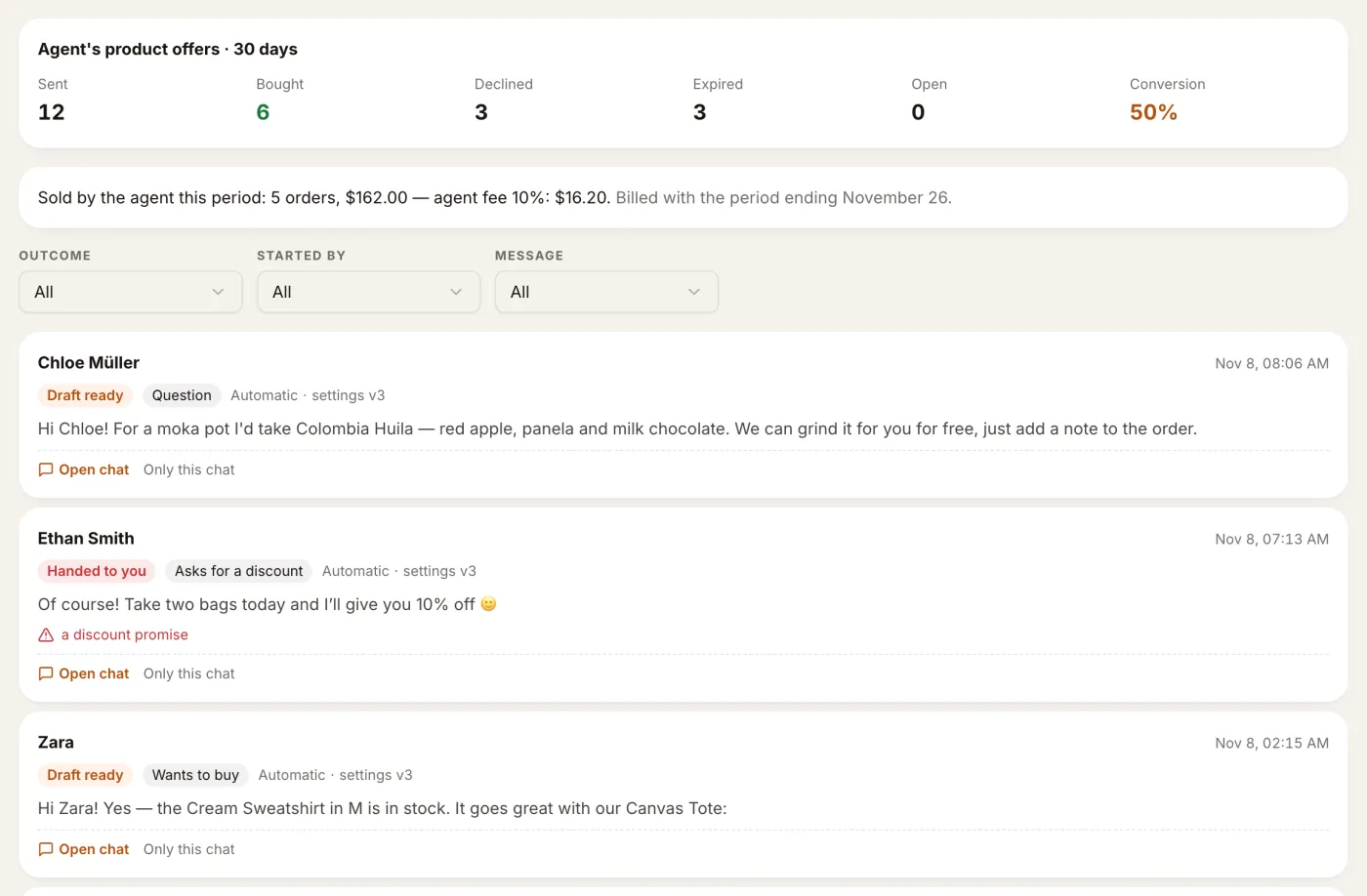
Read the journal once a week. Chats handed to you for the same reason point to a missing FAQ answer. Drafts you keep rewriting "shorter" point to a style chip to switch on.
Sell digital products for Telegram Stars#
Files are a natural fit for chat sales. A buyer asks about your course, and you or the agent offer it right in the chat.
- Add the file in Products. Press New digital product for files up to 50 MB, or send bigger ones, up to 2 GB, to your store bot in Telegram and tap ➕ New product from this file.
- Set the price in Stars on the File for the buyer card and press Send to me in Telegram to see exactly what a buyer gets.
- Send it in the chat from Messages with the product button. A video goes from your account as a locked paid post, any other file as a Pay 150 ⭐ card. The chat shows awaiting payment.
- The buyer pays in the chat. The post turns Paid, the video unlocks in place (a file arrives in the same chat), and the sale appears in Sales.
Files stay in Telegram; Tiny Shops keeps only Telegram's reference. Every step, with troubleshooting, is in how to sell videos and files on Telegram for Stars. Why digital goods are paid in Stars: Telegram Stars vs Stripe.
Telegram Business auto reply vs an AI sales assistant#
Telegram Business has its own greeting and away messages. They are fixed texts: the same words for everyone, sent when you are offline or when someone writes for the first time. They are useful for "We reply within an hour", but they cannot tell a buyer whether size M is in stock.
The agent is different in three ways:
| Telegram Business auto reply | Tiny Shops AI agent | |
|---|---|---|
| What it says | One fixed text | A reply to this message |
| Where facts come from | Nothing | Catalog, stock, delivery, the buyer's orders |
| Who sends | Telegram, automatically | You, after checking the draft |
| Products | None | Up to 3 cards with catalog prices |
You can use both. Keep the away message for nights, and let the agent prepare real answers for the morning, or use the Night shift role.
Pricing#
The agent is on Starter, Pro and Scale. It is not on Free. Drafting replies is part of the plan.
The agent's fee applies only to sales it made. When a buyer orders a product from the agent's card within 72 hours, those items pay the agent fee instead of the plan's percent:
| Plan | Agent fee on its sales |
|---|---|
| Starter | 20% |
| Pro | 10% |
| Scale | 5% |
There is no monthly cap. Product cards you send yourself, and replies you rewrote in your own words, are ordinary sales with the plan's usual percent. A cancelled order pays no agent fee. Each agent sale is marked on the order, in billing and in the journal, so you always know which sales the agent made. Full plan prices are on the pricing page.
The agent for AI tools too#
Everything here is also available through the Tiny Shops MCP server and HTTP API: read and change agent settings, list drafts, rewrite or discard a draft, read the journal, reply to customers. If you run the store from Claude, Cursor or a script, the agent's work is there too.
FAQ#
Can an AI reply to customers in Telegram for my shop? Yes. The Tiny Shops agent drafts replies to messages sent to your store bot and, if connected, your Telegram Business chats. Today you approve every reply before it is sent.
Does the agent send messages without me? No. It works in Drafts mode only. Automatic replies are planned but not available yet.
Can the agent give a discount or promise delivery by Friday? No. Discounts, refunds, delivery dates and payment confirmations are blocked in code. The chat goes to you with the reason.
What happens when the agent does not know the answer? It does not guess. The chat moves to Needs you with a short note, and you reply yourself.
Can I sell PDFs and videos for Stars with it? Yes. Add the file in Products (up to 50 MB from the dashboard, up to 2 GB through your store bot), set a price in Stars and send it in the buyer's chat. The buyer pays there and gets the video or file in the same chat.
How much does the AI sales assistant cost? It is included in Starter, Pro and Scale. Items a buyer orders from the agent's card within 72 hours pay 20%, 10% or 5% of their price instead of the plan's percent.
Does the agent learn from my edits? It reads your 👍 and 👎, the reasons, and how you would have answered. Your settings, FAQ and notes guide it too.
Try the agent in your store's inbox at tiny-shops.com →
