To sell videos on Telegram, make each video a product with a price in Telegram Stars, then send it to the buyer in your chat. The buyer pays inside Telegram, and the video unlocks in the same chat. With Tiny Shops, buyers write to your own Telegram account, and you answer them from Messages in the dashboard. Your store bot does the work in the background: it keeps the files and handles the payment. Buyers never have to talk to it. This guide walks through the whole flow with the exact button names: add the file, set the price, check it, sell it in a chat, and see the sale.
Who this is for#
Anyone who sells in their own Telegram chats something a buyer watches, reads or downloads:
- video courses and lessons: a yoga class, a barista course, a recorded workshop;
- guides and ebooks as PDF;
- presets and templates: Lightroom presets, Notion templates, design kits as an archive;
- music and audio: beats, sample packs, meditations, audiobooks.
How it works#
You sell from a chat store: Tiny Shops is connected to your Telegram account through Telegram Business. A buyer writes to you, the person, as usual. You see the chat in Messages and reply from there, and the reply goes from your account.
Each file is a product in Products. When you send that product in a chat, the buyer gets a locked post or a pay card with the price in Stars. They pay without leaving the chat. A video then unlocks right there; any other file arrives in the same chat. The sale is recorded in Sales.
The files stay in Telegram. Even when you upload from the dashboard, the file goes through Telegram: the bot posts it into your own chat with the bot, and Tiny Shops keeps only Telegram's reference to it. Nothing is stored twice.
Before you start#
- A chat store in Tiny Shops with a connected store bot, added to your account under Telegram Business.
- You signed in to Tiny Shops with Telegram, so the bot knows your chat.
- Open your store bot once and press Start. Until you do, a bot cannot message you, so it cannot take your upload or send you a test copy.
Step 1. Open Products#
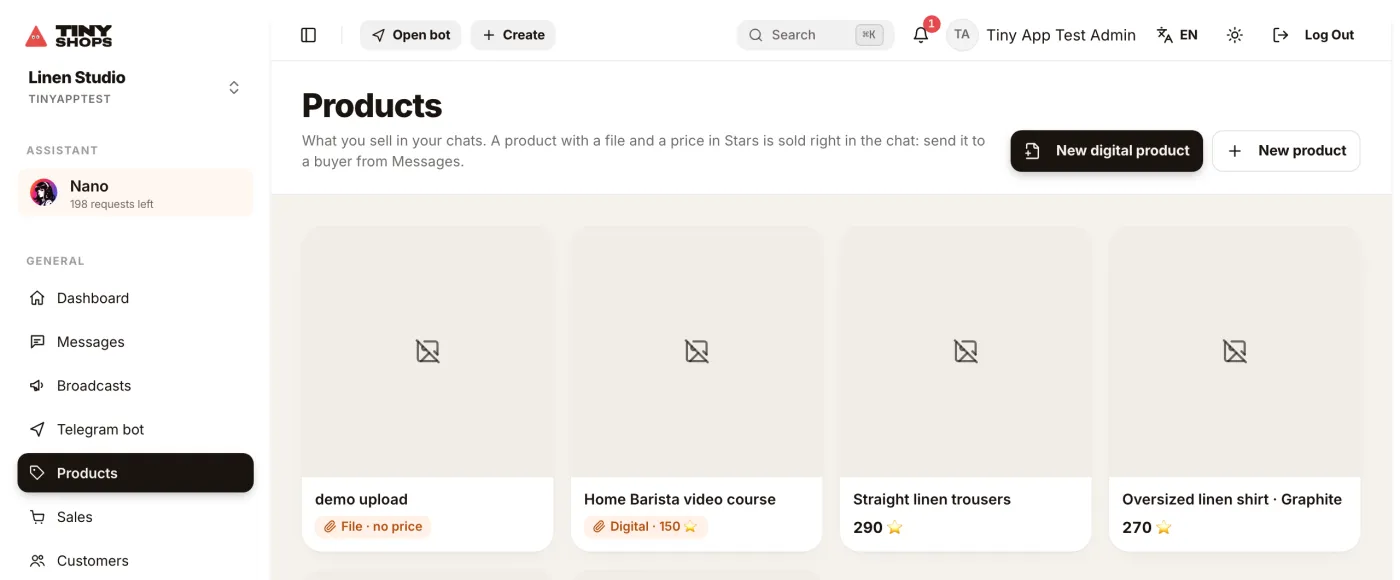
Products is in the dashboard menu. Its subtitle says what it is for: "What you sell in your chats." Everything you uploaded is listed here, from the dashboard or through your bot. A product with a file shows a badge such as Digital · 150 ⭐. A file without a price shows File · no price. The picture is made from Telegram's preview of the file: a video frame, a PDF page or a cover.
Step 2. Add the file#
There are two ways, depending on the size.
Up to 50 MB: from the dashboard. Press New digital product and pick the file. Tiny Shops creates a product from it. To add a file to a product you already have, open the product and press Upload file, or Upload a new file to replace one.
Bigger, up to 2 GB: through your bot. A bot cannot take uploads over 50 MB from a website, but Telegram lets you send it files up to 2 GB. Your store bot is your own upload desk:
- Send
/addto your store bot. It replies with how to send a file. - Send the file into the private chat with the bot: a PDF, a video, an audio file or an archive.
- The bot asks which product it is for. Tap a product, or ➕ New product from this file. The new product is named after your caption or the file name.
- Tap Set the price. It opens the product in the dashboard.
The bot takes files only from you, the store owner. A file a customer sends to the bot goes to your inbox as a normal message.
Step 3. Decide how the buyer gets it#
The buyer gets the file the way you uploaded it.
- A video sent as a video plays right in the chat. Nothing to download. A video file you upload from the dashboard is sent as a video. From a phone, turn on HD before sending to the bot, or Telegram compresses it; Telegram Desktop keeps the quality.
- A file (a PDF, an archive, or a video sent with paperclip → File) arrives as the original file, and the buyer downloads it.
For lessons people watch in Telegram, send video as a video with HD on. Send it as a file only when the original file matters, such as raw footage.
Step 4. Set the price in Stars#
Open the product. The File for the buyer card shows the file name, type, size and when it was attached.
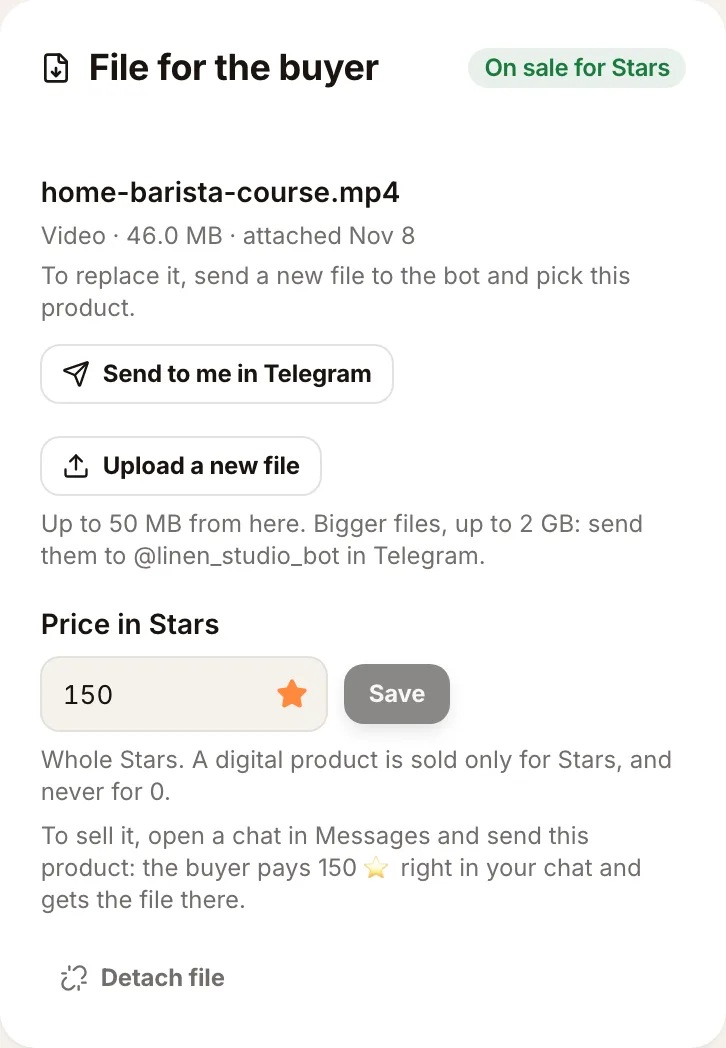
Enter a whole number in Price in Stars and press Save. The price can be from 1 to 25,000 Stars, never 0. The status changes from Needs a price to On sale for Stars.
Why Stars and not a card? Telegram requires digital goods sold through bots to be paid in Stars. More in Telegram Stars vs Stripe.
Step 5. Check what the buyer will get#
Press Send to me in Telegram. Your bot sends you the file exactly as a buyer receives it: a video that plays in the chat, or a file to download. If the quality is wrong, fix it now, before anyone pays.
Step 6. Sell it in the chat#
- Open Messages and the buyer's chat.
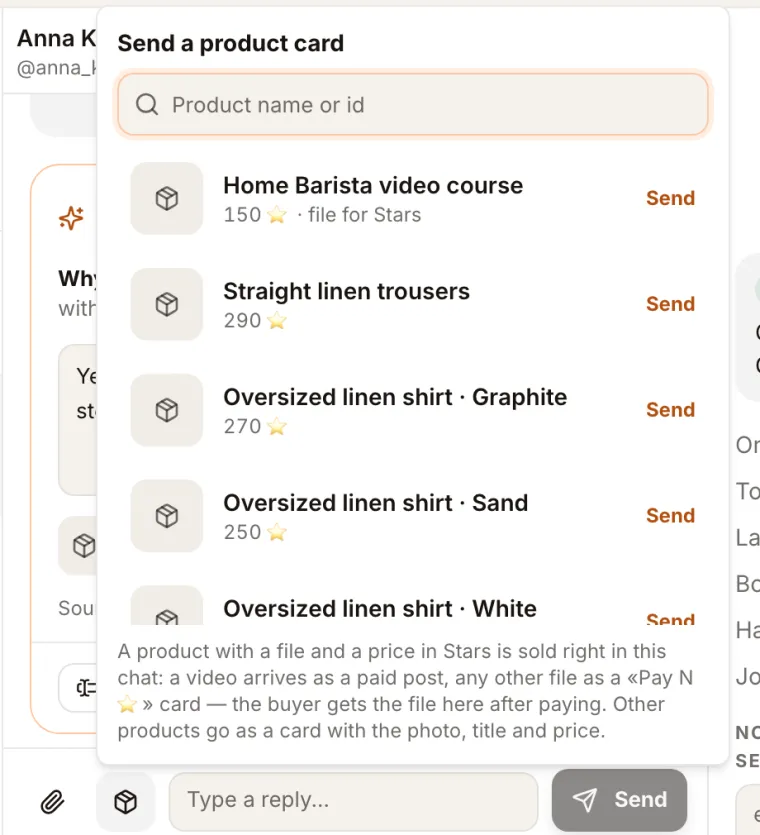
- Press the product button, the box icon next to the paperclip.
- In the list, your file product shows 150 ⭐ · file for Stars. Press Send next to it.
The product goes from your account into the same chat:
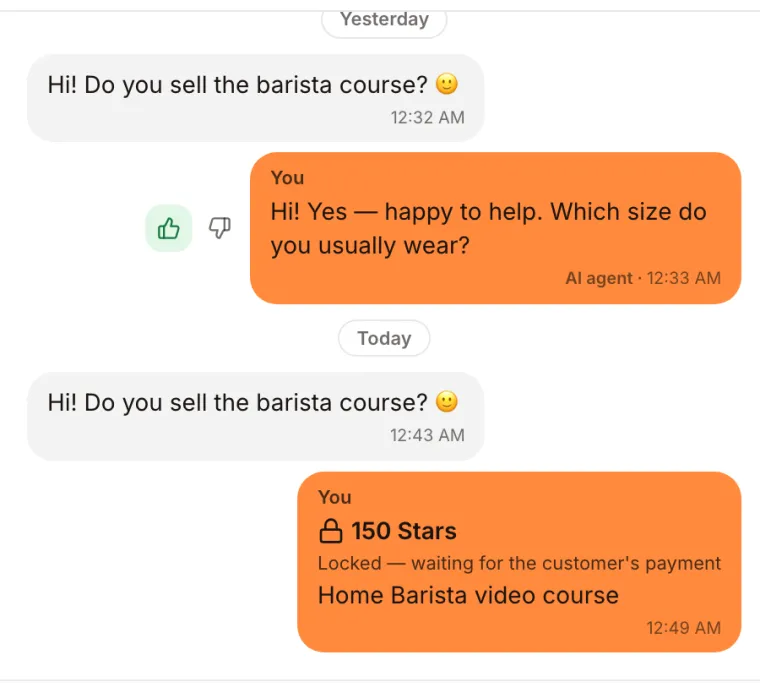
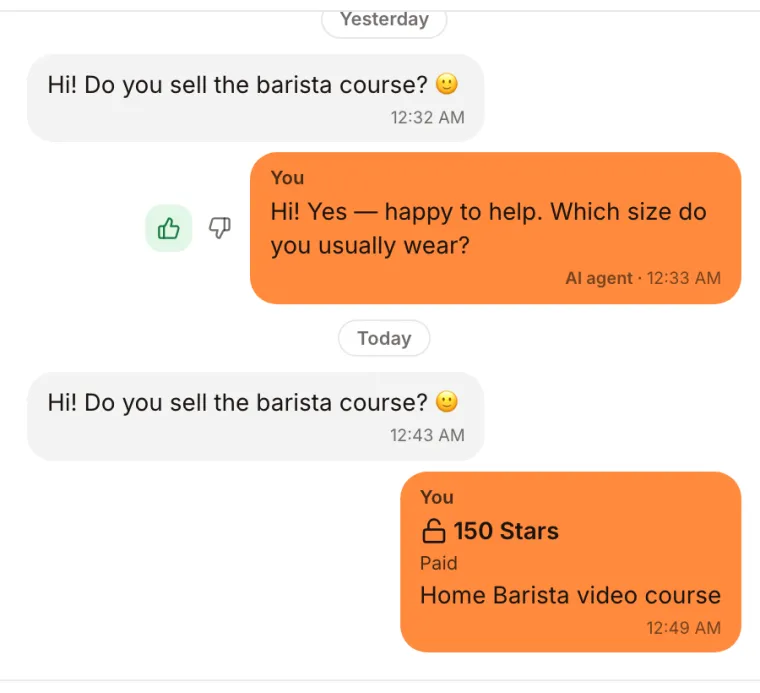
- a video goes as a paid post. In the dashboard it shows 🔒 150 Stars — Locked, waiting for the customer's payment. The buyer sees a blurred preview with a button to unlock it;
- any other file goes as a card with a Pay 150 ⭐ button.
The chat in your list is marked awaiting payment.
Step 7. Get paid#
The buyer pays in Telegram's payment sheet, inside the chat. Then:
- the post in your chat turns Paid;
- the video unlocks for the buyer in place. A file is sent into the same chat after payment;
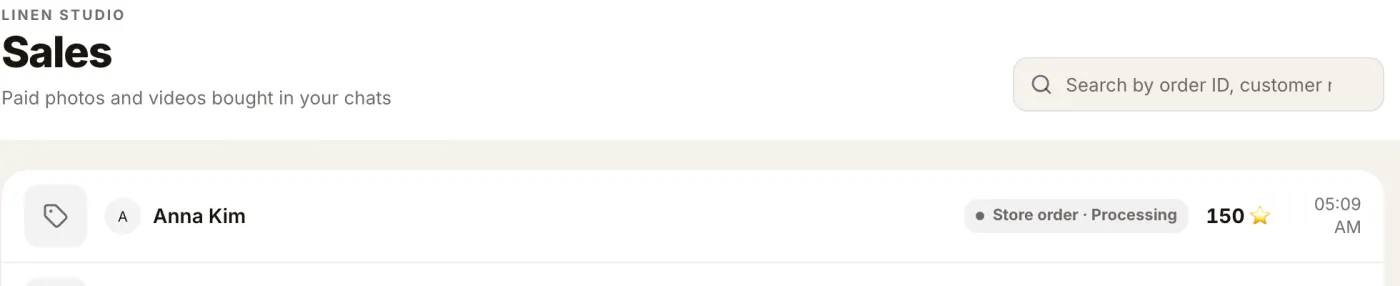
- the sale appears in Sales.
Other ways to sell the same file#
- From your phone, without the dashboard. In the buyer's chat in Telegram, attach the file and write
/sell 150as the caption. See how to sell digital products on Telegram. - In a Mini App store. A digital product shows Buy for 150 ⭐. After paying, the buyer gets the file from your bot, and Get it again in My orders sends it again.
Replace or remove a file#
- Replace: press Upload a new file on the product, or send the new file to your bot and pick the same product.
- Remove: press Detach file. The product stops being digital. Buyers who already bought it keep their copy in Telegram.
Troubleshooting#
| What happened | Why | What to do |
|---|---|---|
| Upload or Send to me in Telegram says to press Start | The bot has never been opened from your account, so it cannot message you | Open your store bot, press Start, then try again |
| The file is over 50 MB | The dashboard upload limit | Send it to your store bot in Telegram (up to 2 GB) and pick the product |
| The video looks blurry | It was sent from a phone with HD off, and Telegram compressed it | Send it again with HD on, from Telegram Desktop, or as a file. Pick the same product |
| The product page says the file was sent to a different bot | You changed the store bot. A file works only with the bot that received it | Upload the file again, or send it to the current bot and pick the same product |
| The status says Needs a price | The file is there, the price is not | Enter the price in Price in Stars and press Save |
| The buyer did not pay | The offer waits for them | The chat stays awaiting payment and the post stays locked until they pay |
| You cannot send into the chat | Telegram allows replies within 24 hours of the buyer's last message | Wait for the buyer to write again |
Sell files in chat with the AI agent#
If buyers ask about your courses in chat, the AI sales agent can draft a reply and offer the product. You approve every message. See AI sales assistant for a Telegram shop.
What it costs#
Stars sales pay your plan's percent, the same as any other sale. Plans and percents are on the pricing page. The Stars land on your store bot's balance; Telegram may hold them for up to 21 days before you can withdraw.
FAQ#
Can I sell videos on Telegram? Yes. Add the video as a product in Tiny Shops, set a price in Stars, and send it in the buyer's chat from Messages. The buyer pays and the video unlocks in the same chat.
Do my buyers need to use a bot? No. They write to your own Telegram account and pay in that chat. The bot works in the background.
How big can the file be? Up to 50 MB from the dashboard. Bigger files, up to 2 GB, as Telegram allows, go through your store bot in Telegram.
Why is my video compressed? Telegram compresses a video sent from a phone with HD off. Turn on HD, send from Telegram Desktop, or send it as a file if the buyer needs the original.
Do you store my files? No. Files stay in Telegram. Tiny Shops keeps only Telegram's reference to each file.
How do I check what the buyer will get? Press Send to me in Telegram on the product. Your bot sends you the file exactly as a buyer receives it.
Can buyers pay by card? No. Telegram requires digital goods sold through bots to be paid in Stars, so a digital product sells only for Stars.
Start selling your videos and files at tiny-shops.com →
