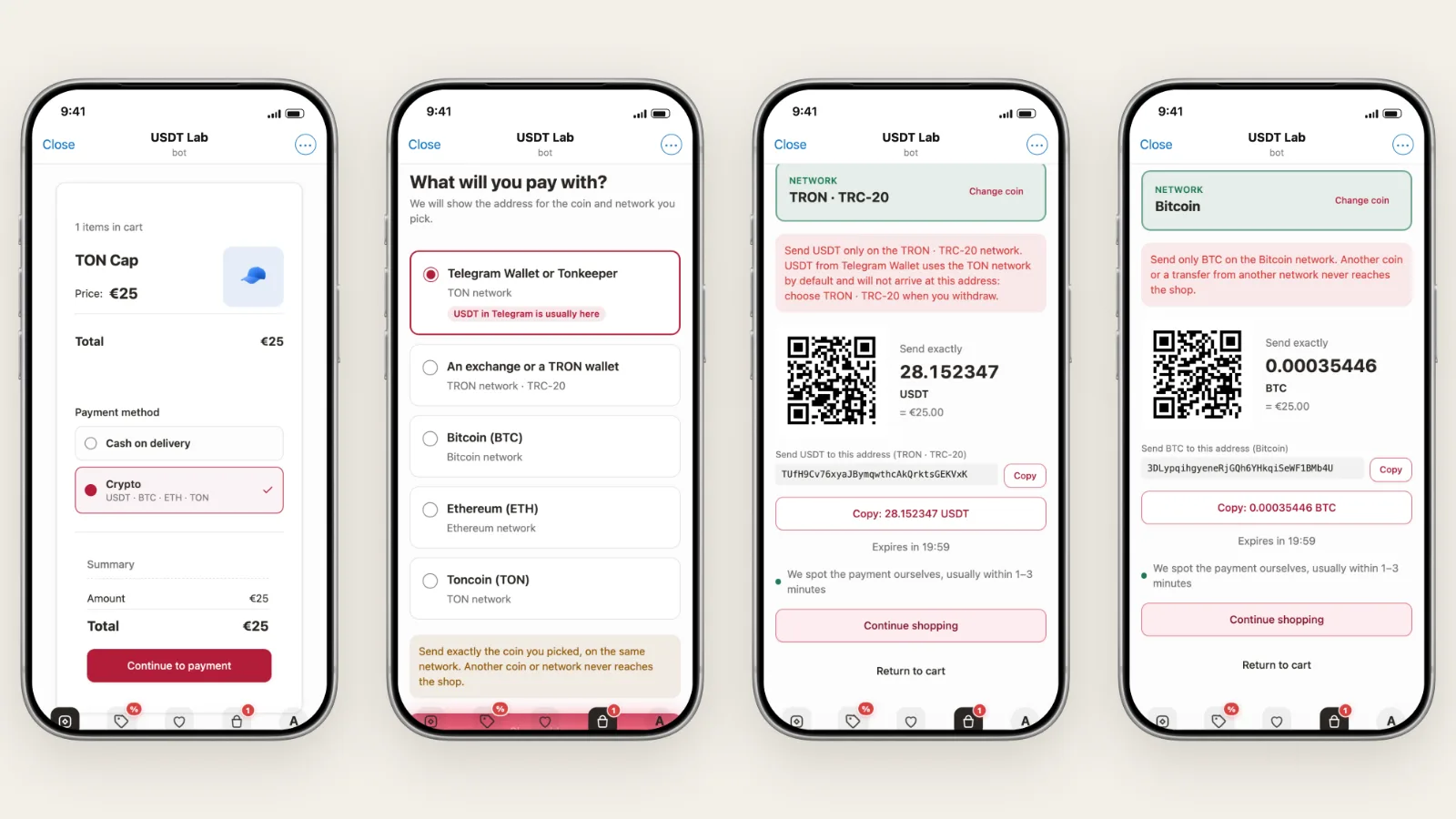
Telegram has a wallet built in, and hundreds of millions of people already hold USDT and TON in it. If you sell in Telegram, letting those buyers pay in crypto is a short step. This guide shows how to accept crypto payments on Telegram with a Tiny Shops store: which coins work, whether you need an account anywhere, and how to set it up in about ten minutes.
The short answer#
A Tiny Shops store takes crypto in two ways. Pick one, or turn on both.
| TON wallet | Crypto through NOWPayments | |
|---|---|---|
| Buyers pay with | Toncoin (TON) | USDT on TON or TRON, USDC, Bitcoin, Ethereum, Solana, Toncoin |
| Money goes to | Your own TON wallet, directly | Your NOWPayments account, then on to your payout wallet |
| Account needed | No, just a wallet address | Yes, a free NOWPayments account |
| Store prices | In TON | In your currency (USD, EUR, INR, …). Converted at checkout |
| Fees on top of your plan | None, only the network fee the buyer pays | NOWPayments' own processing fee |
Rule of thumb: if you price in dollars or euros and want USDT, use NOWPayments. If your store is priced in TON and you want zero middlemen, use the TON wallet.
In both cases the payment is matched to the order automatically. The buyer sees "We spot the payment ourselves", the order shows up in your dashboard as paid, and your bot messages you. Nobody checks a block explorer by hand.
Can I just use my personal USDT wallet?#
This is the most common question, so here it is up front.
- For Toncoin, yes. The TON wallet method sends money straight to your personal wallet (Tonkeeper, Telegram Wallet, any TON wallet). Each order carries its own comment, so the store can tell which transfer paid for which order.
- For USDT and other coins, not as the checkout address. One shared address cannot tell two buyers who both sent 25 USDT apart, and nothing would confirm the payment. NOWPayments solves both problems: every order gets its own address and exact amount, and NOWPayments tells your store the moment it is paid. Your personal wallet still gets the money, as the payout wallet in NOWPayments.
If you really want buyers to send USDT to your own address, use the Manual order method and confirm each payment yourself. It works, but you lose the automatic confirmation.
Option 1: accept USDT, BTC and more through NOWPayments#
NOWPayments is a crypto payment processor. You price in your normal currency. At checkout NOWPayments works out how much USDT, BTC or ETH that is, shows the buyer an address, watches the blockchain and sends the money on to your wallet.
What the buyer sees#
The buyer picks Crypto at checkout. The list under it shows which coins you accept:
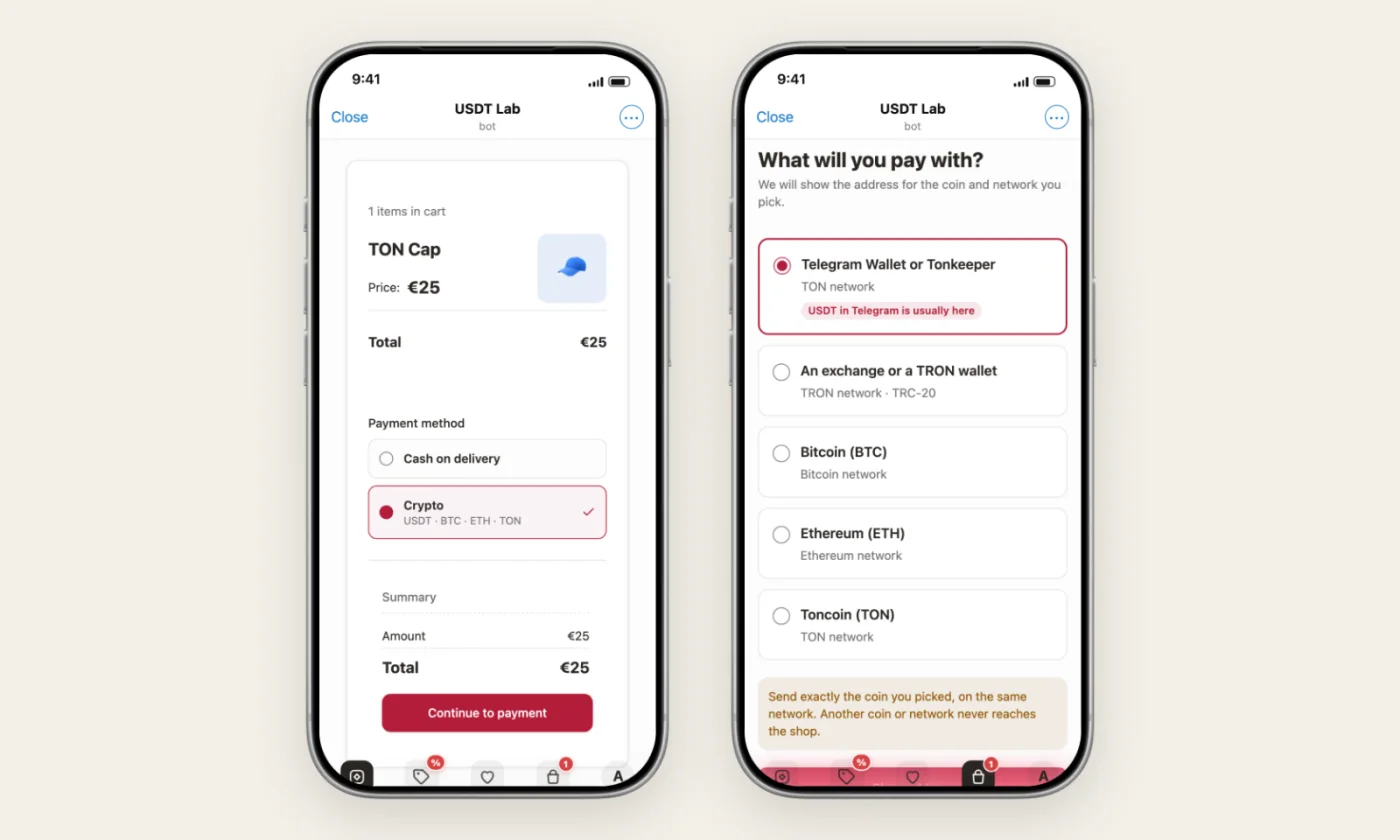
Then they choose what to pay with. USDT comes first, split by where the buyer holds it: Telegram Wallet and Tonkeeper use the TON network, exchanges usually send on TRON.
The payment screen shows the network in big letters, a warning about sending on the wrong network, a QR code, the exact amount and the address. The buyer copies, pays, and the screen updates on its own.
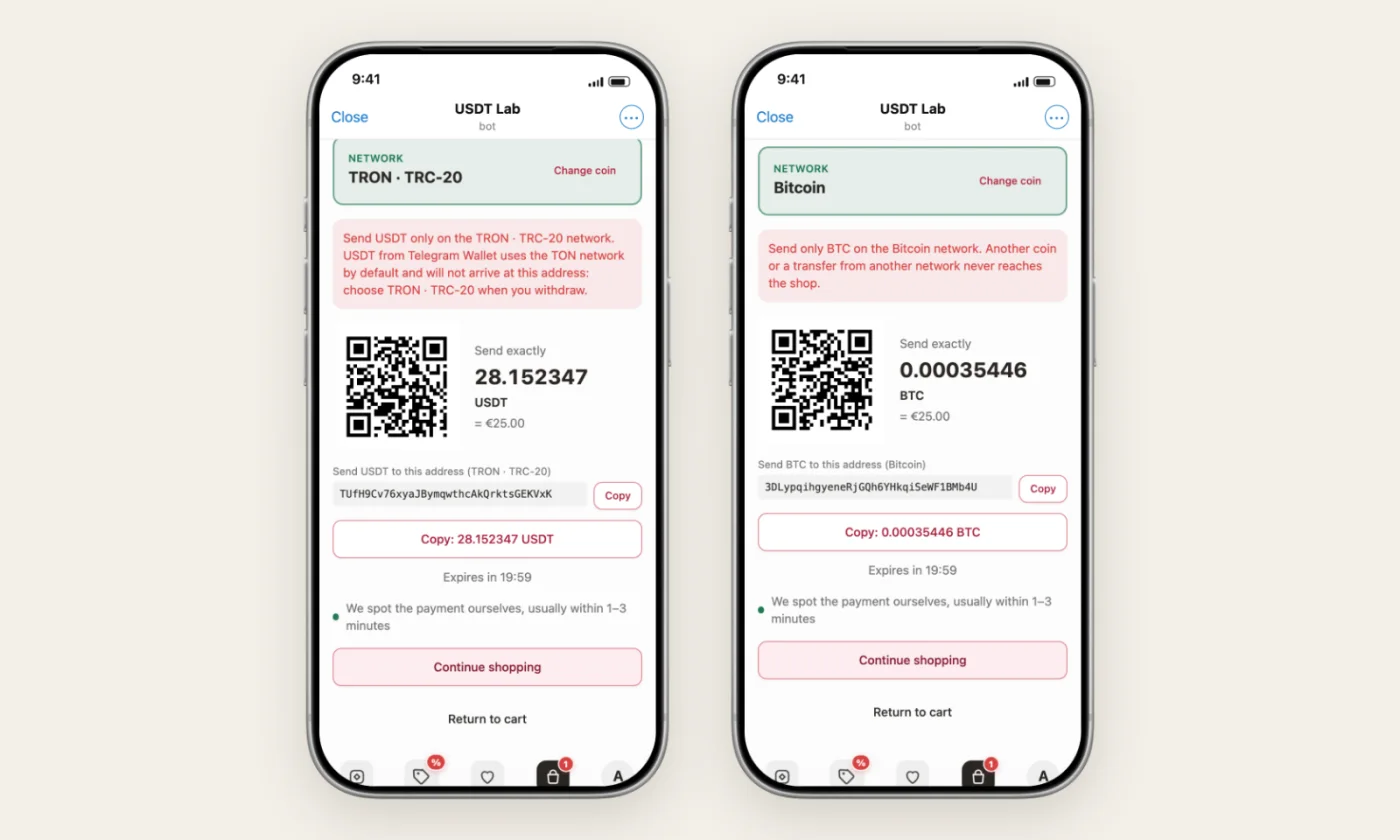
If the buyer's wallet keeps part of the amount as a network fee, the screen switches to "send the rest" and shows exactly how much is missing. The order is created only once the full amount arrives.
Step 1. Create a NOWPayments account#
- Sign up at nowpayments.io. It is free.
- Add a payout wallet: the address where NOWPayments sends your money. A USDT wallet is the usual choice, and it can be your personal one.
- Open Settings → Payments → API keys and create an API key.
- Open Settings → Payments → Instant payment notifications and copy the IPN secret key.
You do not need to enter a callback URL in NOWPayments. Tiny Shops sends it with every payment.
Step 2. Connect it in Tiny Shops#
Open Checkout → Payment methods in the dashboard and press Add method. Crypto has its own section:
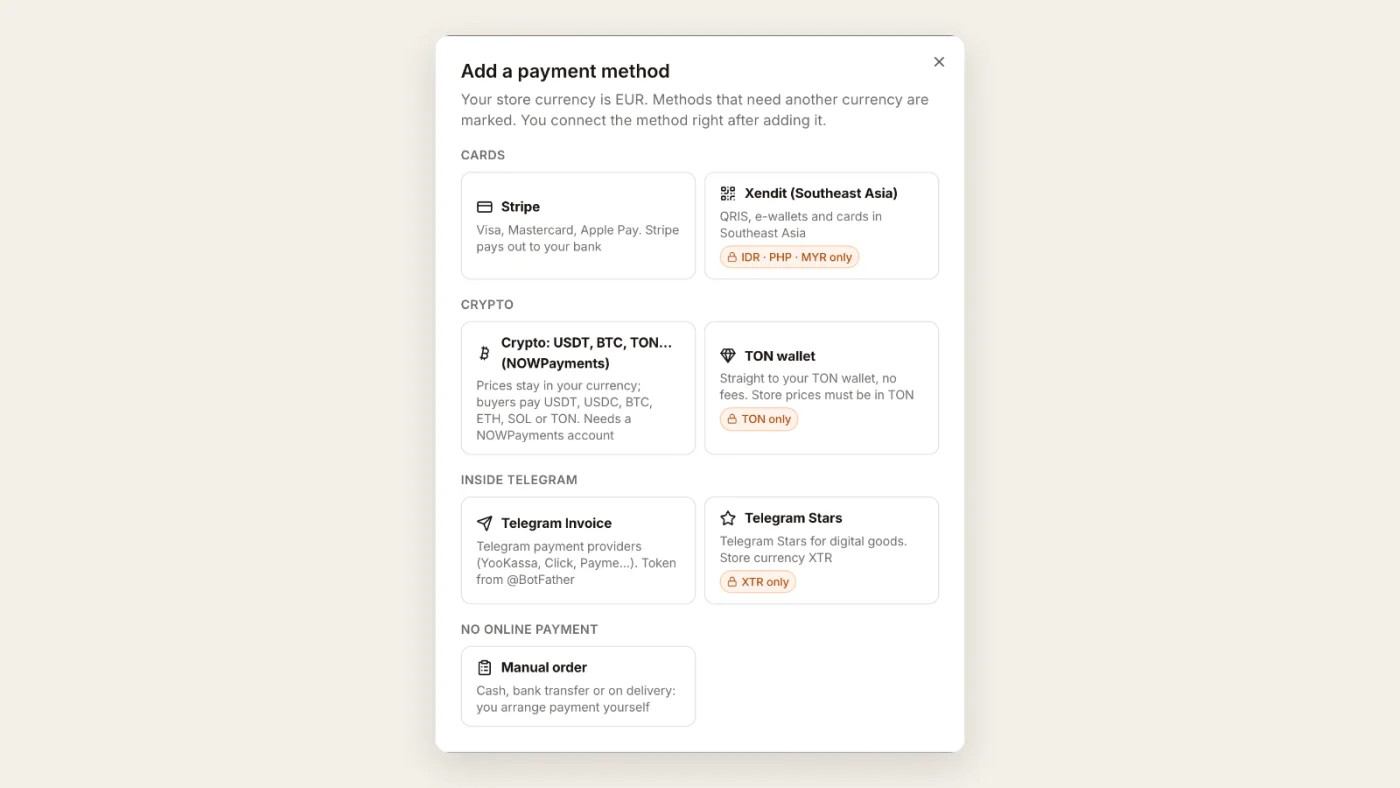
Choose Crypto: USDT, BTC, TON… (NOWPayments). The connection form opens right away:
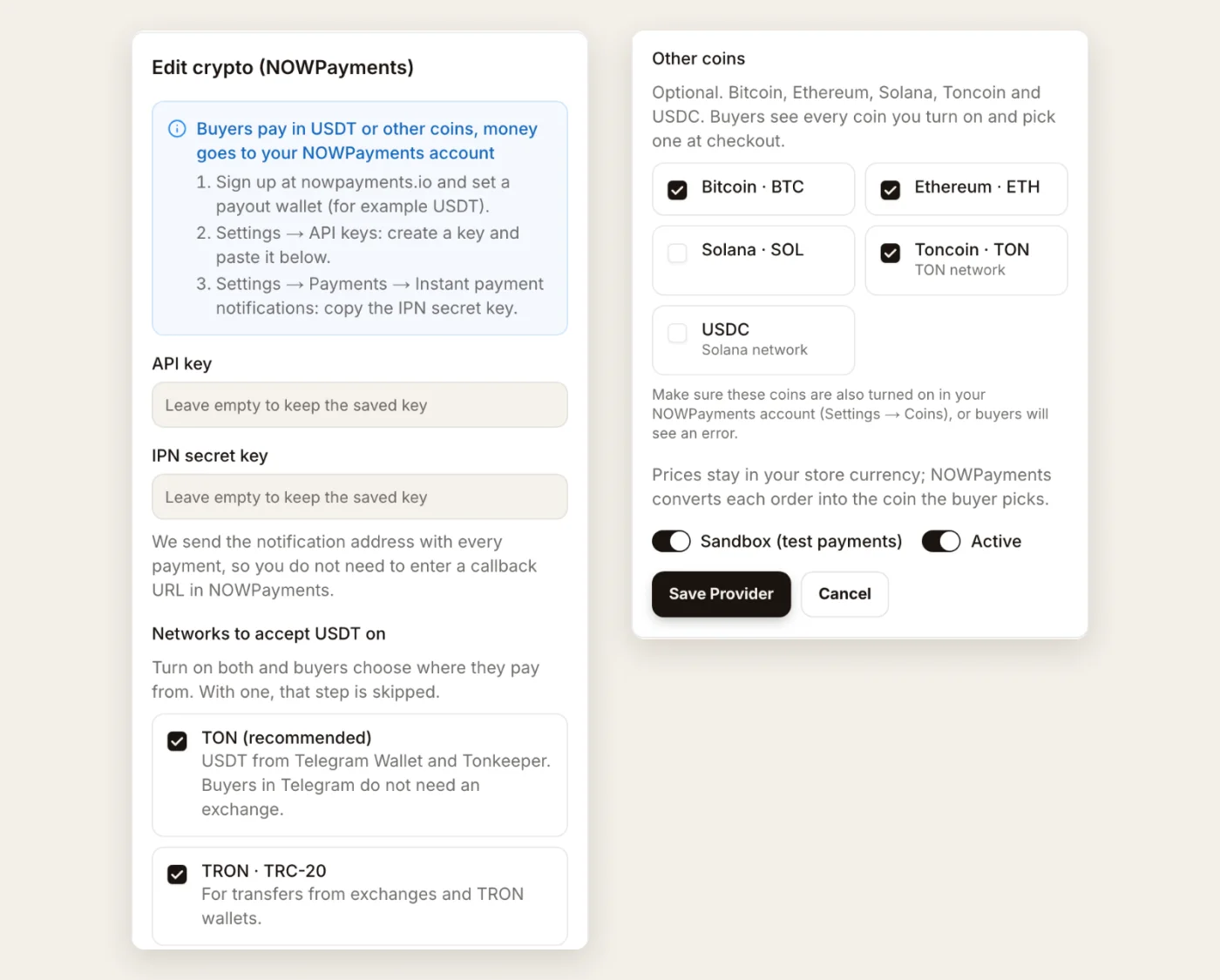
- Paste the API key and the IPN secret key.
- Pick the USDT networks. Turn on both TON and TRON · TRC-20 unless you have a reason not to. TON covers buyers who pay from Telegram Wallet; TRON covers buyers who pay from an exchange.
- Tick any other coins you want: Bitcoin, Ethereum, Solana, Toncoin, USDC. Make sure the same coins are switched on in your NOWPayments account too.
- Press Save provider, then Save changes at the top of the page.
That's it. The Crypto method now shows up at checkout.
Test before you go live#
NOWPayments has a sandbox with test money. Create a separate account at account-sandbox.nowpayments.io, take its API key and IPN secret, and turn on Sandbox (test payments) in the form. Place an order in your store and walk through the payment. When you are happy, swap in the live keys and turn the sandbox off.
One limit to know: NOWPayments has a minimum order per coin, around $10 for USDT on TRON at the time of writing. If an order is smaller, the buyer sees a clear message with the minimum instead of an error.
Option 2: accept TON straight to your wallet#
The TON wallet method needs no account at all. Paste your wallet address and buyers pay you directly.
It works only when your store currency is TON, because the price the buyer sees is the exact amount that lands in your wallet. There is no conversion step.
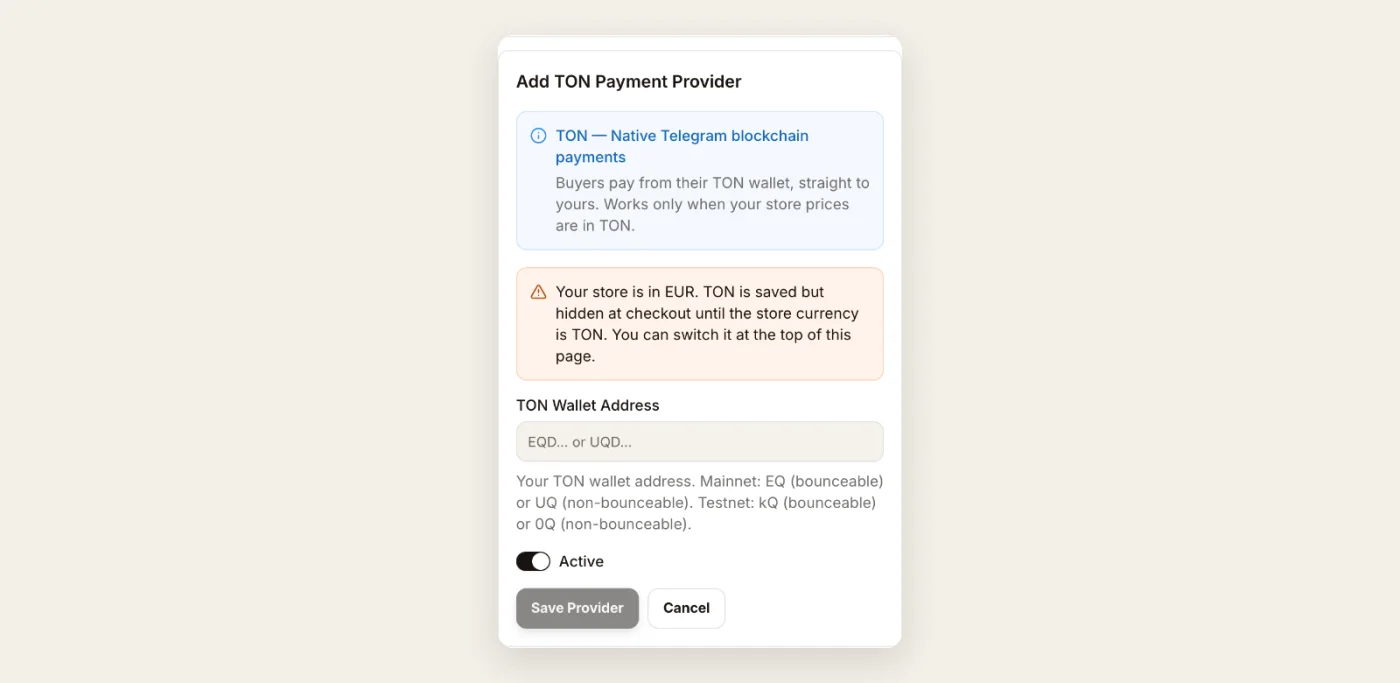
- In the dashboard, set the store currency to TON (Checkout → Payment methods, at the top).
- Press Add method → TON wallet.
- Paste your wallet address (it starts with
UQorEQ) and save.
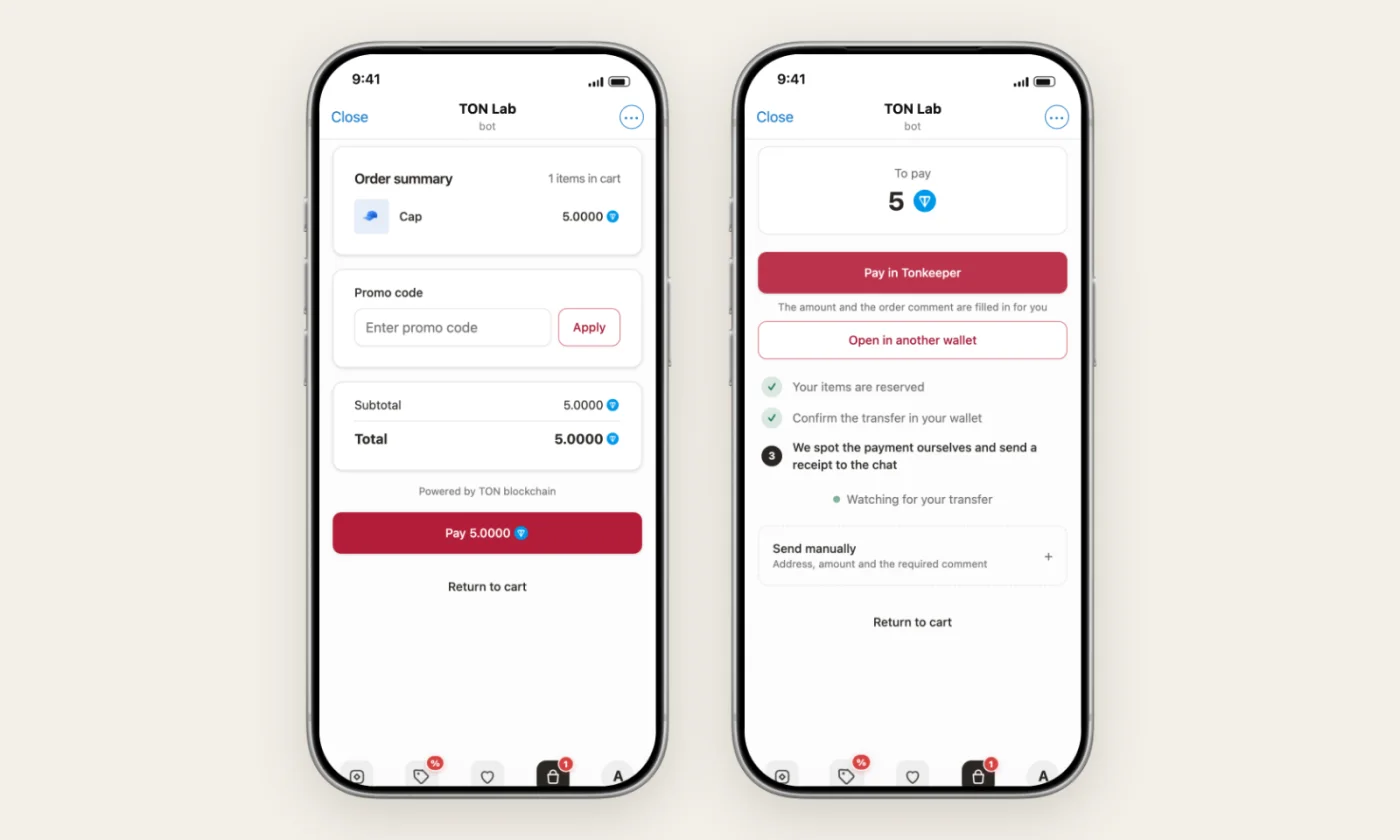
At checkout the buyer taps Pay in Tonkeeper (or any other TON wallet). The amount and the order comment are filled in for them. The store watches your wallet on the blockchain and confirms the order within a minute or two. A background check keeps looking for 24 hours in case the buyer closes the app before the transfer lands.
Other ways to accept crypto in Telegram#
You will run into these names when you research crypto payments in Telegram. Here is how they differ from a store checkout.
- Wallet Pay. The merchant side of Telegram's built-in Wallet. Businesses apply for access and connect it through an API. It is a good fit if you have developers and want to build your own bot.
- CryptoBot and the Crypto Pay API. A popular wallet bot with an invoice API. You still write and host the bot that creates invoices and gives out the goods.
- TON Connect. A protocol that lets a web app or Mini App talk to the buyer's TON wallet. It is a building block for developers, not a ready checkout.
- Telegram Stars. Telegram's own currency for digital goods. It is not crypto, but Stars you earn can be withdrawn as TON. Tiny Shops supports Stars as a separate payment method. See Telegram Stars vs Stripe.
All of these take code. Tiny Shops gives you a catalog, cart, checkout, order tracking and crypto payments without writing any. It also keeps the buyer inside Telegram instead of sending them off to a website, which loses fewer sales.
Which crypto should you accept?#
- USDT on TON. Start here. It is what most people in Telegram hold, it moves in seconds, and network fees are cents.
- USDT on TRON. Add it for buyers who pay from an exchange such as Binance or OKX.
- Toncoin. Popular in Telegram. Either price in TON and use the TON wallet method, or add Toncoin as a coin in NOWPayments.
- Bitcoin and Ethereum. Worth having if your buyers ask for them. Expect slower confirmations and higher network fees, so they suit bigger orders.
- USDC and Solana. Fast and cheap. Add them if your audience already uses Solana wallets.
You can mix crypto with cards, Stars and cash on delivery in the same store. Every method you turn on is offered at checkout, and the buyer picks. All payment methods are covered in a separate guide.
FAQ#
Do I need to register a company to accept crypto? Not for Tiny Shops. NOWPayments may ask for verification depending on your country and volume. Check their terms.
Who holds the money? Never Tiny Shops. With the TON wallet method it lands in your wallet. With NOWPayments it goes through your NOWPayments account to your payout wallet. Our fee (0.7–5% of each order depending on the plan, with your first 50 orders free, once) is billed with your plan.
What if the buyer sends the wrong coin or network? The payment screen warns about this in red, and the buyer picks the network before seeing an address. A transfer on the wrong network does not reach the address and cannot be matched to the order. NOWPayments support can sometimes recover such a transfer.
What if a payment is refunded? When NOWPayments reports a refund or a failed payment, the order is cancelled automatically.
Can I take crypto from buyers outside Telegram? Yes. The same store works as a regular website with the same checkout.
Ready to try it? Create a free store and connect crypto in the Checkout section of the dashboard.
