Tiny Shops is a no-code Telegram Mini App shop builder that takes payment inside the chat: Telegram Stars, Stripe (Apple Pay and Google Pay), TON, and regional providers, with no Tiny Shops commission on the charge.
Every second a customer spends figuring out how to pay you is a second they consider not buying. Telegram solved this: payments happen inside the chat, in one tap, with no redirects or account creation. Stores using in-chat checkout see 2–3× higher conversion than those linking out to external payment pages.
This guide covers every payment method available for Telegram stores in 2026 — Telegram Stars, Stripe, TON crypto, Google Pay, Apple Pay, and regional providers — with real fee data, a comparison table, and a 5-minute setup walkthrough using Tiny Shops.
Why In-Chat Payments Convert Better#
Traditional e-commerce checkout loses 60–80% of shoppers (Baymard Institute, 2025). The top reasons: forced account creation, too many form fields, and redirects to unfamiliar payment pages.
Telegram eliminates all three:
- Pre-authenticated users — no signup, no email verification
- One-tap wallets — Google Pay and Apple Pay complete in under 3 seconds
- Zero context switch — the payment sheet is native to the app the customer is already in
Shops on Tiny Shops report an average checkout completion rate of 78% for in-chat payments vs. 34% for external checkout links. The difference compounds: a store doing 50 orders/day at $25 AOV gains roughly $16,500/month by closing that gap.
If you haven't set up your store yet, start with our Telegram store setup guide, then come back here to configure payments.
Payment Methods Compared#
| Method | Fees | Coverage | Setup Time | Best For |
|---|---|---|---|---|
| Telegram Stars | 0% (Telegram takes ~15% on Star purchases) | Global, all platforms | 2 min | Digital goods, subscriptions, tips |
| Stripe (Google Pay / Apple Pay / cards) | 2.9% + $0.30 | 46 countries, 135+ currencies | 10 min | International physical & digital goods |
| TON / Crypto (via Crypto Bot or Wallet) | 0.5–1% network fee | Global, no KYC for small amounts | 15 min | Crypto-native audiences, cross-border |
| ЮKassa (YooMoney) | 3.5% | Russia, CIS | 10 min | Russian-market merchants |
| Sberbank | 2.6–3.5% | Russia | 10 min | Russian merchants needing SBP payouts |
| Tranzzo | 2.7% + ₴5 | Ukraine | 10 min | Ukrainian merchants |
“Stripe and ЮKassa both surface Google Pay and Apple Pay automatically — the customer sees whichever wallet matches their device. You don't configure wallets separately.
Telegram Stars: The Zero-Setup Option#
Stars (ticker: XTR) are Telegram's native virtual currency. They're the fastest path to accepting payment because no provider token is required.
How it works for you:
- Customer pays with their Stars balance (purchased via Apple/Google in-app)
- You receive Stars instantly in your bot balance
- Withdraw to TON (Toncoin) after a 21-day hold, or use Stars for Telegram Ads
Constraints:
- Whole units only (no decimals)
- Tips are not supported for XTR checkout
- Best for digital goods, subscriptions, and micro-transactions under $50
If your catalog is digital-only, Stars alone may be enough. For physical products, pair Stars with a card processor.
Stripe & Card Payments#
Stripe#
The default choice for international sellers. One provider token unlocks Visa, Mastercard, Google Pay, and Apple Pay in a single integration.
- Payouts: 2–7 business days (rolling basis)
- Chargebacks handled through Stripe Dashboard
- Supports 135+ currencies; settlement in your home currency
What about PayPal?#
PayPal is not on Telegram's list of supported payment providers, so it can't be plugged into in-chat checkout. If some of your buyers only pay via PayPal, the workaround is an external payment link — with the conversion drop that comes with leaving the chat. For card and wallet payments inside Telegram, Stripe covers the same US/EU audience natively.
TON / Crypto#
Telegram's native blockchain. Customers pay from their TON Wallet or Crypto Bot balance.
- Near-zero fees (~0.05 TON per transaction)
- No chargebacks — final settlement
- Convert to fiat via P2P or centralized exchanges
- Ideal for cross-border sales where card processing is unavailable
Step-by-Step: Set Up Payments in Tiny Shops#
Total time: ~5 minutes. You need a Telegram bot (create one via @BotFather — see our bot creation guide).
Step 1 — Get a Provider Token#
- Open Telegram → message @BotFather
- Send
/mybots→ select your store bot → tap Payments - Choose a provider (Stripe, ЮKassa, Sberbank, Tranzzo, etc.)
- Complete the provider's merchant onboarding
- Copy the provider token (format:
123456789:TEST:AbCdEf...)
You'll receive a test token and a live token. Use the test token first.
For Telegram Stars, skip this step entirely — no token needed.
Step 2 — Connect the Token in Tiny Shops#
- Log in to your Tiny Shops dashboard
- Go to Storefront Settings → Checkout Mode
- Select Native Payments
- Click Add Payment Provider:
- Name: e.g. "Stripe" (internal label)
- Token: paste the token from BotFather
- Test mode: ON for now
- Active: ON
- Save
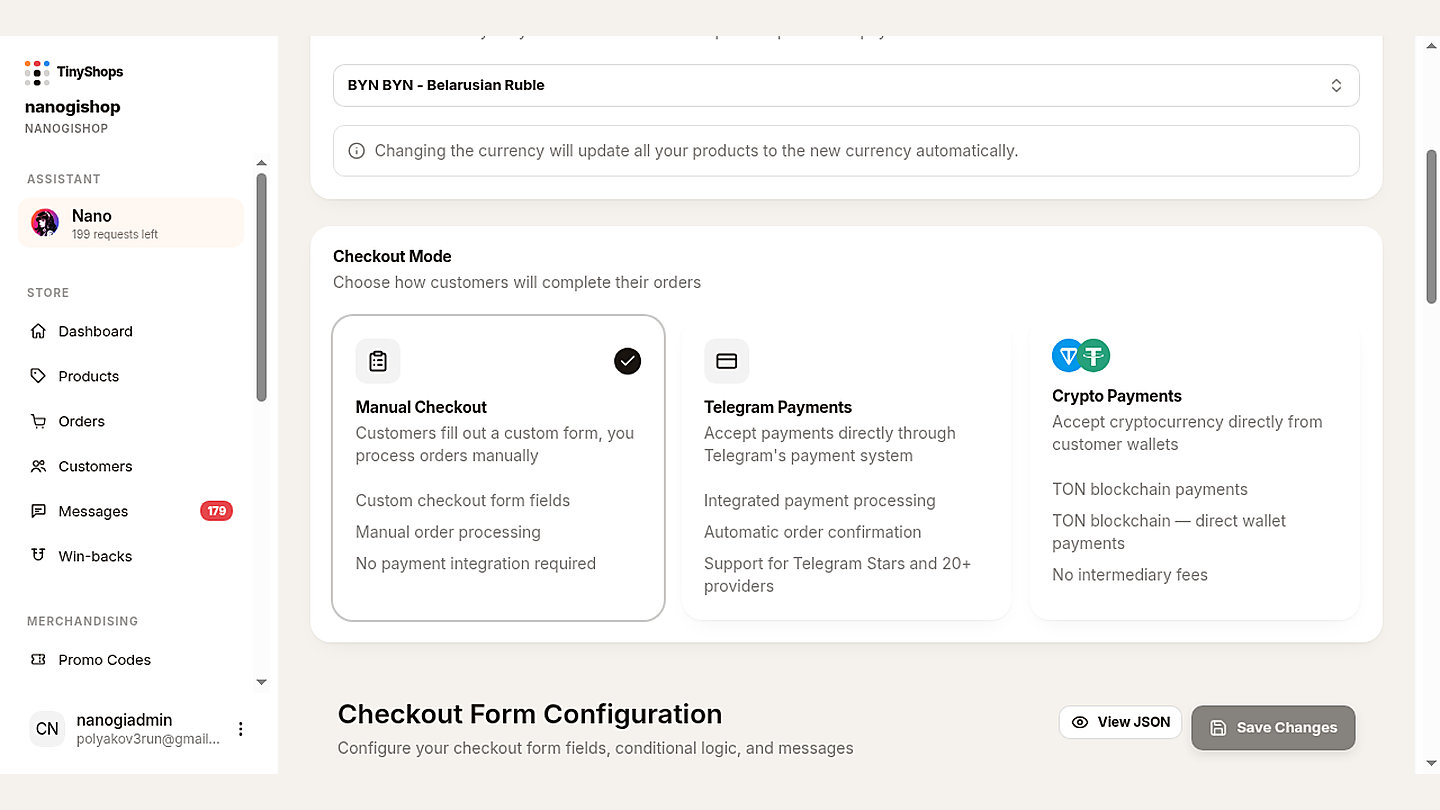
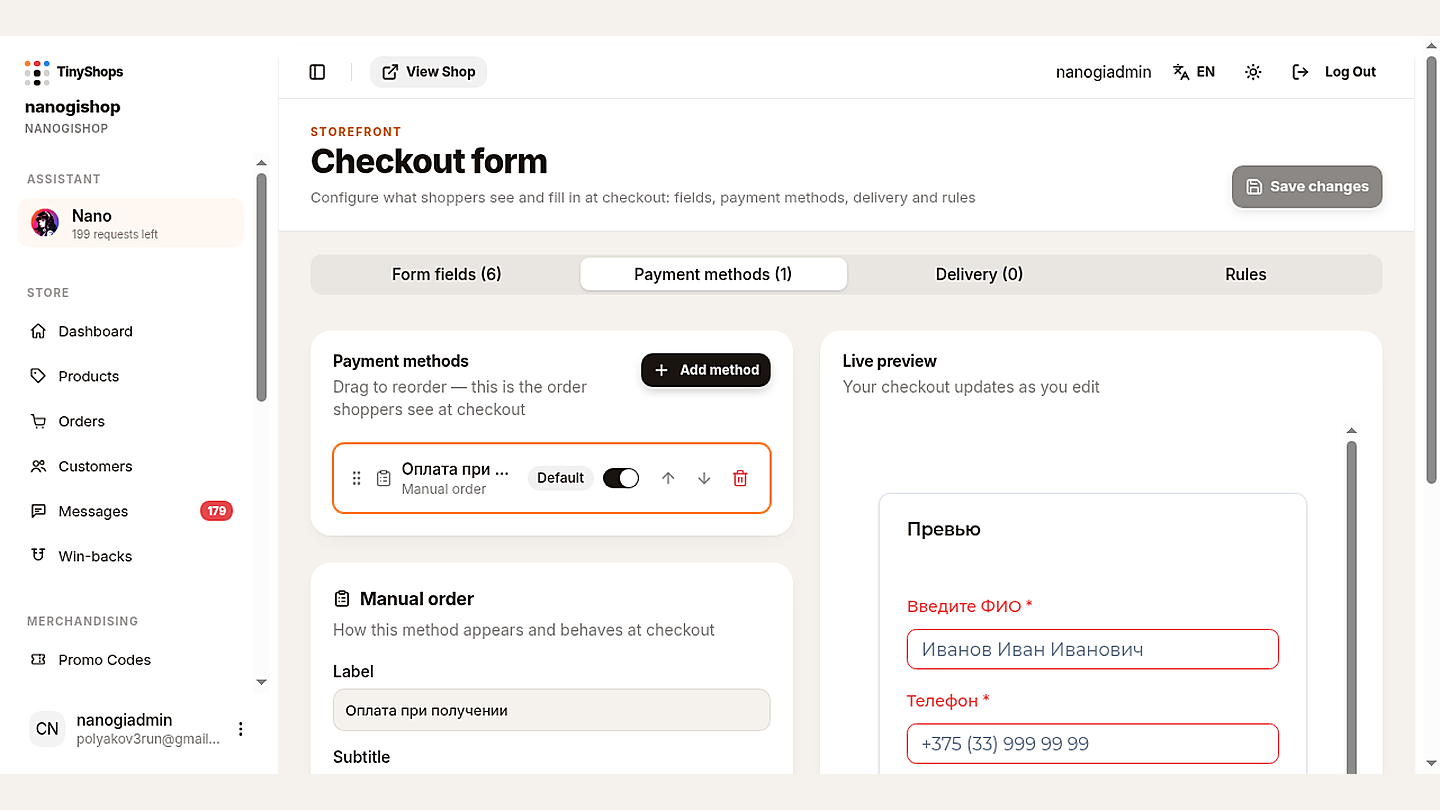
Checkout Mode now lives under Storefront Settings → Orders & Payments: Manual, Telegram Payments (Stars and card providers), or Crypto Payments (TON). Payment methods are configured on the dedicated Checkout form.
For Stars: set your store currency to XTR in Storefront Settings. No provider entry needed.
Step 3 — Configure Checkout Fields#
Under Storefront Settings → Invoice Configuration, toggle fields:
| Field | Digital goods | Physical (local) | Physical (intl) |
|---|---|---|---|
| Name | ○ | ✓ | ✓ |
| Phone | ○ | ✓ | ✓ |
| ✓ | ✓ | ✓ | |
| Shipping address | ○ | ○ | ✓ |
Enable Flexible Shipping if delivery cost depends on the customer's address — Telegram will send a shipping query before finalizing payment.
Step 4 — Enable Tips (optional)#
Under Invoice Configuration → Tips:
- Set up to 4 suggested amounts (e.g. $1, $2, $3, $5)
- Set a max tip (e.g. $10)
- Amounts are in smallest currency units (cents for USD, kopecks for RUB)
Tips are unavailable for XTR (Stars) checkout.
Step 5 — Test Before Going Live#
- Keep Test mode ON and use the test token
- Open your bot in Telegram, add a product, proceed to checkout
- Use your provider's test card:
- Stripe:
4242 4242 4242 4242, any future expiry, any CVC - ЮKassa:
5555 5555 5555 5559
- Stripe:
- Verify:
- Payment sheet shows your store name and correct amount
- Required checkout fields appear
- Order appears in your dashboard with status "Pending"
- Customer receives a confirmation message
- Notification group gets an alert
Step 6 — Go Live#
- Replace the test token with your live token
- Toggle Test mode OFF
- Save — you're now accepting real money
Troubleshooting#
| Symptom | Cause | Fix |
|---|---|---|
| "Payment provider not found" | Token typo or wrong bot | Re-copy token from BotFather; confirm it belongs to this bot |
| Payment sheet shows $0.00 | Price stored in wrong unit | Ensure prices are in smallest units (×100 for USD/EUR/RUB) |
| Stars option missing | Store currency ≠ XTR | Set store currency to XTR in Storefront Settings |
| Google Pay / Apple Pay not shown | Provider doesn't support wallets in your region | Switch to Stripe or confirm provider wallet support |
| Test payment succeeds but live fails | Still using test token in live mode | Swap to the live token and disable test mode |
| Order created but no notification | Notification group not linked | Link a Telegram group in Storefront Settings → Notifications |
FAQ#
What commission does Tiny Shops take? Zero. You pay only your payment provider's standard fee (typically 2.6–3.5%).
Can I run Stars and card payments simultaneously? Yes. Set your primary currency for card payments and enable a second storefront (or product category) priced in XTR.
How fast do I get paid? Stripe: 2–7 days. ЮKassa/Sberbank: 1–3 days. Stars: withdrawable to TON after 21 days. TON/crypto: instant settlement.
Are refunds possible?
Card refunds go through your provider's dashboard. Stars refunds use Telegram's refundStarPayment API. TON transactions are irreversible — handle disputes manually.
Is customer card data safe? Yes. Card data flows directly between Telegram and the PCI DSS-certified provider. It never touches Tiny Shops servers.
Do I need a developer? No. The entire setup is done through BotFather + the Tiny Shops dashboard. No code required. For advanced customization, see our Telegram Mini Apps guide.
Start Accepting Payments Today#
The math is simple: in-chat checkout converts 2–3× better than external links, and Tiny Shops charges 0% platform commission. You keep every cent minus your provider's fee.
- Create your free Tiny Shops store
- Paste your provider token (or enable Stars)
- Test one transaction
- Go live — your first sale can happen in the next 10 minutes
Already selling? Read how to boost repeat purchases with cashback or choose the best Telegram store builder for your needs.
