Cashback in Tiny Shops, a no-code Telegram Mini App shop builder, is store credit added the moment a payment clears, so the next order is already cheaper for that shopper.
A customer spends $50 in your Telegram store. With 5% cashback, they get $2.50 in store credit — credited to their balance the second the payment clears. That $2.50 is now a reason to come back. A 5% discount would have just made the item feel cheaper. Same cost to you, completely different psychology.
That single difference is why cashback outperforms discounts for retention. In this guide we'll cover the numbers behind it, how the Tiny Shops cashback engine works, and the exact configuration to launch it in under five minutes.
Why cashback matters: the numbers#
Retention is the cheapest growth lever you have. The data is consistent across studies:
- Acquiring a new customer costs 5–7x more than keeping an existing one.
- A 5% increase in retention can lift profits by 25–95% (Harvard Business Review / Bain & Company).
- Loyalty programs lift repeat purchase rates by up to 40% in well-run stores.
- 73% of consumers are more likely to recommend a brand with a good loyalty program.
- A 5% increase in customer lifetime value compounds: retained customers buy more often, return fewer items, and cost less to serve.
Discounts and cashback cost the same on paper, but they drive opposite behavior. A discount rewards waiting for the next sale. Cashback rewards buying now — and plants a credit balance that pulls the customer toward their next order. If you're still leaning on promo codes as your main retention tool, you're paying the same amount to train the wrong habit.
How the Tiny Shops cashback engine works#
Tiny Shops ships with a built-in tiered cashback system — no code, no third-party apps. The whole thing runs on one loop:
- Customer pays for an order.
- Cashback is calculated from their current tier and added to their bonus balance immediately — not after delivery, no waiting period.
- The customer sees the credit in their in-store profile, alongside a live progress bar to the next tier.
- They spend bonuses at checkout on a future order (up to 50% of the order total).
- Each completed order counts toward the next tier, so the rate climbs the more they buy.
Tiers are based on completed order count (orders with status "Delivered" or "Pending"). More orders → higher tier → higher cashback rate. It's the same progression mechanic that makes airline miles and credit-card points sticky: visible progress toward a reward is a powerful motivator, and research puts the lift in goal-completion from a visible progress bar at up to 78%.
The math, with a real example#
cashback = order_total × (cashback_rate / 100)
A Silver-tier customer (2.5%) places a $50 order:
- Cashback earned: $50 × 2.5% = $1.25, added to their balance instantly.
Now they return with $15 in bonuses and a $40 cart:
- Max applicable: $20 (50% of $40).
- They apply their full $15 balance → charged $25, balance resets to $0.
- New cashback on this order: $25 × 2.5% = $0.63 (calculated on the amount actually charged).
Rules to remember: bonuses apply to up to 50% of an order, not to items already on sale, and a customer picks either a promo code or bonuses on a given order — never both. Deduction happens atomically with payment, so there's no double-spend window.
Step-by-step: set up cashback in Tiny Shops#
You need a working store first. If you don't have one yet, follow our step-by-step guide to setting up a Telegram store, then come back here. Cashback configuration takes about five minutes.
Step 1 — Open Cashback Settings#
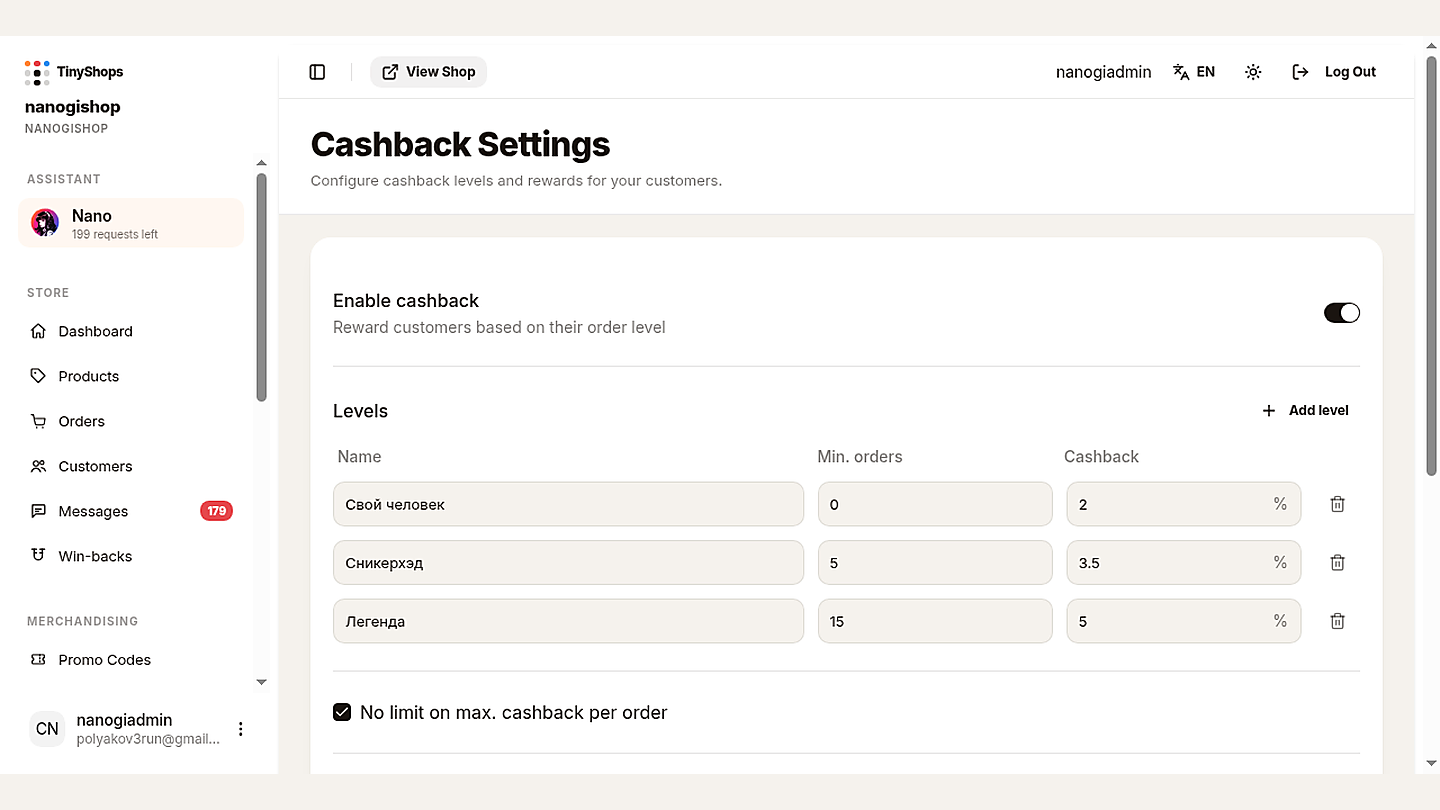
Log in to your Tiny Shops dashboard and open Cashback Settings in the sidebar. Everything is configured on a single page: the on/off toggle, your tiers, an optional per-order cap, and a customer-facing description.
Step 2 — Enable cashback#
Flip Enable cashback to ON. From this point:
- Customers earn cashback on their next purchase.
- A cashback section appears in every customer profile.
- Credits land in bonus balances automatically.
If you ever turn it off, existing balances stay intact and spendable — customers simply stop earning new cashback until you re-enable it.
Step 3 — Build your tiers#
Click Add Level. Each tier has three fields:
- Name — anything that fits your brand (Bronze/Silver/Gold, Starter/Regular/VIP, Fan/Superfan/Ambassador). Any language works.
- Minimum orders — completed orders required to reach the tier.
- Cashback % — the share of each order returned as store credit (0–100%).
Start with 3 tiers. Proven starting configs by business type:
| Business | Tier 1 (0 orders) | Tier 2 | Tier 3 |
|---|---|---|---|
| Clothing / accessories | 2% | 4% at 3 orders | 6% at 8 orders |
| Food / bakery | 3% | 5% at 5 orders | 7% at 15 orders |
| Digital products | 1% | 2.5% at 3 orders | 5% at 10 orders |
The logic: a low second threshold (3–5 orders) targets the critical 2nd–3rd purchase where most customers churn, while the top tier stays reachable for your best customers within 6–12 months.
Step 4 — Set a per-order cap (optional)#
If you sell high-ticket items, cap the cashback per order. At 5%, a $2,000 order yields $100 in credit — you might cap that at $50. If your average order value is moderate, leave "No limit on max cashback per order" checked and skip the cap entirely.
Step 5 — Write the customer-facing description#
This short text appears under the "Cashback" heading in customer profiles. Keep it to 2–3 sentences, e.g.: "Earn cashback on every purchase. The more you buy, the higher your level and the bigger your reward — up to 6% back, added automatically."
Step 6 — Save and verify#
Click Save Changes (the button highlights orange when you have unsaved edits). Then verify end-to-end:
- Open your store bot in Telegram → Profile → Cashback.
- Confirm your tiers and the "How it works" block render.
- Place a test order and check that the credit appears in the bonus balance.
Payments need to be configured for cashback to trigger — see our guide to accepting payments in Telegram if checkout isn't live yet.
Best practices#
Protect your margin. Cashback should never eat more than ~30% of your gross margin:
max_safe_cashback = gross_margin × 0.3
At a 30% margin, that's a 9% ceiling. The volume lift from repeat purchases should more than offset the smaller per-order profit — but run the number for your own margin before setting the top tier.
Make the next tier feel close. Set thresholds so customers naturally land just below the next tier after a few purchases. "1 more order to Silver!" with a 70% progress bar converts far better than a distant, abstract goal.
Keep it to 3–4 tiers. Fewer feels pointless; more is impossible to track. And make the top tier genuinely reachable — if it needs 100 orders but your average customer buys 5x a year, it's invisible.
Promote it. Cashback you never mention is wasted. Tiny Shops auto-notifies customers about earnings after each purchase, but also surface it in your bot's welcome message, order confirmations ("You earned $1.25 cashback!"), and group chats. If your bot runs in communities, members mentioning their rewards creates an organic viral loop.
Pair it with other tools. Cashback and referral bonuses feed the same balance, giving customers a "buy and share" incentive. Use promo codes for acquisition (first-purchase hooks) and cashback for retention — customers quickly learn the difference. For more on combining loyalty mechanics with store design, see our Telegram Mini Apps guide for sellers.
Measure and tune. Track repeat purchase rate (30%+ good, 50%+ excellent), average orders per customer (3+ means tiers are working), and bonus redemption rate (60%+ means customers value the rewards). Adjust percentages and thresholds once you have a few weeks of real data.
FAQ#
Is cashback available on the free plan? Cashback is part of the Pro plan, alongside the referral and loyalty features built for growing stores.
Do customers see their cashback right away? Yes. It's calculated and credited to their bonus balance immediately after payment — the updated balance shows in their profile at once.
What happens to balances if I disable cashback? Existing balances remain and stay spendable. Customers just stop earning new cashback until you re-enable it.
Can I change tier rates after launch? Anytime. Changes apply from the next purchase. Past earnings keep the rate that was active when they were credited — they're stored as a historical record and never recalculated.
How many tiers can I create? No hard limit, but 3–4 is the sweet spot for clarity. Add more as you grow.
Can tier names be in my own language? Yes — tier names are fully customizable text in any language.
Can bonuses be combined with a promo code? No. On a single order a customer chooses either a promo code or bonuses, and bonuses never apply to items already on sale.
Start small, scale with data#
You can launch a working 3-tier cashback program in under five minutes:
- Enable cashback.
- Create three tiers: 0 orders → 2%, 5 orders → 4%, 10 orders → 6%.
- Skip the per-order cap for now.
- Add a one-line description.
- Save, verify with a test order, and start watching the metrics.
Refine the numbers once real customer data comes in. The important part is to start — every day without a loyalty program is a day your customers have one less reason to choose you over a competitor. New to selling on Telegram? Our beginner's guide walks you from zero to first sale.
Ready to turn one-time buyers into regulars? Create your Telegram store with Tiny Shops and switch on cashback today.