Win-backs is how Tiny Shops, a no-code Telegram Mini App shop builder, follows up with shoppers who favorited an item or left checkout unfinished. It sends a private, one-time WB- discount from your shop bot, on a timer you set, or a send by hand when you want to nudge someone now.
Someone hearts a hoodie, then disappears. Someone else fills checkout, glances at the total, and never taps Pay. You already have their Telegram. This walkthrough covers every click in the editor, what the shopper actually sees, and the defaults that keep the offer personal instead of spammy.
What Win-backs is#
Win-backs lives in your Tiny Shops dashboard at Win-backs (magnet icon in the STORE menu, right after Messages). Direct URL: dashboard.tiny-shops.com/win-backs.
Each automation watches for one behaviour, waits a window you choose, then DMs a personal discount — a one-time WB- code minted for that shopper, that product, that send. You can also fire a nudge by hand from the Up next tab if you don't want to wait.
It is not a blast. It is not a sitewide sale. It is a private offer for one person who already showed intent.
Two things have to be true for it to send:
- Your shop can message. Win-backs DMs go out through the shop bot, so messaging needs to be on. If you don't have it yet, the page will prompt you to upgrade before the flows can go live.
- They still haven't bought. If they check out on their own during the wait, they are not nudged — and no leftover code is sitting around.
Why it matters#
Favorites and unfinished checkouts are the warmest almost-sales you have. The shopper already picked a size, a color, a price. What they usually need is a reason to finish — and a door that opens inside Telegram, not a reminder to "come back to the website sometime."
A win-back does three jobs at once:
- It catches the drift. A 3-day wait on a favorite (or an instant nudge after checkout) is enough room for them to return on their own, then a nudge if they don't.
- It makes the offer feel private. The code is single-use and tied to that shopper. Forwarding it to a friend will not work. That keeps the discount from leaking into a public sale.
- It opens the product, not a homepage scavenger hunt. The button deep-links into the Mini App, on the item they already wanted.
Pair this with cashback for people who already buy. Cashback rewards the next order after a purchase; Win-backs recovers the order that never happened. And none of it works if checkout itself is clunky — set up payments in Telegram first if you haven't.
A look around the page#
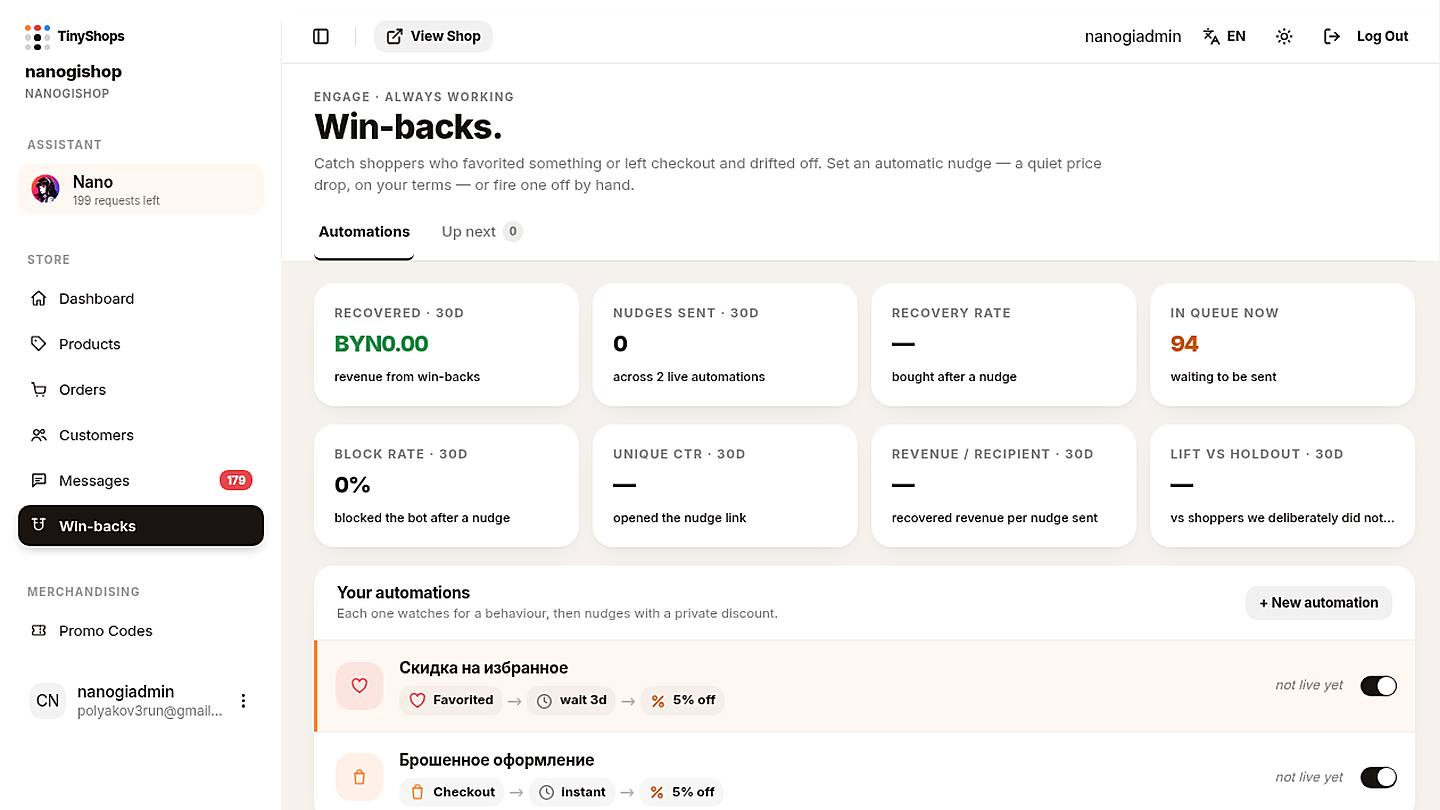
The page eyebrow is ENGAGE · ALWAYS WORKING. The heading is Win-backs. Under it:
“Catch shoppers who favorited something or left checkout and drifted off. Set an automatic nudge — a quiet price drop, on your terms — or fire one off by hand.
Two tabs:
| Tab | URL | What it's for |
|---|---|---|
| Automations | /win-backs?tab=automations | Build and toggle the flows. |
| Up next | /win-backs?tab=queue | People in the waiting window. The badge is how many are due to send now — not how many are waiting. You can have 94 waiting and a 0 on the tab. |
Eight cards sit above the list. They look back 30 days:
- Recovered — revenue that came from win-backs.
- Nudges sent — how many DMs went out, across however many automations are live.
- Recovery rate — share who bought after a nudge.
- In queue now — people currently in a waiting window.
- Block rate — share who blocked the bot after a nudge. Watch this; if it climbs, the copy or the discount is too aggressive.
- Unique CTR — share who opened the nudge link.
- Revenue / recipient — recovered revenue per person you nudged.
- Lift vs holdout — recovered sales compared with shoppers we deliberately did not nudge, so you can see whether the offer is actually pulling its weight.
Under the cards: Your automations — "Each one watches for a behaviour, then nudges with a private discount." The + New automation button is on the right.
The first time you open the page, Tiny Shops seeds two paused presets in your shop language. They are not live until you turn them on. A Russian shop, for example, sees:
- Скидка на избранное — Favorited → wait 3 days → 5% off, status not live yet.
- Брошенное оформление — Checkout → instant → 5% off, status not live yet.
Paused is the safe default. Nothing sends until you flip a flow On and save.
Before you click: messaging#
Win-backs talks through the same bot that already confirms orders and runs Messages. If messaging isn't available on the shop, you'll see an upgrade prompt on this page — not a silent failure after you build a beautiful flow. Turn messaging on, then come back. There is no extra paywall on Win-backs itself once the shop can DM.
Step 1 — Open Win-backs#
- Log in to the Tiny Shops dashboard.
- In the left nav, under STORE, click Win-backs (magnet icon, directly under Messages).
- Land on Automations. You should see the eight cards, the list, and — if a row is selected — the flow builder underneath.
Step 2 — Turn on a preset, or start a new one#
You have two honest paths. Most shops should start with a preset.
Path A — Switch on a preset#
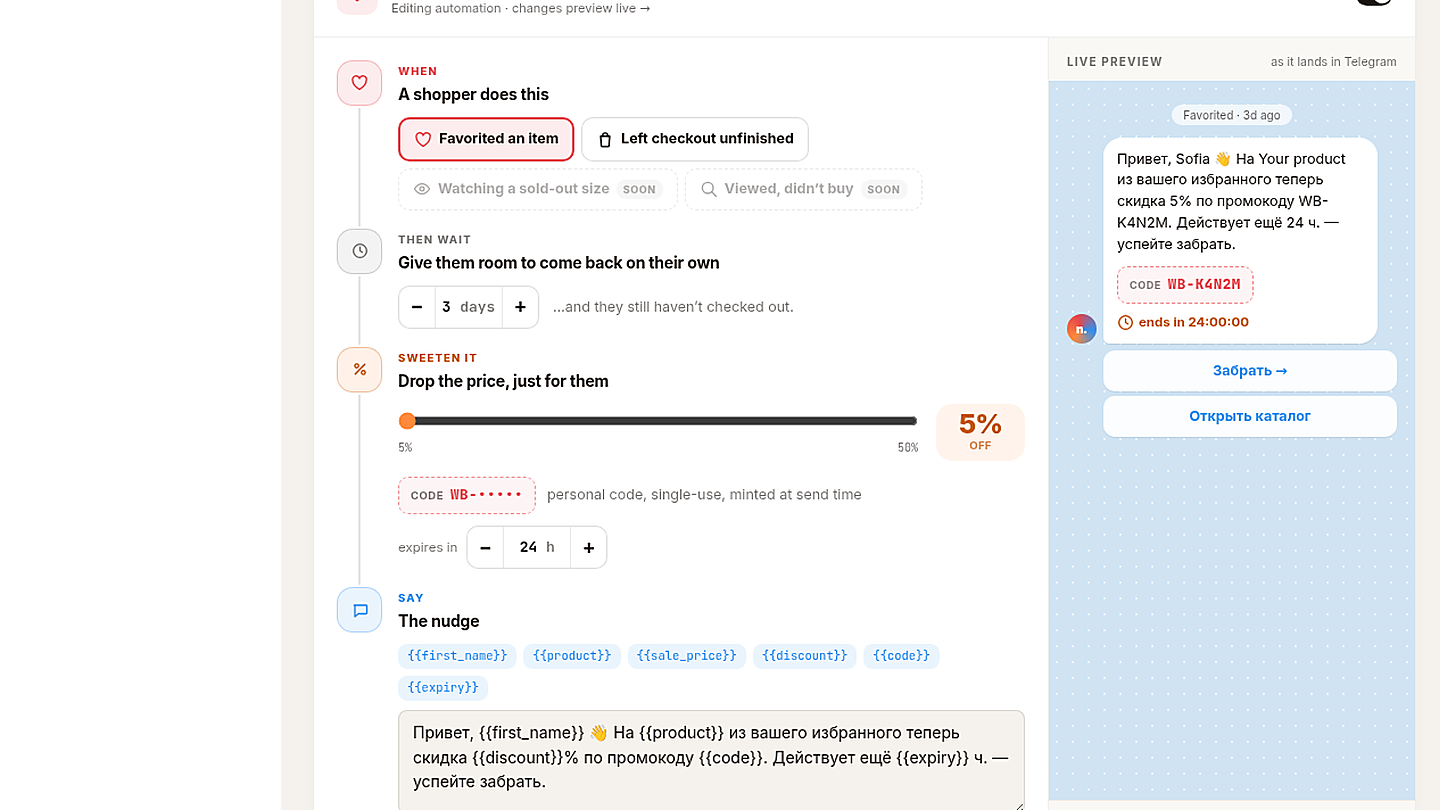
Click a row in Your automations. The editor opens under the list. Read the WHEN / WAIT / SWEETEN IT / SAY blocks (they already have sensible copy in the shop language), then flip the editor toggle from Paused to On and hit Save automation.
That's enough to go live: favorites wait three days at 5% off; unfinished checkout nudges immediately at 5% off. Tune later.
Path B — + New automation#
Click + New automation. A new list row appears with a DRAFT badge:
“not saved yet — set it up below and save
The editor header reads New automation · appears in the list once you save. Until you save, it is a scratch pad — it will not send, and it will not survive a refresh as a real automation.
Fresh-draft defaults:
| Field | Default |
|---|---|
| WHEN | Favorited an item |
| THEN WAIT | 3 days |
| SWEETEN IT | 15% off, expires in 24 h |
| BUTTONS | one button, Grab it →, Opens the product |
| Toggle | Paused |
Work top to bottom through the builder, then save.
Step 3 — WHEN: a shopper does this#
Section label: WHEN – A shopper does this.
Pick one trigger per automation. Live today:
- Favorited an item — they hearted a product and left.
- Left checkout unfinished — they started checkout and didn't pay.
Greyed out, marked SOON (you can't select them yet):
- Watching a sold-out size
- Viewed, didn't buy
Want both favorites and checkout? That's two automations — which is exactly what the presets already are. Don't try to make one flow do both.
Step 4 — THEN WAIT: give them room#
Section label: THEN WAIT – Give them room to come back on their own.
A stepper in days.
- 0 days helper: Send as soon as they qualify. That's the checkout preset ("Instant").
- 1+ days helper: …and they still haven't checked out. The wait is a grace period. If they buy during it, the nudge is cancelled. If they don't, it fires.
A good split:
- Favorites: 2–3 days. They were browsing, not buying. A pause feels human.
- Checkout: 0 days, or 1 day if your average shopper often comes back the same evening.
The wait is also where leftover discounts die naturally: no send, no code.
Step 5 — SWEETEN IT: a private price drop#
Section label: SWEETEN IT – Drop the price, just for them.
- Slider 5%–50%.
- Code preview: CODE WB-••••• with the line personal code, single-use, minted at send time.
- Expiry stepper in hours (the presets and new drafts use 24 h).
Treat the percent as a private thank-you, not a fire sale:
| Catalog | Starting % | Why |
|---|---|---|
| Apparel / accessories | 5–15% | Enough to finish a maybe; 15% is the new-draft default. |
| Food / consumables | 5–10% | Checkout is usually a timing problem, not a price problem. |
| Higher-ticket / handmade | 5% | Protect margin; the personal code already feels special. |
What "personal, single-use, minted at send time" means in practice:
- The
WB-code does not exist until the DM goes out. You will not see a reusable pool in Promo Codes. - It is tied to that shopper. A forwarded screenshot will not work for someone else.
- It is one use. After checkout, it's done.
- It expires on the countdown you set. After that, the full price is back.
Step 6 — SAY: write the nudge#
Section label: SAY – The nudge.
Tap chips to insert fields. They fill in at send time:
| Chip | Becomes |
|---|---|
{{first_name}} | Their Telegram first name (the preview uses a sample like Sofia). |
{{product}} | The item they favorited or left at checkout. |
{{sale_price}} | The discounted price. |
{{discount}} | The percent, as a number. |
{{code}} | The personal WB- code. |
{{expiry}} | Hours left. |
Keep it short. One greeting, one reason, one expiry. Presets already ship copy in the shop language. A Russian favorites preset looks like this:
“Привет, 👋 На из вашего избранного теперь скидка % по промокоду . Действует ещё ч. — успейте забрать.
An English-shop version of the same idea:
“Hi 👋 from your favorites is % off with code . It lasts hours — grab it while it's yours.
For checkout, name the unfinished thing and skip the guilt:
“Hi 👋 You left at checkout. Here's % off with — expires in hours.
Don't stack three CTAs in the text. The buttons do the clicking.
Step 7 — BUTTONS#
Up to two buttons. Each one is either:
- Opens the product — Mini App deep link, straight on the item.
- Opens the shop — the storefront.
+ Add button adds the second. The new-draft default is a single Grab it → that opens the product. A Russian preset often has two: Забрать → (product) and Открыть каталог (shop).
Put the product button first. That's the one you want them to tap.
Step 8 — Live preview, save, send a test#
On the right, LIVE PREVIEW shows the Telegram bubble as it will land: your copy with names filled in, a code box (WB-K4N2M style), a countdown ends in HH:MM:SS, and the buttons underneath.
Then the footer:
- Flip On / Paused on the editor (Paused means it will not send, even after save).
- Save automation — required. A DRAFT is not live, and unsaved edits are not live.
- Send a test to myself — a real DM from the shop bot, to you. Check the code box, the timer, and that each button opens the right place.
- Delete automation — removes the flow. Use it for experiments you don't want, not for a quick pause (that's what Paused is for).
After save, the list row drops the DRAFT badge and shows the summary: trigger → wait → percent off, plus live / not live.
Up next: send, snooze, or skip by hand#
Automations run on the timer. Up next is the waiting room — and the place you intervene.
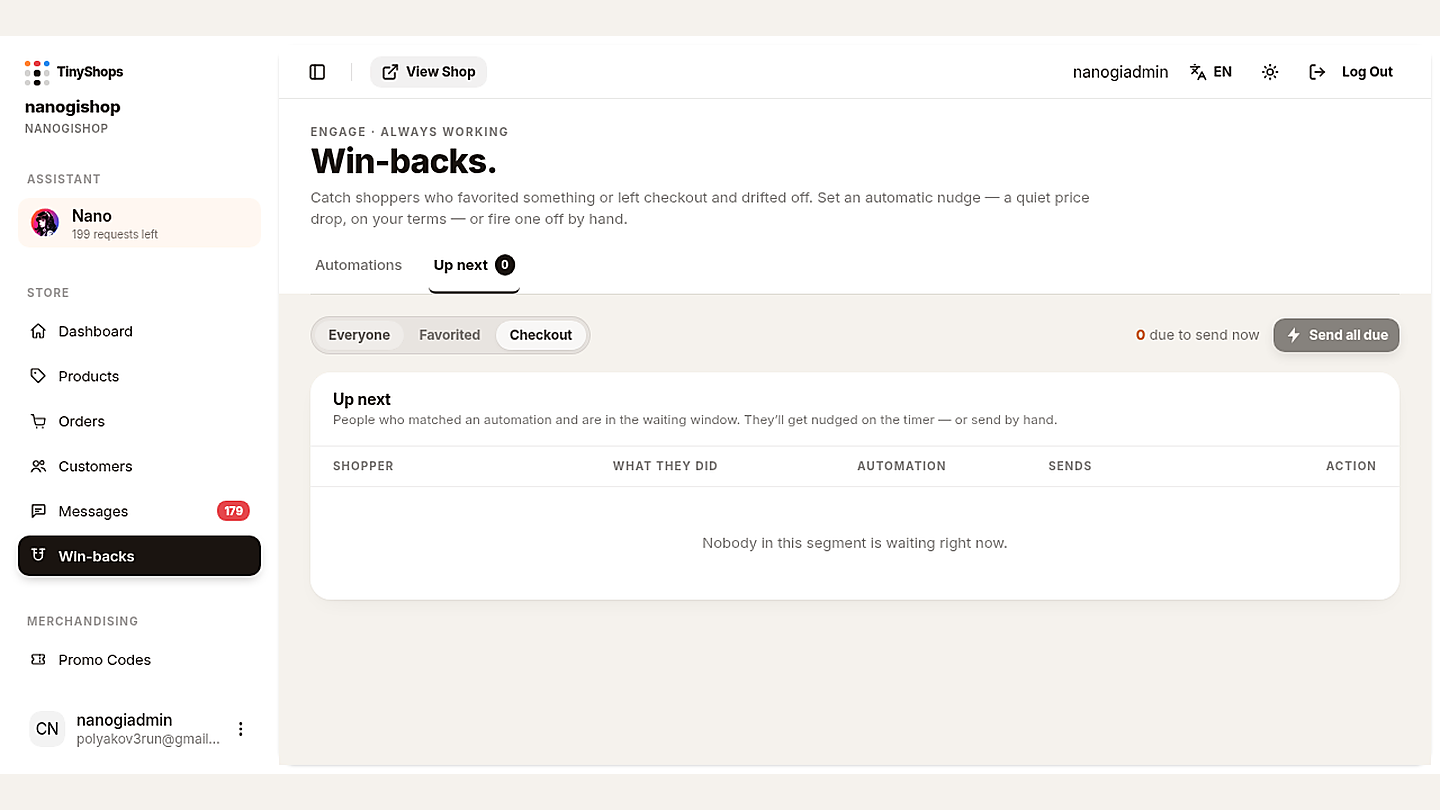
Open the Up next tab. Filters across the top:
- Everyone
- Favorited
- Checkout
On the right: 0 due to send now (or whatever is actually due) and Send all due. The tab badge is that due-now count. Waiting is not the same as due: people can sit in the window for days with a 0 on the tab.
The panel title is Up next. Helper text:
“People who matched an automation and are in the waiting window. They'll get nudged on the timer — or send by hand.
Columns: SHOPPER · WHAT THEY DID · AUTOMATION · SENDS · ACTION.
Per row you can:
- Send now — skip the rest of the wait, fire this one DM.
- Snooze a day — push the send by 24 hours.
- Skip — don't send this one.
Empty state (for example Checkout with nobody waiting):
“Nobody in this segment is waiting right now.
Use Send now when you know the moment is right (a restock, a story you just posted, a shopper who pinged you). Use Snooze when they just asked a question in Messages and a discount DM on top would feel loud. Use Skip when they already bought another way, or you don't want to discount that item.
What the shopper sees#
They get a normal Telegram DM from your shop bot — not from you personally, not from a Tiny Shops account.
Inside the bubble:
- Your SAY text, with their name and product filled in.
- A code box with their personal
WB-code. - A countdown (
ends in 24:00:00, then ticking down). - One or two buttons.
Tapping the product button opens that item in the Mini App. They apply the code, pay, done. If they buy before the DM would have gone out, they never see a nudge and they never get a code — they just bought at full (or cashback) price, which is the win.
A few guardrails you don't have to think about:
- About two weeks between win-back DMs to the same person, so one shopper isn't hit by favorites and checkout back-to-back.
- A win-back will not stack on top of a broadcast they just got. If you just ran a campaign, they get breathing room.
- The code is useless to anyone else. Let them screenshot it; it still only works for them.
Good defaults (steal these)#
Start here, then move the slider only if recovery is weak and block rate is still calm.
Favorites (most shops)
- WHEN: Favorited an item
- WAIT: 3 days
- DISCOUNT: 5% if you already seeded the preset; 10–15% if you want a stronger first test (15% is the new-automation default)
- EXPIRY: 24 hours
- BUTTON: Grab it → → Opens the product
- Second button optional: Opens the shop
Unfinished checkout
- WHEN: Left checkout unfinished
- WAIT: 0 days (Instant) — they were already paying
- DISCOUNT: 5%
- EXPIRY: 12–24 hours
- BUTTON: Opens the product. Keep copy about the item they left, not a catalog tour.
Don't
- Don't set 40–50% "just to see." That's a sale with extra steps, and block rate will tell on you.
- Don't write a paragraph. The preview is a phone bubble.
- Don't turn on both presets and two extra drafts of the same WHEN. One live flow per behaviour is enough.
- Don't skip Send a test to myself. The first DM you see should be your own.
How to read the cards after a couple of weeks#
Give it real traffic before you retune.
- In queue now climbing with Nudges sent still at 0 usually means automations are still Paused, or everyone is still inside a multi-day wait. Check the toggles.
- Recovery rate healthy and Block rate near 0 — leave it. Nudge the percent down before you nudge it up.
- Unique CTR low — the button or the first line isn't earning the tap. Fix SAY and BUTTONS before you touch the slider.
- Revenue / recipient is your "is this discount paying for itself?" number. If recovered revenue per person is thinner than the percent you're giving, wait longer or offer less.
FAQ#
Do I have to build this from scratch? No. The first visit seeds two paused presets in the shop language. Open one, turn it On, save.
Is there a paywall on Win-backs? Not on this feature by itself. It DMs through the shop bot, so the shop needs messaging. If that's missing, you'll see an upgrade prompt on the page.
What if they buy before the wait ends? They are not nudged. No DM, no leftover WB- code.
Can a friend use a forwarded code? No. The code is single-use and tied to that shopper.
Will this spam someone I just messaged? Win-backs won't sit a discount DM on top of a broadcast they just received, and the same person won't get another win-back for about two weeks.
Can I send one without waiting? Yes — Up next → Send now on the row, or Send all due for everyone whose timer is up.
What does the Up next badge mean? Due-now count, not waiting count. 0 with people in the table is normal; they're still in the wait.
Where does the button go? Opens the product deep-links that item in the Mini App. Opens the shop opens the storefront.
Can I pause without deleting? Yes. Toggle Paused on the editor and save. Delete automation is permanent for that flow.
When will "Watching a sold-out size" and "Viewed, didn't buy" work? They're marked SOON in WHEN. Favorited and Left checkout unfinished are the two you can run today.
Turn it on today#
- Open Win-backs (STORE → magnet icon).
- Click Скидка на избранное / your Favorited preset — or + New automation.
- Confirm WHEN, wait, percent, copy, buttons.
- Toggle On → Save automation → Send a test to myself.
- Glance at Up next so you know what "waiting" looks like.
Then leave it running. The point of ALWAYS WORKING is that you don't sit in this tab.
Create or open your store at tiny-shops.com →
Questions or a flow that feels off? Tell us in Telegram:
- 🇷🇺 Tiny Shops RU
- 🇬🇧 Tiny Shops EN
Tiny Shops is a no-code Telegram Mini App shop builder: catalog, checkout, cashback, and now win-backs, inside the chat your customers already live in. New here? Accept payments in Telegram, then turn on cashback so recovered shoppers have a reason to come back a second time.