Tiny Shops is a no-code Telegram Mini App shop builder: connect a BotFather token, add products, turn on payments, and share a Mini App. No code and no hosting.
Telegram has over 1 billion monthly active users and a message open rate above 90%. Compare that to email's ~20% or Instagram's algorithm-fed ~10% organic reach. If you sell anything — physical goods, digital products, services — Telegram is the cheapest customer-acquisition channel available in 2026.
This guide walks you through building a fully functional Telegram store with Tiny Shops in roughly 10 minutes. Every step includes the exact buttons to click. By the end you'll have a live Mini App store accepting real payments.
Still deciding whether Telegram is right for you? Read our beginner's guide to selling on Telegram first. Want the condensed version? See the 5-minute checklist.
What You Need Before Starting#
| Requirement | Details |
|---|---|
| Telegram account | Any device — phone or desktop |
| Something to sell | Physical goods, digital files, services, subscriptions |
| 10 minutes | The entire setup, start to finish |
| Payment account (optional for launch) | Stripe, YooKassa, or Telegram Stars — you can add this after launch |
No code. No hosting. No credit card to create the store.
Step 1: Create Your Bot with @BotFather (2 minutes)#
Every Telegram store lives inside a bot. The bot is the "shell" — Tiny Shops fills it with your storefront.
- Open Telegram, search for @BotFather (look for the blue verification badge)
- Send
/newbot - Enter a display name — this is what users see in chats (e.g., "Anna's Bakery")
- Enter a username — must end in
bot(e.g.,annas_bakery_bot) - BotFather replies with your API token: a string like
7123456789:AAH1b2C3d4E5f6G7h8I9j0K
Copy that token. You'll paste it in Step 2.
Security note: Never share your bot token publicly. Anyone with it can control your bot. If it leaks, send /revoke to BotFather immediately.
“Tip: While you're in BotFather, send
/mybots→ select your bot → Edit Bot to set a profile photo and description. Stores with a photo get ~30% more "Start" taps than those with the default placeholder.
Step 2: Connect Your Bot to Tiny Shops (2 minutes)#
- Go to tiny-shops.com and click "Create Your Store"
- Fill in three fields:
Store ID — your URL slug. Lowercase letters, numbers, hyphens. Example: annas-bakery. This becomes part of your public store URL.
Store Display Name — what customers see inside the Mini App. Example: "Anna's Bakery".
Bot Token — paste the token from Step 1, then click "Verify Token". You'll see a green checkmark and the bot's name if it's valid.
-
Notification group (recommended): Create a private Telegram group, add your bot as a member, send any message in the group, then click "Refresh Groups" in the wizard and select it. You'll get instant order alerts here.
-
Admin account: Enter your email, choose a username (3–50 chars), set a password (8+ chars, letters + numbers). This gives you access to the management dashboard.
Click "Create Store". You're in.
Step 3: Add Products (3 minutes)#
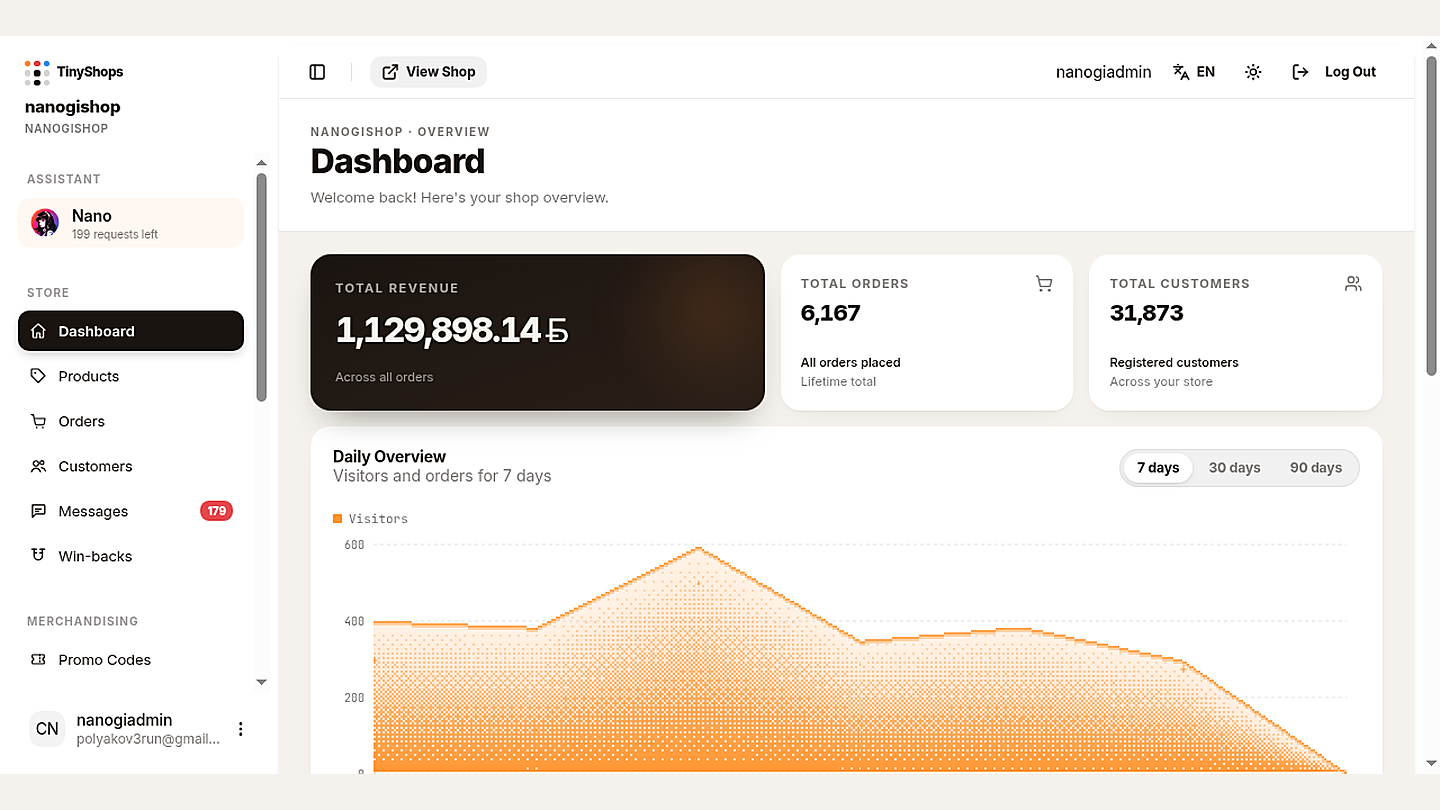
Go to your dashboard → Products → "Add Product".
For each product, fill in:
- Name — be specific. "Sourdough Loaf 500g" beats "Bread"
- Price — in your store currency (set under Settings → General → Currency)
- Description — 2–3 sentences: what it is, who it's for, one differentiator
- Photos — minimum 1, ideally 3 (front, detail, in-use). Square 1:1 ratio renders best in Mini Apps
- Category — keeps your catalog browsable once you pass 10 items
- Stock — optional, but setting it enables "Only X left" urgency badges
Bulk import via Google Sheets#
If you have more than 10 products, skip manual entry:
- Go to Settings → Google Sheets → Connect
- Paste your spreadsheet URL (columns: Name, Price, Description, Image URL, Category, Stock)
- Map columns to fields
- Toggle Auto-sync ON — edits in the sheet push to your store within 60 seconds
This is the same workflow used by stores with 500+ SKUs. No CSV uploads, no re-importing.
Step 4: Set Up Payments (2 minutes)#
Go to Storefront Settings → Orders & Payments (Checkout Mode), then open the Checkout form for payment methods.
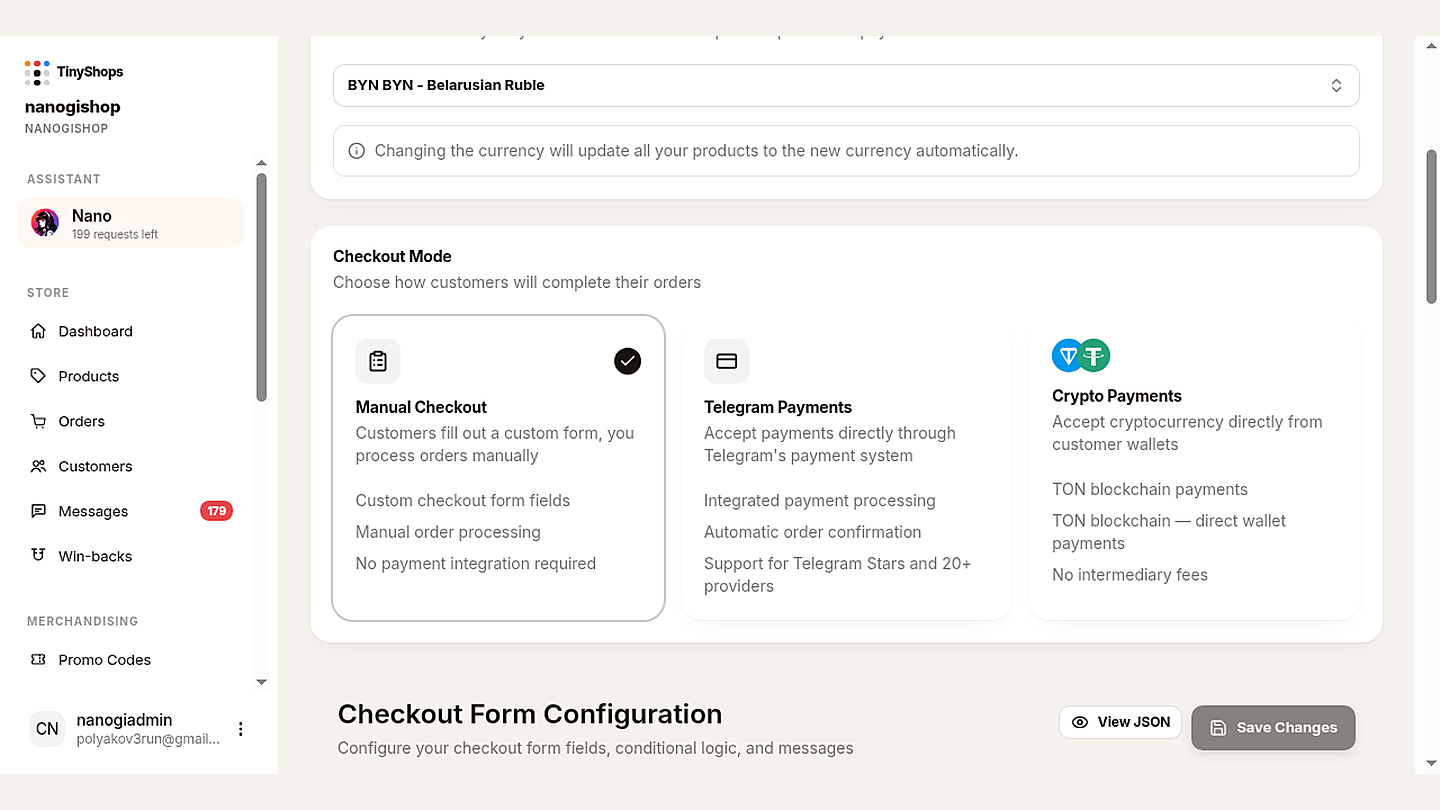
You'll see available providers. Click "Connect" next to your preferred option:
- Stripe — supports cards, Google Pay, Apple Pay. Available in 40+ countries. Enter your Stripe publishable key and secret key.
- YooKassa — for Russian-market sellers. Enter your shopId and secretKey.
- Telegram Stars — native in-app currency, zero setup. Toggle it on and you're done.
After connecting, click "Send Test Payment" to verify the integration. You'll see a $0.01 charge appear in your provider dashboard.
“Important: Tiny Shops charges 0% platform commission. You only pay your payment processor's standard fee (Stripe: 2.9% + 30¢; YooKassa: 3.5%). No hidden markup.
For a deeper comparison of payment options, see our guide to accepting payments in Telegram.
Step 5: Launch Loyalty & Cashback (1 minute)#
Open Cashback Settings in the sidebar and flip the enable toggle.
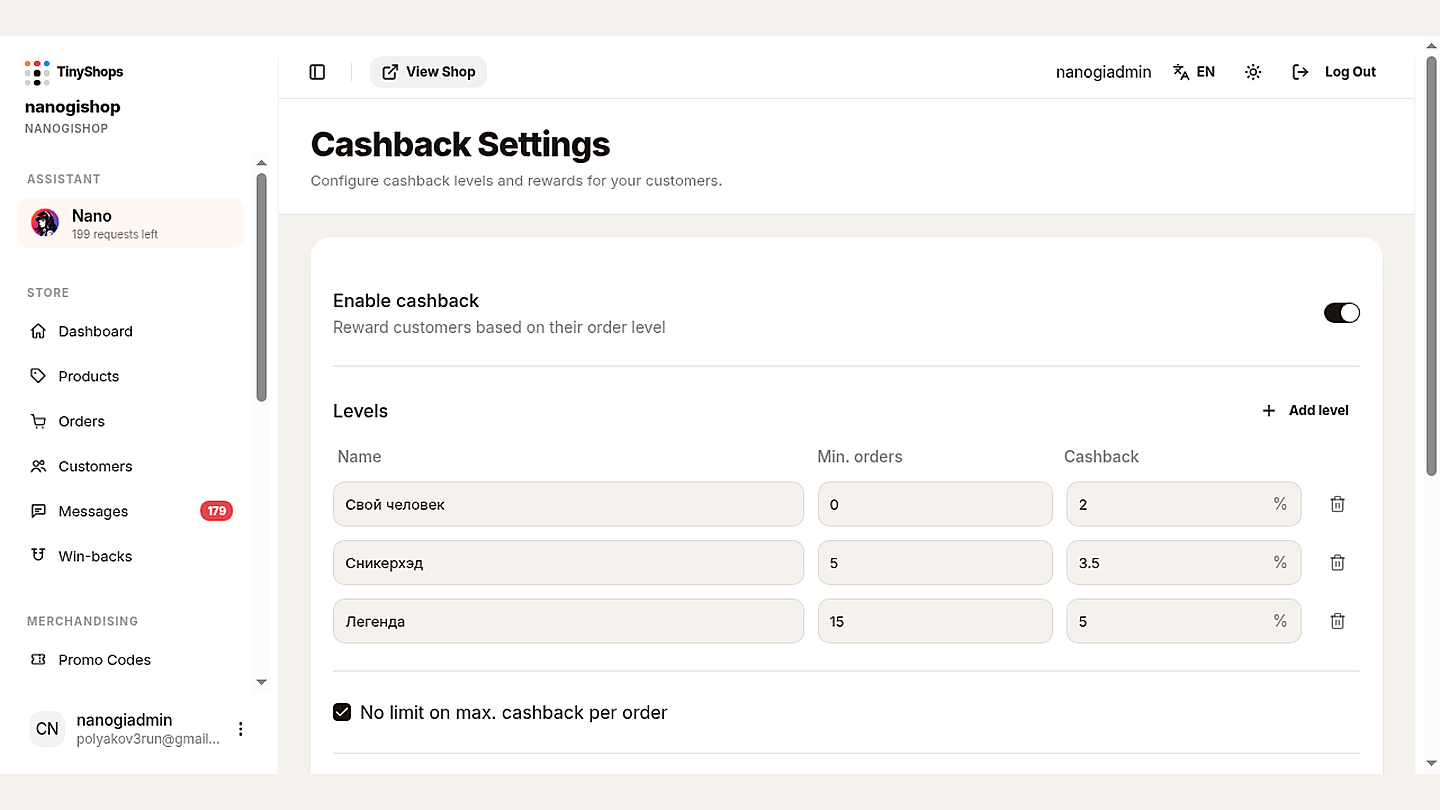
Tiny Shops ships a three-tier system out of the box:
| Tier | Trigger | Cashback |
|---|---|---|
| Bronze | Default for all new customers | 3% |
| Silver | 5+ completed orders | 5% |
| Gold | 15+ completed orders | 8% |
You can adjust percentages under Settings → Loyalty → Edit Tiers. Cashback accrues as store credit customers spend on their next order.
Stores that enable cashback see repeat purchase rates climb 25–40% within 60 days (Tiny Shops internal data, Q1 2026). It costs you less than a single ad impression per retained customer.
Also under Settings → Loyalty, toggle on:
- Referral program — each customer gets a unique link; both parties get a bonus on first purchase
- Promo codes — create codes under Marketing → Promo Codes → Create (set discount %, usage cap, expiry)
For the full loyalty playbook, read how cashback increases repeat purchases.
Step 6: Customize & Share (1 minute)#
Make it yours#
Go to Settings → Appearance:
- Pick a light or dark theme (or match Telegram's system theme)
- Set your brand accent color
- Upload a store banner (1200×400px recommended)
Go to Settings → General to set your store language and currency.
Get your links#
After setup, your dashboard → Share shows three distribution channels:
- Bot link —
t.me/your_bot_username— the primary entry point - Mini App link — opens the store inline inside any chat
- Web link — a browser-accessible URL for non-Telegram traffic
Launch checklist#
- 5+ products with photos and descriptions
- Payment provider connected and test payment passed
- Notification group receiving alerts
- Bot profile photo and description set via BotFather
- Cashback enabled
- Store shared in at least one channel or group
Getting Your First Sale (This Week)#
Setup is done. Now you need eyeballs. Here's what works for new Telegram stores:
- Post in your existing channels/groups. Even a 200-subscriber channel converts 2–5% on a first announcement. That's 4–10 customers from one message.
- Add your bot to niche community groups. Members browse your catalog without leaving the conversation. A fitness group of 1,000 members is worth more than 10,000 cold ad impressions.
- Send the bot link to 10 friends. Ask them to place a test order. This validates your flow and gives you social proof (order count, reviews).
- Run a launch promo code. "GRANDOPENING — 15% off, first 50 orders." Create it under Marketing → Promo Codes.
- Cross-post to Instagram/TikTok bio. Link to your bot or web store URL.
Stores that share in 3+ groups within their first week average their first paid order within 48 hours.
Day-to-Day Management#
Once you're live, your routine is simple:
- Orders arrive as notifications in your group + appear in Dashboard → Orders. Each shows customer name, items, payment status, and delivery notes.
- Products — edit prices, toggle availability, or add new items from Dashboard → Products. Changes go live instantly.
- Analytics — Dashboard → Analytics shows daily revenue, top products, conversion rate, and customer retention.
- Customers — Dashboard → Customers lists every buyer with order history, tier status, and accrued cashback.
- Google Sheets sync — if enabled, just edit the spreadsheet. The store updates itself.
Most sellers spend under 15 minutes per day on store management once the catalog is stable.
7 Mistakes New Sellers Make (And How to Avoid Them)#
- No product photos. Listings with images convert 3× higher than text-only. Even a phone photo on a white background works.
- Vague product names. "Item 1" tells nobody anything. "Hand-poured Soy Candle — Lavender, 200g" sells.
- Skipping the test payment. Always run the test transaction in Step 4. A broken checkout on launch day kills momentum.
- Ignoring the notification group. If you don't see orders within seconds, you can't ship fast. Set it up.
- Launching with 1 product. A store with 5+ items looks credible. One item looks like a test.
- Not enabling cashback. You're leaving repeat purchases on the table. It takes 30 seconds to toggle on.
- Sharing the link once and waiting. Post regularly. Pin the bot link in your channel. Add it to your Telegram bio. Visibility is ongoing.
FAQ#
How much does Tiny Shops cost?#
Free to start — the Starter plan includes unlimited orders, Google Sheets sync, Google Pay & Apple Pay, group chat commerce, referral program, promo codes, and priority support. You pay $0 until you exceed 100 customer contacts, then $9.99/mo for 1,000 contacts. Pricing scales only with your audience size.
Do I need coding skills?#
No. If you can fill out a form and upload a photo, you can run a Tiny Shops store.
What payment methods can my customers use?#
Google Pay, Apple Pay, credit/debit cards (via Stripe or YooKassa), and Telegram Stars. All processed securely through PCI-compliant providers.
Can I sell digital products?#
Yes. After payment, deliver files via Telegram message, download link, or access code. Many sellers use Tiny Shops for courses, templates, presets, and e-books.
How does shipping work for physical goods?#
You handle fulfillment. Order notifications include the customer's Telegram contact, so you coordinate delivery directly. Most sellers use local couriers, postal services, or CDEK/Boxberry (for Russia).
Can I run multiple stores?#
Yes. Each store gets its own bot, products, settings, and dashboard. Create additional stores from tiny-shops.com.
Is there an order limit?#
No. Every plan supports unlimited orders with no transaction caps.
What currencies are supported?#
100+ currencies. Set yours under Settings → General → Currency.
How is this different from building a Telegram Mini App from scratch?#
Building a Mini App yourself requires a developer, hosting, payment integration, and ongoing maintenance — typically $3,000–$15,000 and 4–8 weeks. Tiny Shops gives you the same result in 10 minutes for $0 upfront. See our Mini App guide for sellers for the technical comparison.
Ready to Launch?#
You now have everything you need: a bot, a storefront, products, payments, loyalty, and a distribution plan. The sellers who win on Telegram in 2026 are the ones who ship fast and iterate.
Create your free store on Tiny Shops →
Ten minutes from now, your store could be live. Your first customer might be one share away.