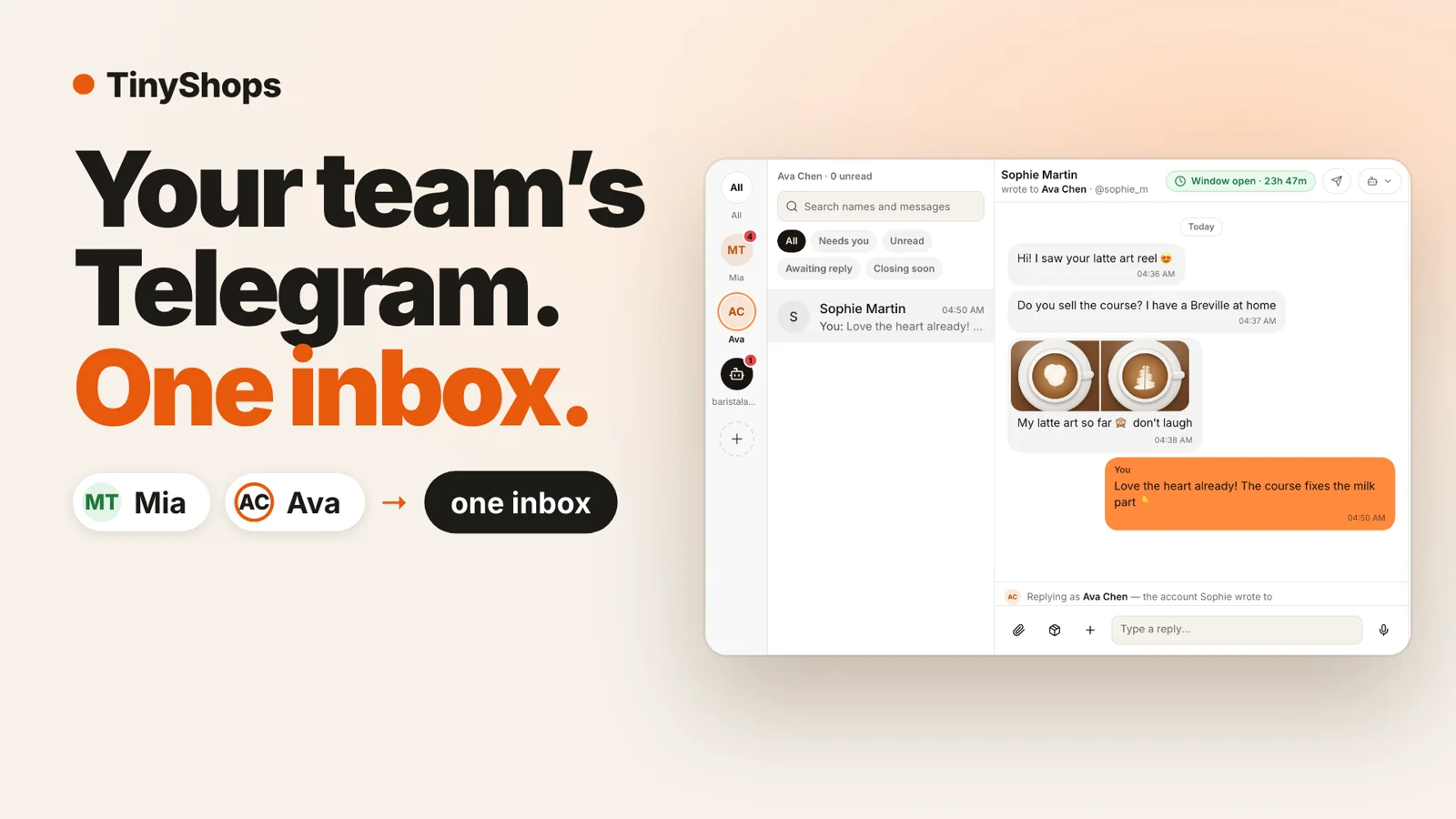
To run multiple Telegram accounts as one team, connect each account to the same store bot through Telegram Business and read them all in one inbox. In Tiny Shops, the owner and every manager keep selling from their own Telegram account, and every chat lands in Messages. A reply always goes out from the account the buyer wrote to, never from a bot. You can send a paid photo or video (PPV) for Telegram Stars from any of those accounts, see in Sales which account made each sale, and switch the AI agent on for one account while it stays off on another. This guide shows every step with the exact button names.
Quick answers#
- Can one store use several Telegram accounts? Yes. Every account connected to your store bot shows up in one inbox, each with its own unread count.
- Who does the buyer see? The person they wrote to. Replies go out from that same account, in that same chat.
- Does the manager need Telegram Premium? No. Telegram Premium isn't needed to connect.
- Where does the money go? Stars from every account go to your store bot.
- Can the AI agent answer for just one account? Yes. The agent mode is set per account: off, drafts only, or auto replies.
Who this is for#
Anyone whose buyers write to a person, and there is more than one person:
- a shop with a manager: the owner answers regulars, the manager takes new leads from ads;
- creators and their chatters: several people answer DMs and sell paid photos and videos (PPV) for Stars;
- course and coaching sellers: an assistant handles questions while the expert answers the warm ones;
- services: a salon, a studio, a tutor team, where each master has their own clients.
Without one inbox, the chats live on different phones. Nobody sees what the other promised, and a sale made by the manager is invisible to the owner. Sharing one login on several phones fixes that badly: buyers see one name, and you can't tell who said what.
How it works#
Telegram Business lets an account add a chatbot that can read and answer its private chats. Each person in your team adds the same store bot to their own account. Tiny Shops then sees every chat the account allows and puts it in one inbox.
- The buyer writes to a person, as usual. Nothing changes for them.
- You see the chat in Messages, under the account it came to.
- Your reply goes out from that account, in that chat.
- A paid post, a product card or a file you send also goes from that account.
- The sale is recorded with the account that made it.
Before you start#
- A chat store in Tiny Shops with a connected store bot.
- Each person who sells has their own Telegram account and can open Telegram Settings → Telegram Business → Chatbots.
- One Telegram account can serve one store at a time.
Step 1. Connect your own account#
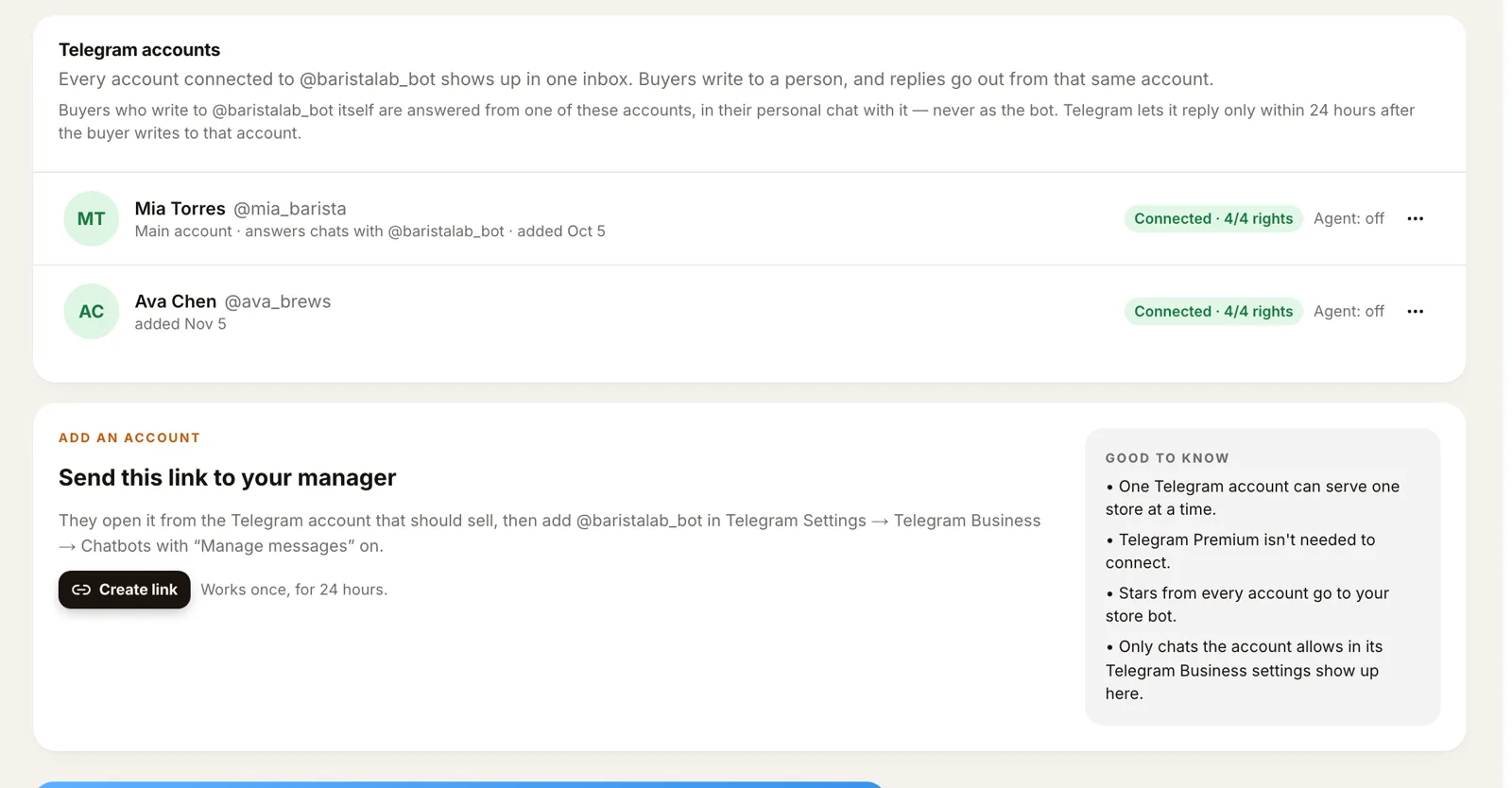
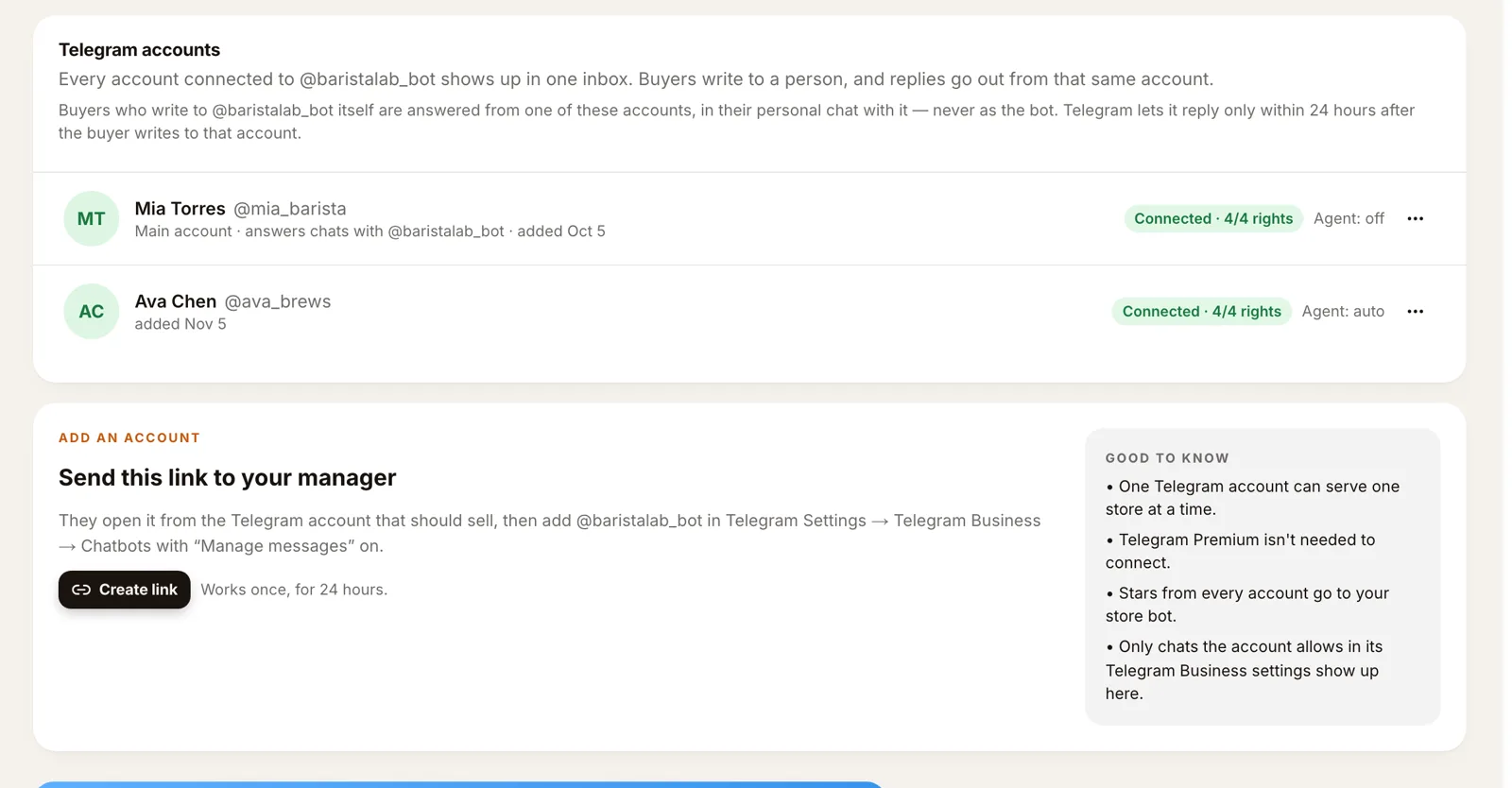
Your account is the main one. Open Telegram, go to Settings → Telegram Business → Chatbots, add your store bot and turn Manage messages on. In the dashboard, open Telegram bot and scroll to Telegram accounts. Your account shows Main account, the status Connected · 4/4 rights and the agent mode.
Step 2. Invite a manager#
- Under Add an account ("Send this link to your manager"), press Create link. The link works once, for 24 hours.
- Send it to your manager.
- They open it from the Telegram account that should sell, then add your store bot in Telegram Settings → Telegram Business → Chatbots with Manage messages on.
Their account appears in the list as Connected. If someone adds your bot without an invite, the account shows Waiting for you: nothing from it is saved until you press Approve.
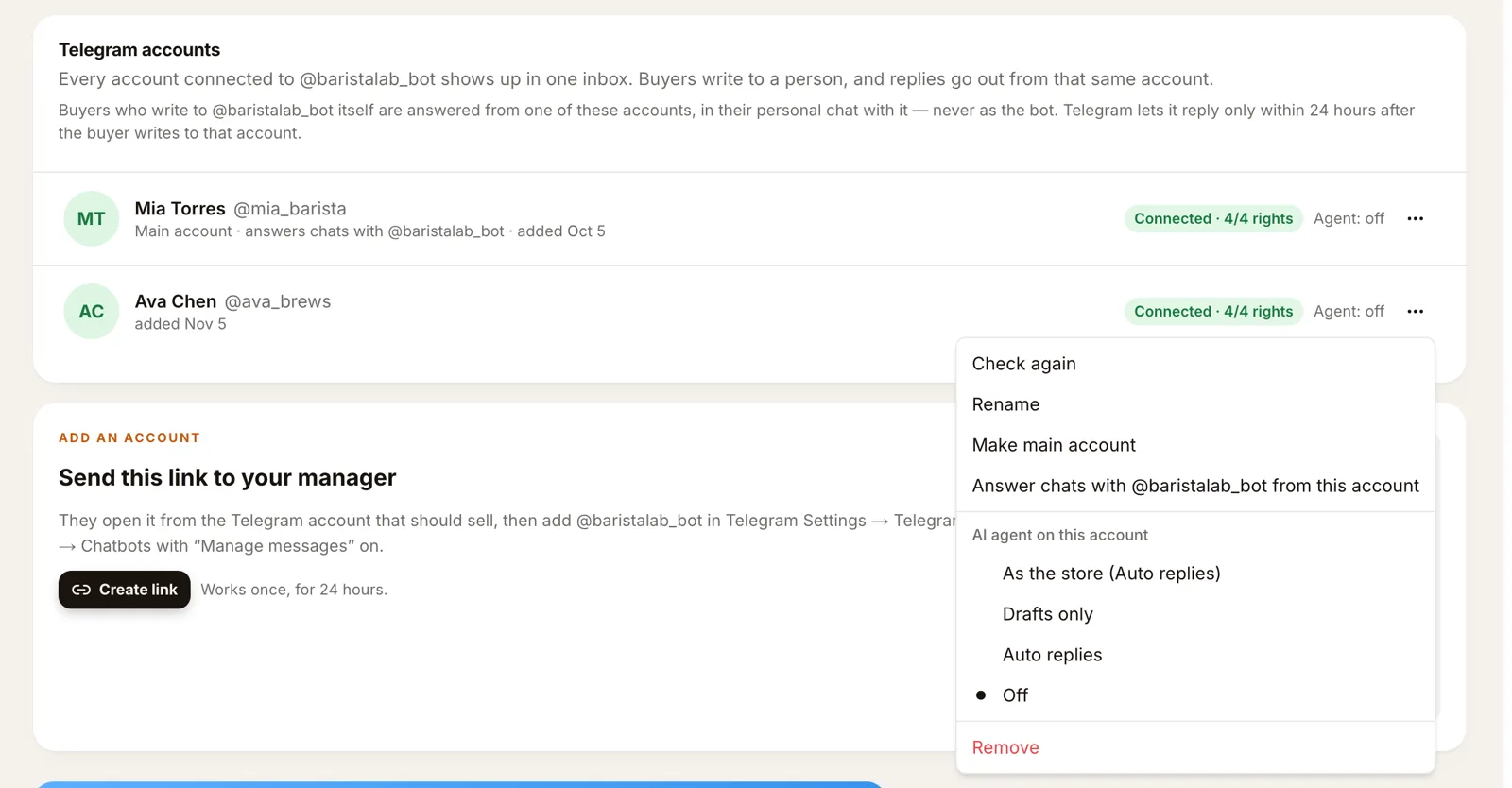
Each account has a ⋯ menu: Check again, Rename (your own name for it, like "Anna, manager"), Make main account, and Remove. Removing keeps its chats readable, but nothing new is saved.
Only chats the account allows in its Telegram Business settings show up in the inbox. If your manager also uses the account for personal chats, they can exclude those in Telegram.
Step 3. Read every account in one inbox#
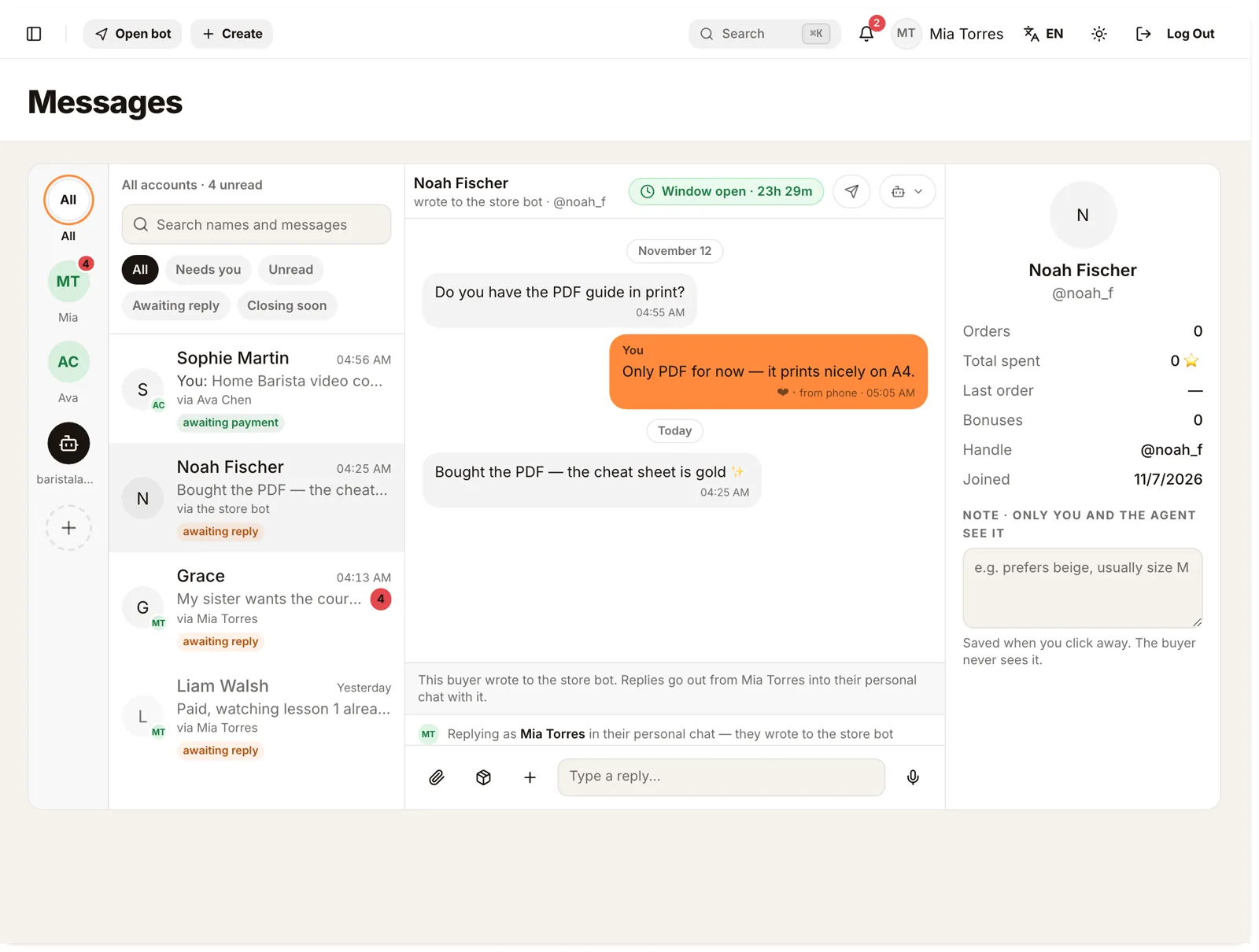
Open Messages. The rail on the left lists All and then every account with its own unread count. Tap an account to see only its chats; tap All to see everything. In the list, each chat says which account it came to ("via Ava Chen").
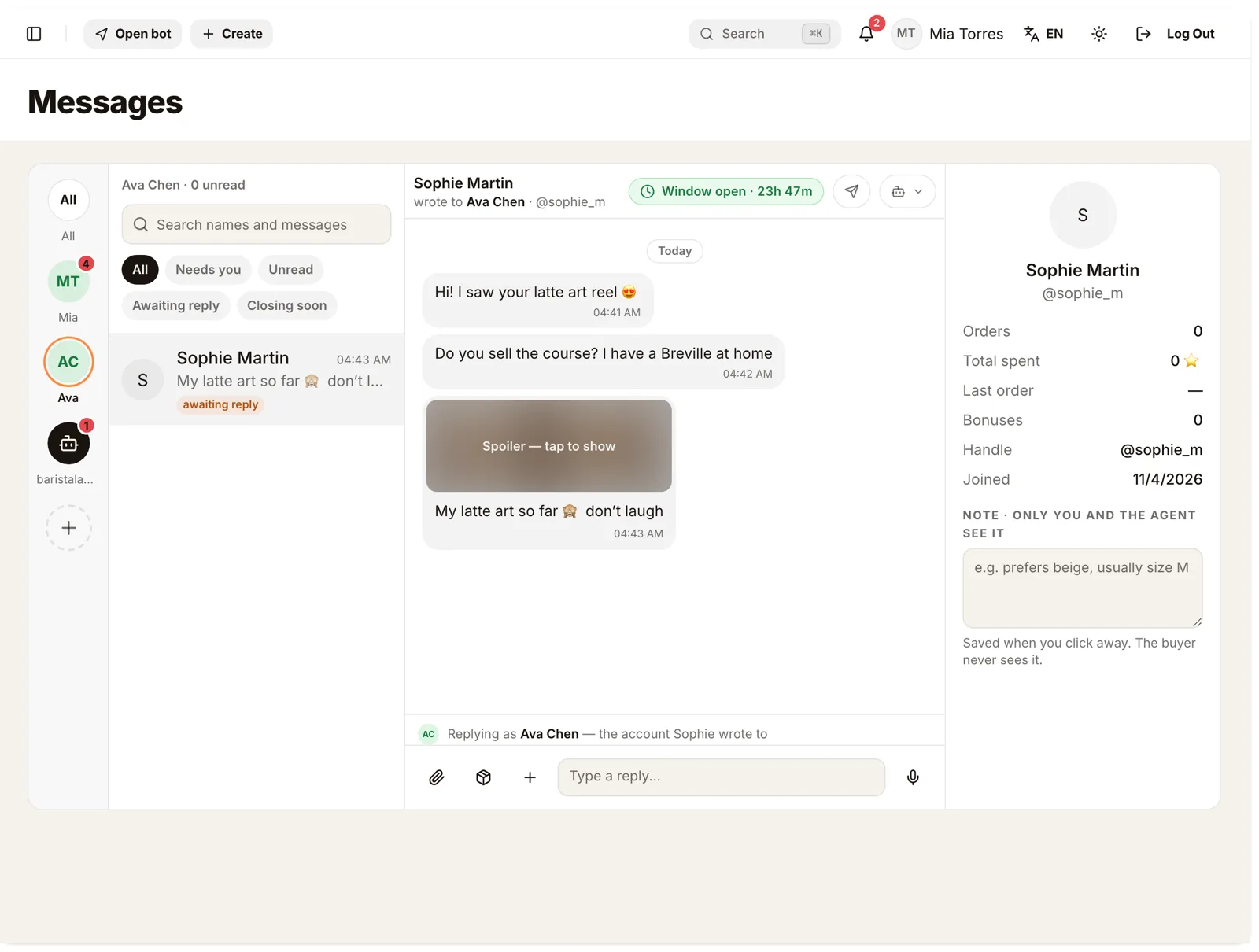
Photos sent under a spoiler stay hidden until you tap them ("Spoiler — tap to show"), just as in Telegram.
Step 4. Reply from the right account#
Open a chat and type. Above the box, the inbox tells you who will send it: "Replying as Ava Chen — the account Sophie wrote to". Press send, and the message goes from Ava's Telegram account into the same chat. Sophie sees Ava, not a bot.
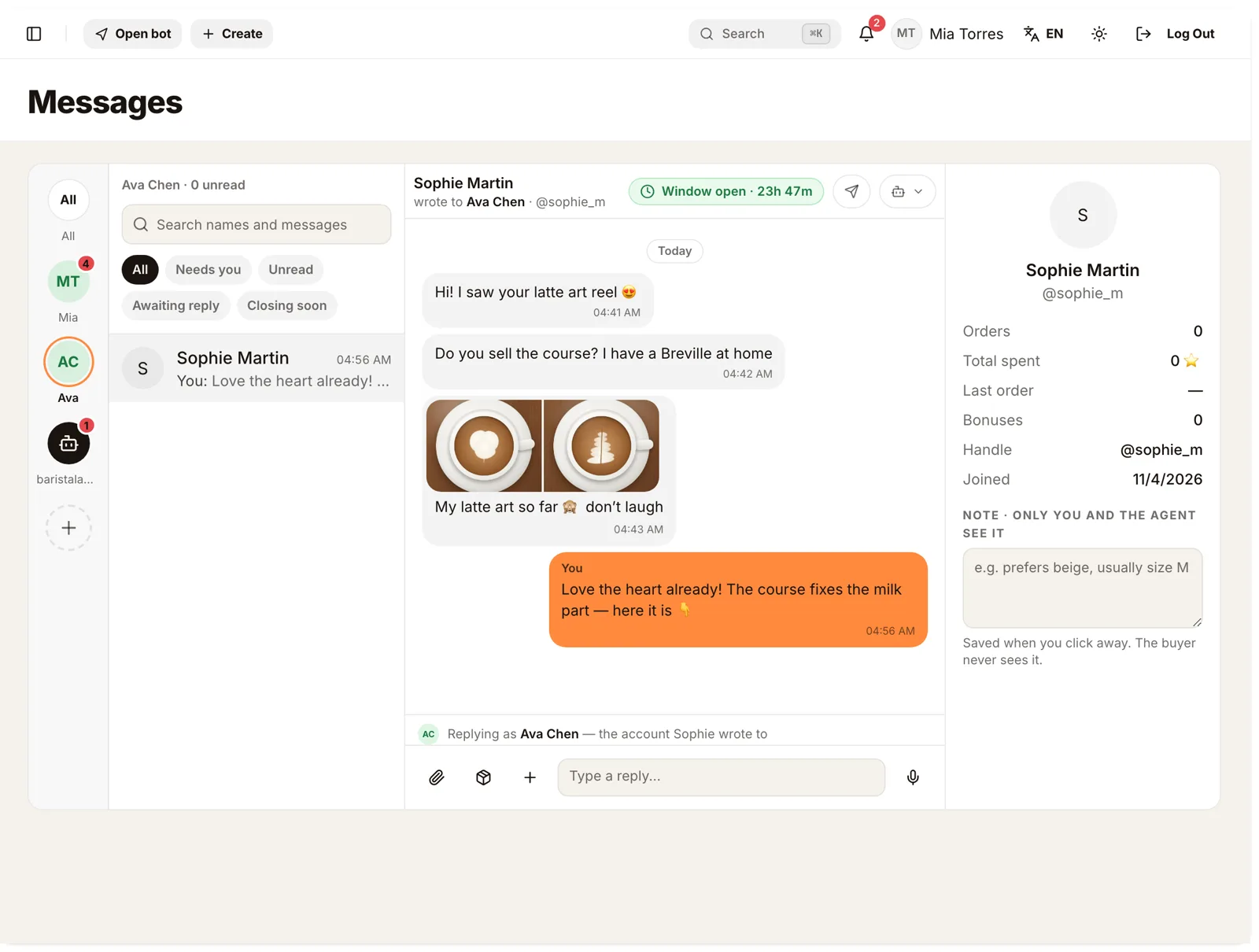
The owner can answer any chat. The reply still goes from the account the buyer wrote to, so the buyer keeps talking to one person.
Telegram lets a business account reply only within 24 hours after the buyer's last message. The chat header shows how much time is left ("Window open · 23h 47m").
Step 5. Sell PPV from the chat#
PPV (pay per view) on Telegram means a photo or video the buyer unlocks for Stars right in the chat. Any account in your team can send one.
- In the chat, press the product button, the box icon next to the paperclip.
- Pick a product with a file and a price in Stars, for example Home Barista video course · 150 ⭐, and press Send.
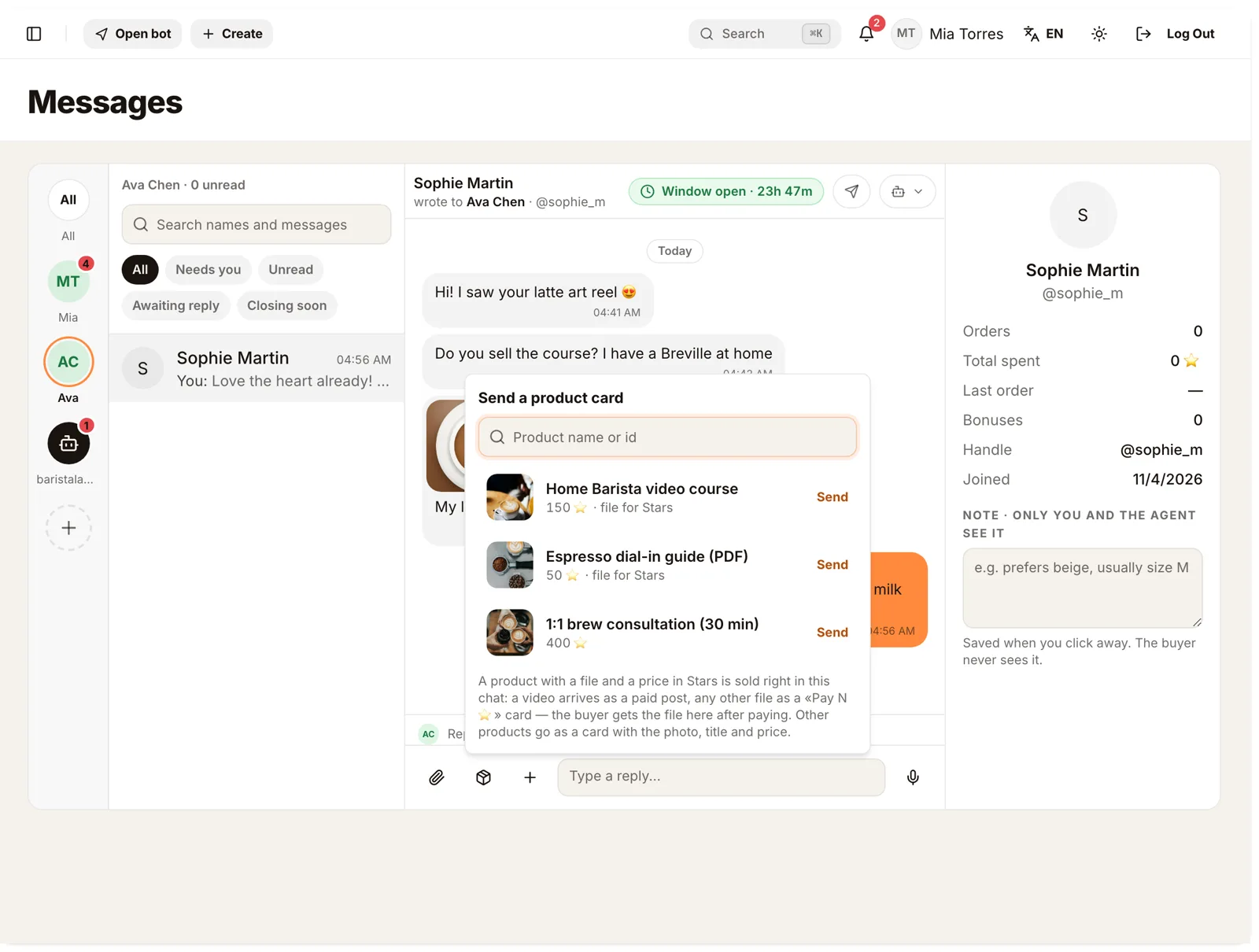
A video goes as a paid post: the buyer sees a blurred preview with a button to unlock it. In your inbox it shows 🔒 150 Stars — Locked — waiting for the customer's payment, and the chat is marked awaiting payment.
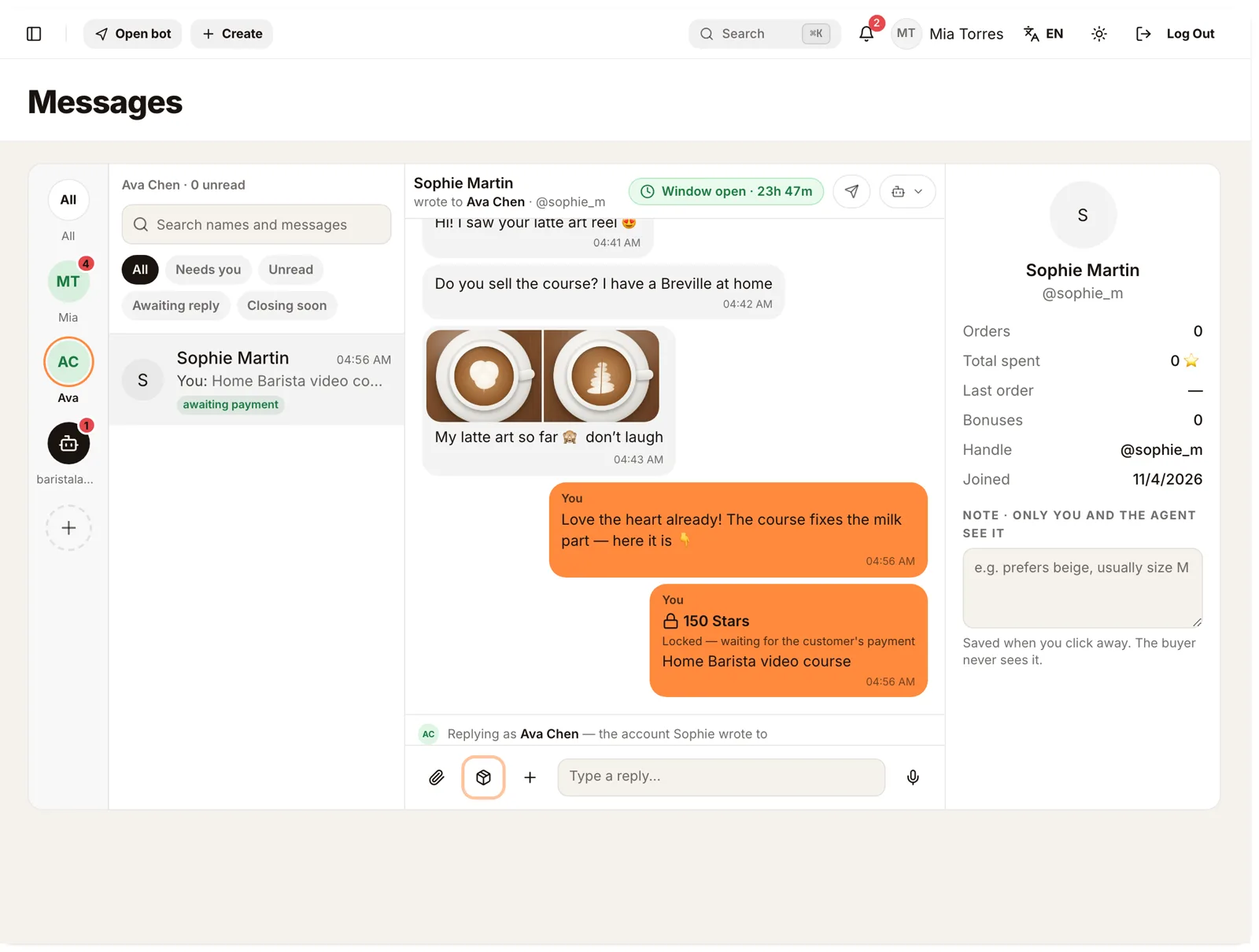
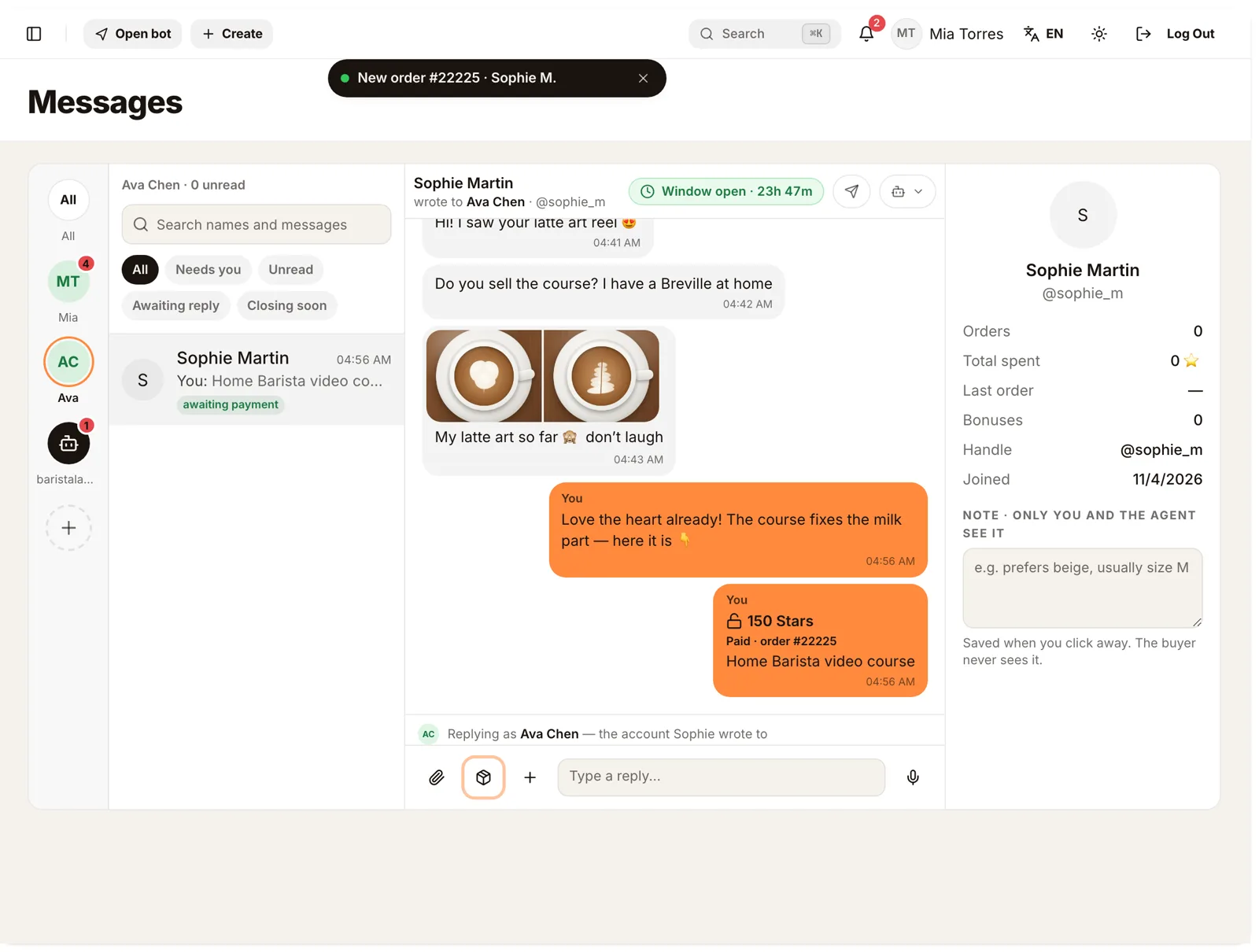
When the buyer pays, the post turns Paid and the video unlocks for them in place. Any other file arrives in the same chat after payment.
How the prices work, what Telegram allows and when PPV beats a catalog: Telegram pay per view vs a Mini App shop. To prepare the files themselves, see how to sell videos and files on Telegram for Stars.
Step 6. See which account made the sale#
Open Sales. Every sale shows the buyer, the product, the price in Stars and the account it came from: "from Ava Chen" or "from Mia Torres". The order page has a Sold from line too.
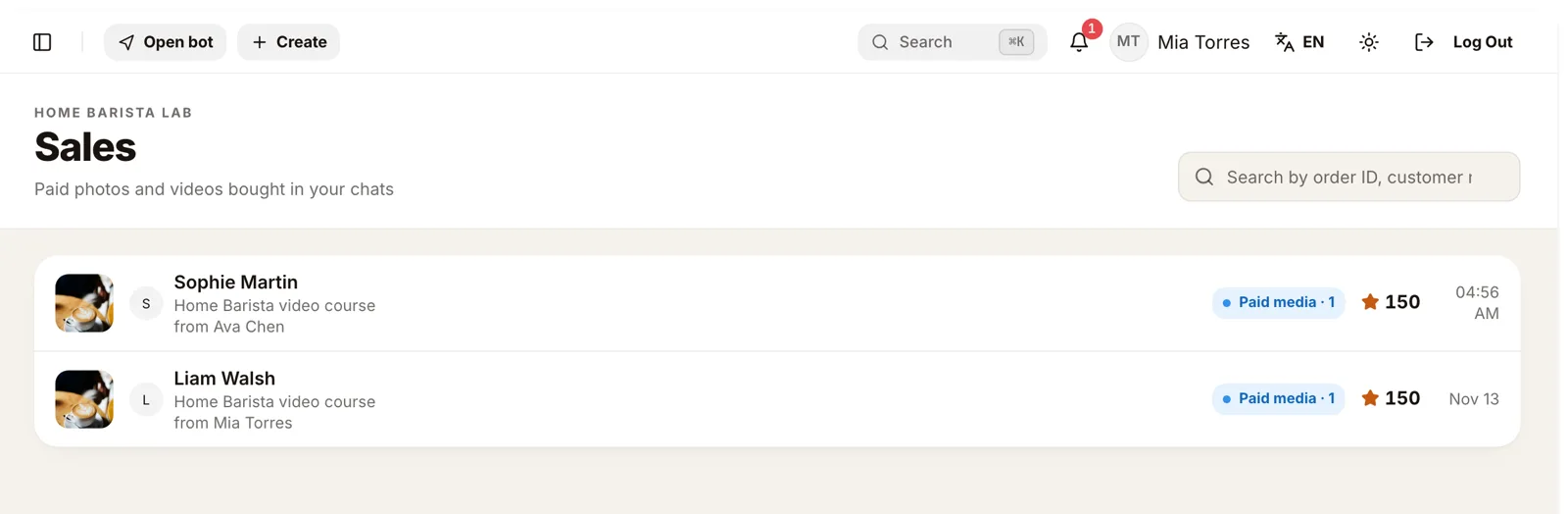
That is how you pay a manager a commission, or see which account your ads should send people to.
Step 7. Turn on the AI agent for one account#
The AI agent can answer for some accounts and stay away from others. Open Telegram bot → Telegram accounts, press ⋯ next to the account, and choose under AI agent on this account:
- As the store: follows the store-wide agent setting;
- Drafts only: the agent prepares replies, a person sends them;
- Auto replies: the agent answers on its own;
- Off: the agent never touches this account's chats.
The label next to the account changes to Agent: auto, Agent: drafts or Agent: off. A common setup: the owner's account off, so regulars always get the owner; the account that takes ad traffic on auto replies, so new leads get an answer at 2 a.m.
If a chat says the agent is off for this account, that is this setting. How the agent writes and what it is not allowed to do: AI sales assistant for a Telegram shop.
Buyers who write to the store bot#
Some buyers write to your store bot itself, from a link or the bot's profile. They are answered from one of your accounts, in their personal chat, never as the bot. By default that is the main account; to change it, choose Answer chats with @your_bot from this account in an account's ⋯ menu.
Such a chat shows "Replying as Mia Torres in their personal chat — they wrote to the store bot". The 24-hour rule applies here too: the account can reply only after the buyer has written to it.
In bot chats Telegram also delivers the buyer's reactions. A ❤ on your message shows under it, and you can react back from the message's ⋯ menu.
Every kind of message, as in Telegram#
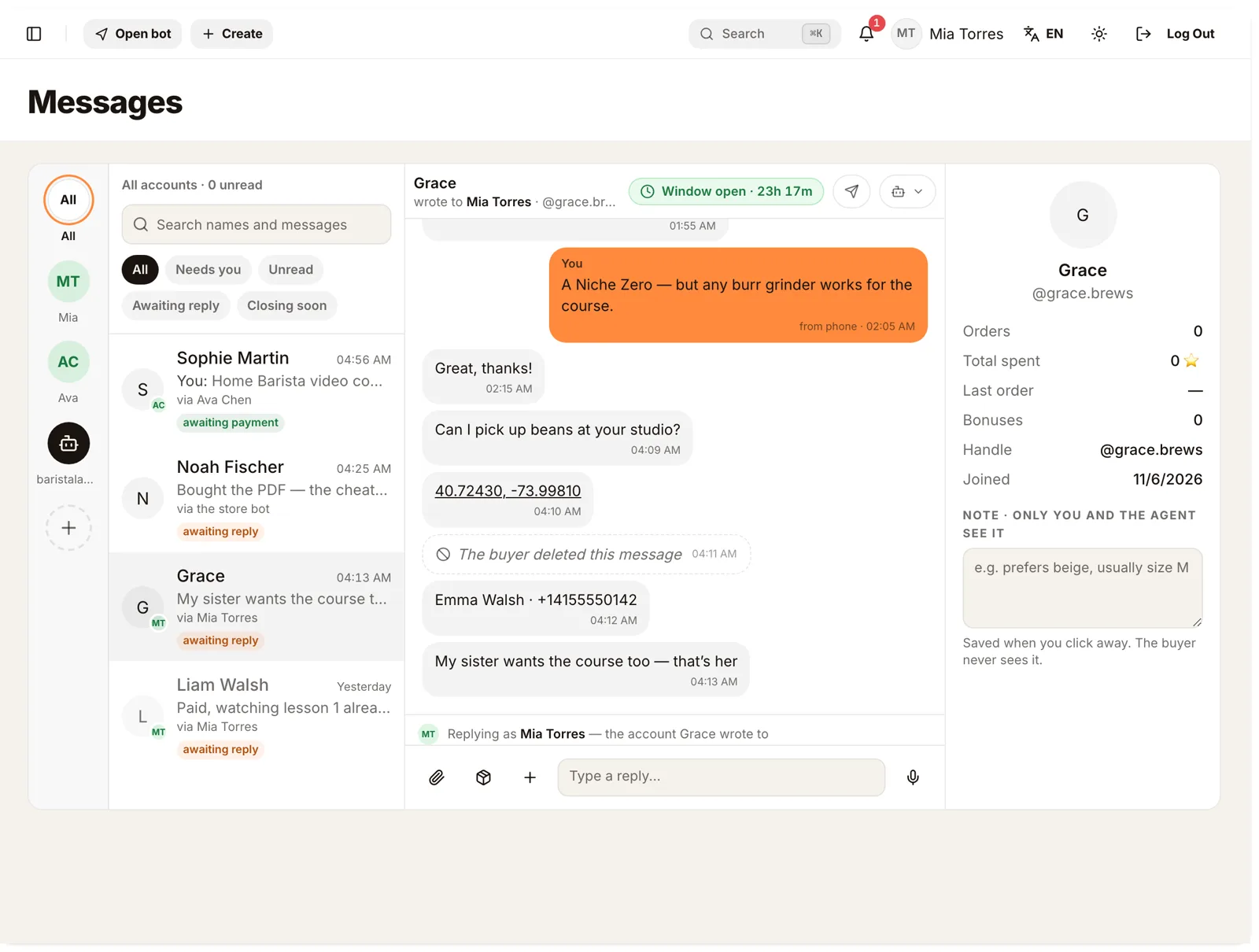
The inbox shows what the buyer sent the way Telegram does:
- photos and albums, including ones under a spoiler;
- a location, as coordinates that open on a map;
- a contact card with the name and phone number;
- "The buyer deleted this message" where a message was deleted;
- reactions in bot chats.
Ways to run multiple Telegram accounts#
| Way | Who the buyer sees | One place for all chats | Who sold it | Sell PPV for Stars |
|---|---|---|---|---|
| Everyone on their own phone | The person | No | Ask around | By hand |
| One shared login on several phones | One name for everyone | Yes | No | By hand |
| Switching accounts in the Telegram app | The person | No, one at a time | No | By hand |
| A Telegram CRM | Usually the person | Yes | Depends on the tool | Some tools |
| Tiny Shops | The person they wrote to | Yes, with a rail per account | Yes, in Sales | Yes, from the chat |
Tiny Shops is also a store: the same products you sell in chats can live in a Mini App catalog, and the same buyers get broadcasts and cashback. More on the Telegram business features a seller needs.
Troubleshooting#
| What happened | Why | What to do |
|---|---|---|
| The manager's account doesn't appear | The bot isn't added in their Telegram Business settings, or Manage messages is off | Ask them to add the store bot in Telegram Business → Chatbots with Manage messages on, then press Check again |
| The account says Waiting for you | The bot was added without an invite link | Press Approve if it's your person, Reject if not |
| The rights show less than 4/4 | Some permissions are off in Telegram | Turn them on in the account's Telegram Business → Chatbots, then Check again |
| A chat is missing | The account excludes it in its Telegram Business settings | Change the chat list in Telegram Business → Chatbots |
| You can't send into a chat | More than 24 hours since the buyer's last message | Wait for the buyer to write again |
| The agent doesn't answer in one account | Its agent mode is Off | Change it under AI agent on this account |
| The account says Disconnected | The bot was removed or replies were turned off in Telegram | Add the bot again in that account's Telegram Business settings |
What it costs#
There is no separate fee per connected account. Sales pay your plan's percent, the same as any other sale; the AI agent is on Starter, Pro and Scale. Plans are on the pricing page. Stars land on your store bot's balance; Telegram may hold them for up to 21 days before you can withdraw.
FAQ#
Can I use multiple Telegram accounts for one business? Yes. Connect each account to the same store bot through Telegram Business. All their chats appear in one inbox, and each reply goes from the account the buyer wrote to.
Does the buyer know other people read the chat? No. They write to a person and get answers from that person's account. The bot works in the background.
Can managers see each other's chats? Everyone who has access to Messages in your dashboard sees the chats of every connected account. Filter by account on the rail to focus on one. Only the store owner can add, approve or remove accounts.
How do I sell PPV on Telegram from a team account? Open the buyer's chat in Messages, press the product button and send a product with a file and a price in Stars. The buyer unlocks it in the chat, and Sales records which account sold it.
Where do Stars from the manager's sales go? To your store bot, the same as every other sale. The manager's account never holds the money.
Can the AI agent work only on the manager's account? Yes. Set Auto replies or Drafts only on that account and Off on yours.
What happens when a manager leaves? Press Remove on their account and ask them to remove the bot in Telegram Business → Chatbots. Their chats stay readable; nothing new is saved.
Bring your team's Telegram into one inbox at tiny-shops.com →
